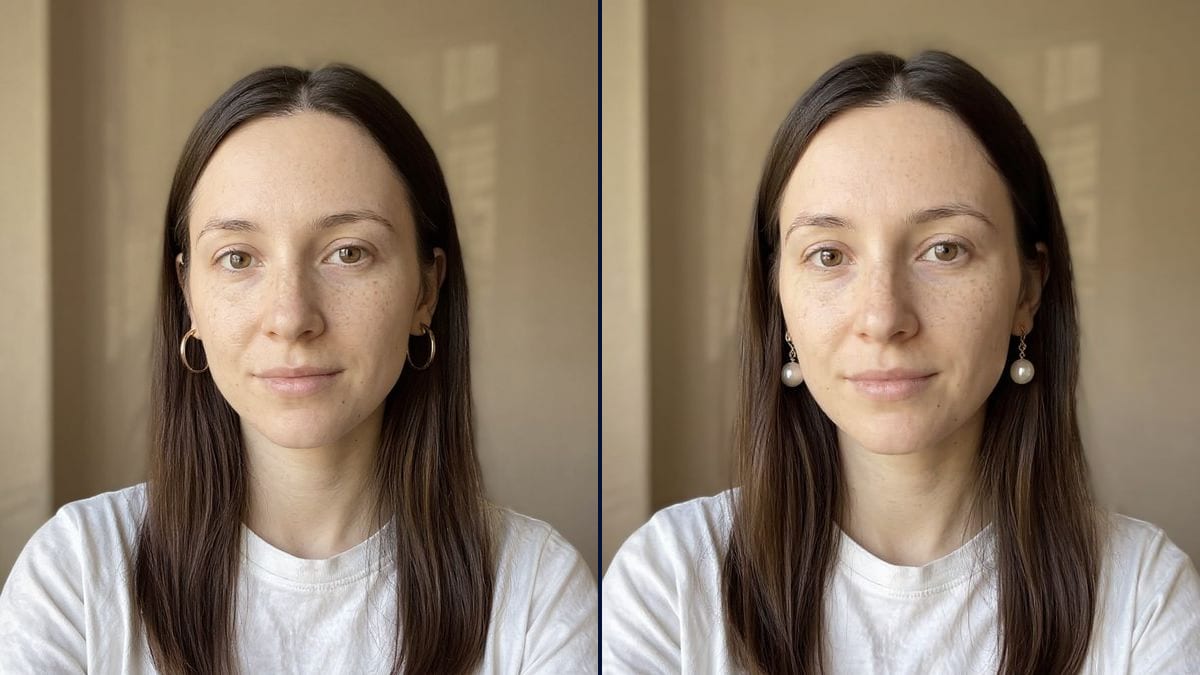
Her first pair of hoops
She has always worn studs and wonders whether hoops would be too much. Two sizes tried on her own photo, and she orders the right one first time, with no trip back to the post office.
Your portrait wearing three-centimetre gold hoops, then pearl drop earrings, on the same face. Pick a pair before you order. Workflow visible here, no account needed.
Real workflow: a portrait of a woman with long brown hair, no jewellery, in a white t-shirt, then the same woman wearing gold hoops and wearing white pearl drops. Face, wall and framing stay put.
At a glance
Online, earrings are shot on a white background or worn by a model who has neither your face nor your hair. Is three centimetres big or subtle? You order, try them in the mirror, send them back. This workflow puts two pairs on YOUR portrait: gold hoops, then pearl drops.
The hard part is the ear. With long hair the lobe is hidden, and an image model hooks the earring onto a strand or blows it up at random. The prompt first tucks the hair behind the ears, then gives the size and how the earring hangs. Flux Kontext adds the earrings and leaves the face alone.
For something bolder, move on to the piercing try-on; to shoot pieces you make yourself, use jewellery photography. Both try-ons cost twelve credits.
These are the files of the workflow above, exactly as the models produced them, unretouched. The starting point is shown when there is one.
Starting point
Render
Women weighing a pair before they order, brides-to-be, jewellery makers and small online shops.
A front-facing portrait with the ears visible or hair easy to tuck back, and the metal, shape and size of the earrings.
Take a front-facing portrait
Soft light, face straight to the camera, ears showing or hair easy to tuck back. A phone photo is fine.
Describe the earring
Metal, shape, size in centimetres: 3 cm gold hoops, silver studs, pearl drops. "Earrings" on its own lets the model choose.
Clear the ears
Keep the line that tucks the hair behind the ears. Without it, the earring can end up floating on a strand.
Compare the two pairs
Side by side, you quickly see what balances your face. Keep the picture to find the right model in a shop or online.
The same canvas, tuned for different needs: each variation is two or three lines of prompt away.
She has always worn studs and wonders whether hoops would be too much. Two sizes tried on her own photo, and she orders the right one first time, with no trip back to the post office.
Dress chosen, hair going up on the day. She compares pearl drops and small sparkling studs on a portrait with her hair pulled back, and walks into the jeweller's knowing what she wants.
She makes her earrings by hand and has no model to wear them. She describes each design on the same portrait so customers see the size when worn, next to her product shots on a plain background.
He wants to give his partner earrings and can't choose between gold and pearl. On a photo of her, both options can be compared without spoiling the surprise or asking her opinion.
The lobe has just been pierced and the starter studs have to stay in for weeks. She plans ahead by trying the pairs she'll wear once it has fully healed.
A small brand adds a worn shot to every product page, all on the same portrait, so customers can see how long a drop earring hangs compared with the face and jawline.
With nothing about the hair, the model sometimes hooks the earring onto a strand or makes it appear out of nowhere. Ask for the hair to be tucked behind the ears.
"Hoops" can give you a ten-centimetre ring. Give a diameter or a length, as the product listing does.
One ear is hidden and the model invents the other earring at an odd angle. Facing the camera, both lobes show and the pair stays symmetrical.
The render shows the look, not the weight or the comfort. A heavy drop earring is judged on the ear, in a shop or when the parcel arrives.
No: same face, same freckles, same expression, same t-shirt. Only the hair moves behind the ears and the earrings are added.
Yes, by describing it as the listing does: metal, shape, size, stone. The result gets close, without copying an exact product.
Yes, and it is even easier. Drop the line about the hair and keep the rest.
Twelve credits, six per render on Flux Kontext. A third pair on the same photo costs six more.
Because it edits one precise area and keeps the rest: your face, skin, hair and t-shirt stay yours, and only the earrings are added.
The shape is, the size less so: they come out bigger than a typical pearl, and the stud turned into a small gold link. Give the diameter in millimetres for a more restrained result.
Yes: write "a hoop in the left ear, a stud in the right ear". Describe each side separately.
The format of your photo, here 3:4. A portrait is shot vertically, framed from the shoulders to just above the head.
Try on earrings on your own photo with AI
Use this workflowFree account, no card required. The workflow opens pre-filled in your canvas.
 Flux Kontext
 Nano Banana 2.1
 GPT Image 2.5 Sunburst