Starting first grade
Lucas starts school with a list of fifteen items to label. His mum prints the rocket sheet on sticker paper the night before, and every book has its label by breakfast.
A sheet of labels with your child's name, rocket or fox, the same name spelled right on every label, ready to cut out. Workflow visible here, no account needed.
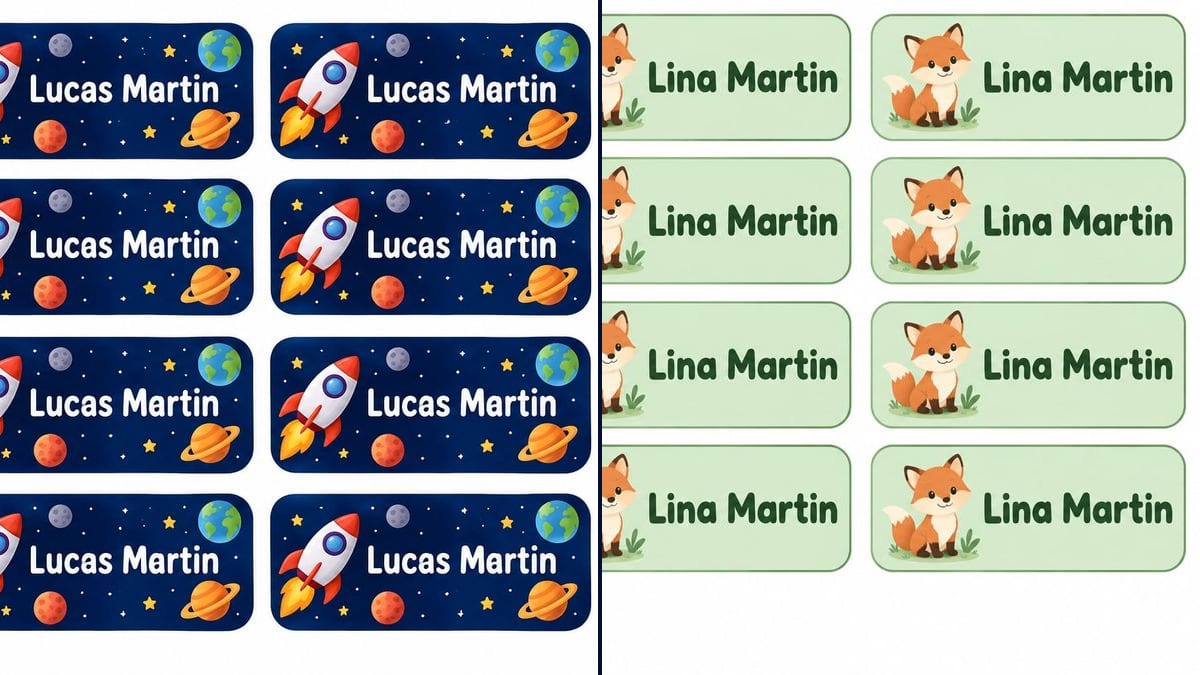
Real workflow: a sheet of twelve navy "Lucas Martin" labels with a rocket and planets, then a sheet of twelve pastel green "Lina Martin" labels with a little fox sitting in the grass.
At a glance
Back to school means labelling every exercise book, pencil case and lunch box. Labels ordered online take a week to arrive, and marker on a book cover rarely lasts until half-term. This workflow gives you a sheet of labels with your child's name to print at home the same evening.
The hard part is repetition: twelve times the same name, not one letter off, with the same drawing. The prompt asks for identical labels in a grid and repeats the exact name for each one. GPT Image 2.5 Sunburst copies it accurately, and the number of labels is set in the prompt.
For the end of the school year, see the custom certificate; to plan the week, the printable planner. Both sheets cost six credits.
These are the files of the workflow above, exactly as the models produced them, unretouched. The starting point is shown when there is one.
Render
Parents getting ready for back to school, nurseries and teachers labelling children's things.
The child's first and last name in quotes, and the drawing theme.
Pick a theme
Space, animals, dinosaurs, unicorns: change the drawing and the background colour in the prompt. One small drawing per label.
Put in the name
Replace "Lucas Martin" with your child's first and last name. The surname helps when there are two Lucases in the class.
Count and check
Check the number of labels and the name on each. A quick look before printing is enough: a changed letter is easy to spot.
Print on sticker paper
On A4 or letter in landscape, each label comes out around 3.5 inches wide. Cover with clear film to make them last.
The same canvas, tuned for different needs: each variation is two or three lines of prompt away.
Lucas starts school with a list of fifteen items to label. His mum prints the rocket sheet on sticker paper the night before, and every book has its label by breakfast.
At nursery, bottles, dummies and boxes all look alike. A sheet with Lina's name and the little fox she recognises long before she can read, so she spots her own things.
Camp asks you to label the water bottle, torch and wash bag. The sheet prints on waterproof sticker paper, and nothing comes home lost at the end of the week.
Two children in the same class, two sheets in different colours, same theme. Parents can tell whose pencil case it is at a glance, even from across the room.
A teacher prepares a label for each pupil's peg and tray. One render per name, the same theme for the whole class, and the classroom is ready for day one.
The kids lend books to their cousins and never see them again. A name label inside every front cover, and more of the borrowed books find their way back home.
With no number in the prompt, the model picks the grid itself, and the label size with it. Write how many you want, then adjust the scale when you print.
First name, surname, class, school, phone number: at that size nothing reads. First name and surname are enough for school supplies.
Without that sentence, the model sometimes adds "School" or "My name is". Keep it in the prompt.
Taped on, a paper label doesn't survive the first month in a school bag. Use sticker paper, and laminate the ones for lunch boxes.
On the demo, yes: "Lucas Martin" and "Lina Martin" are identical on all twelve labels of each sheet. Check yours one by one.
Yes: the number is set in the prompt, so replace "twelve" with the count you want. The demo has twelve on each sheet, as asked.
Not on sticker paper. For clothing, print the sheet on iron-on transfer paper and follow the manufacturer's instructions.
Six credits, three per render on GPT Image 2.5 Sunburst at medium quality. One more sheet, for a brother or sister, costs three credits.
It copies a short name accurately, even repeated twelve times, and it is the cheapest model in the catalogue. On a dark navy background it also held the white letters.
The prompt asks for 4:3 and the render comes out in 3:2, landscape. It prints on an A4 or letter sheet in landscape with a small margin.
Yes: ask for fewer labels to get bigger ones, or scale down when printing for small pencil labels.
Not in this canvas, which has no input photo. For school, a drawing appeals more to children and keeps their face off their belongings.
Make school name labels with AI
Use this workflowFree account, no card required. The workflow opens pre-filled in your canvas.
 GPT Image 2.5 Sunburst
 Nano Banana 2.1
 Recraft V4.1