School-day mornings
Jules forgets his school bag every other day. The weekly chart is taped next to the front door, and he ticks "pack my bag" before he puts his shoes on.
A weekly chore chart or a star reward chart to print on A4, with your child's name, chores and reward spelled right. Workflow visible here, no account needed.
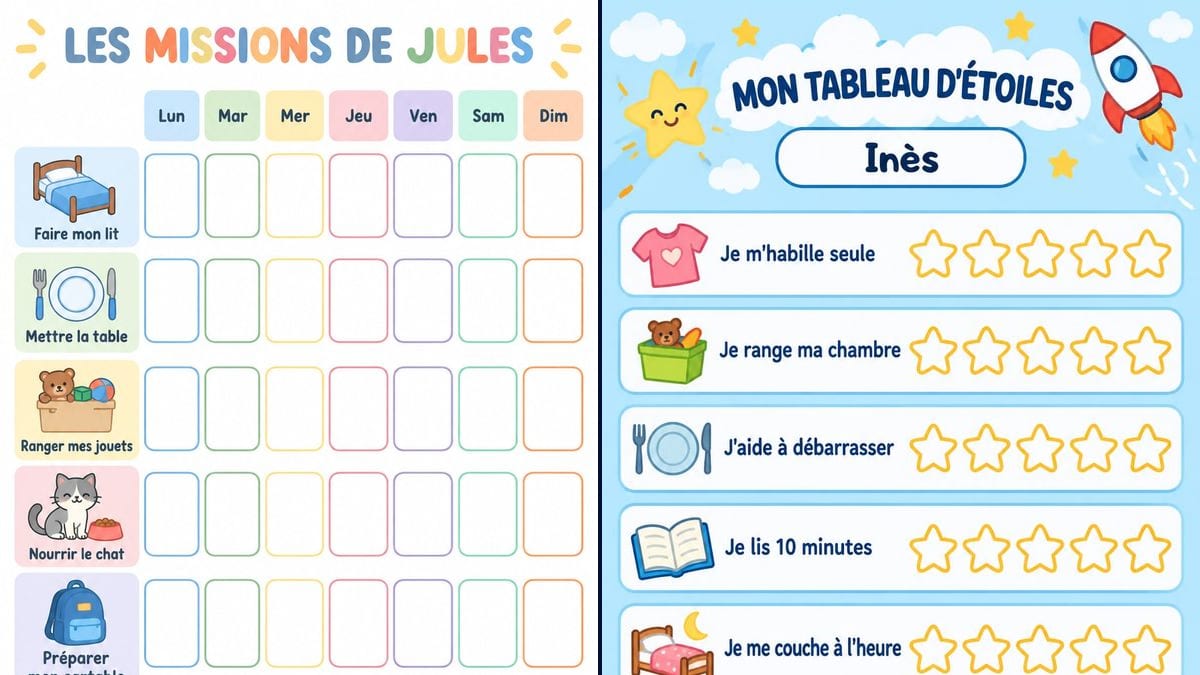
Real workflow (demo in French): a weekly chart for Jules, a white pastel grid with six chores, a drawing for each one and a box for every day from Monday to Sunday, then a star chart for Inès on a sky-blue background with clouds and a rocket, five stars to colour per chore and a trip to the zoo promised at the bottom.
At a glance
The chore charts you find online rarely have the right chores. They say "feed the dog" when you have a cat, the school bag is missing, and the name goes in by hand in a corner. This workflow starts from your list: your child's name, their chores, and the reward if you want one. It gives you two A4 charts, a weekly grid to tick and a star chart to colour in.
The tricky part is the text. A child learning to read trips over a spelling mistake, and an image model left to itself makes them, or adds words. The prompt puts every line in quotation marks and forbids the rest. GPT Image 2.5 Sunburst spells correctly, accents included, and draws a small picture next to each chore on its own, which helps a child who can't read yet.
To organise the whole family, try the weekly planner; to celebrate a finished chart, the custom certificate; for back to school, the name labels. Both charts cost six credits.
These are the files of the workflow above, exactly as the models produced them, unretouched. The starting point is shown when there is one.
Render
Parents who want to get a child doing small jobs around the house, childminders, and nursery or primary teachers handing out classroom jobs.
Your child's name, their chores and, for the star chart, the reward, each in quotation marks.
Keep the list short
Four to six chores your child already does, or nearly does. Write them the way they'd say them, "Make my bed" rather than "Bed made", each one in quotation marks.
Put the name in the title
"JULES'S MISSIONS" or "MY STAR CHART" with the name underneath. Spell it exactly as it's written, accents and all: the model copies what you give it.
Write the reward at the bottom
On the star chart, the bottom box says what they win and how many stars it takes. Pick a reward you can actually deliver.
Print on A4
The render has the proportions of an A4 sheet, so print it full page with no margins to adjust. One idea if you want to reuse it: laminate it and tick with a dry-erase marker.
The same canvas, tuned for different needs: each variation is two or three lines of prompt away.
Jules forgets his school bag every other day. The weekly chart is taped next to the front door, and he ticks "pack my bag" before he puts his shoes on.
Five chores, five stars each, twenty-five in all. Inès colours in a star every time she does a chore, and the zoo trip is written at the bottom so nobody forgets it.
One chart per child, with chores that fit their age: "I put my teddy away", "I wash my hands". Parents see it when they come to pick their child up in the evening.
In reception or year one, classroom jobs fit the same layout: "Water the plants", "Hand out the books". Put the class name where the child's name would go.
Without school, days lose their shape. A summer chart with "I read for 10 minutes" or "I help with the shopping" puts two or three fixed points back into the day.
The same chart printed twice, one copy at each parent's house, with the same chores. Your child finds the same boxes to tick whichever home they're in that week.
Ten rows on an A4 sheet means tiny boxes and a chart that gets abandoned by March. Start with four to six chores and add more on the next chart.
"Do the washing up" at four is a box that never gets ticked. Pick what your child can already do, or nearly, and write it in their words.
Write a chore without quotation marks and the model rewords it or translates it. Quote every line and keep the "No other words" sentence at the end of the prompt.
If the zoo trip written at the bottom never happens, the chart stops meaning much. Write a reward you can deliver, and a number of stars your child can reach.
In the demo, yes: both charts are exact, the French accents on "Préparer", "ÉTOILES", "Inès" and "débarrasser" included, and no word was added. Still read every line before you print.
Sunburst draws a small object next to each chore: a bed, a toothbrush, a school bag. Your child recognises the chore from the picture. Pick chores that are easy to draw.
Better to make one chart per child, each with their own name and chores: a grid with several names shrinks the boxes fast. Duplicate the node and change the quoted text.
Six credits, three per render on GPT Image 2.5 Sunburst at medium quality. One more chart, for a brother or sister, costs three credits.
Because it copies text letter for letter, accents included, and it is the cheapest model in the catalogue. In the demo it got six chores and seven days right without a single mistake.
The prompt asks for 3:4, and Sunburst returns 1054 by 1492 pixels. That is almost exactly the shape of an A4 sheet, so the chart fills the page when you print it.
Yes. Write "no drawings" for a plain grid, or name the drawing you want after each chore. For a full page to colour in, see the printable colouring page.
Yes, the columns are quoted text. Keep only Monday to Friday for school days, or write the days out in full if the grid has fewer columns.
Make a printable chore chart for kids with AI
Use this workflowFree account, no card required. The workflow opens pre-filled in your canvas.
 GPT Image 2.5 Sunburst
 Nano Banana 2.1
 Recraft V4.1