The neighbourhood café
The owner watches regulars drift to the chain with an app. A cream card with ten spaces, stamped with each coffee and a free cup on the tenth, does the same job without a phone.
A loyalty card ready to print, with the right number of stamp spaces, the reward in the last one and your offer spelled right. Workflow visible here, no account needed.
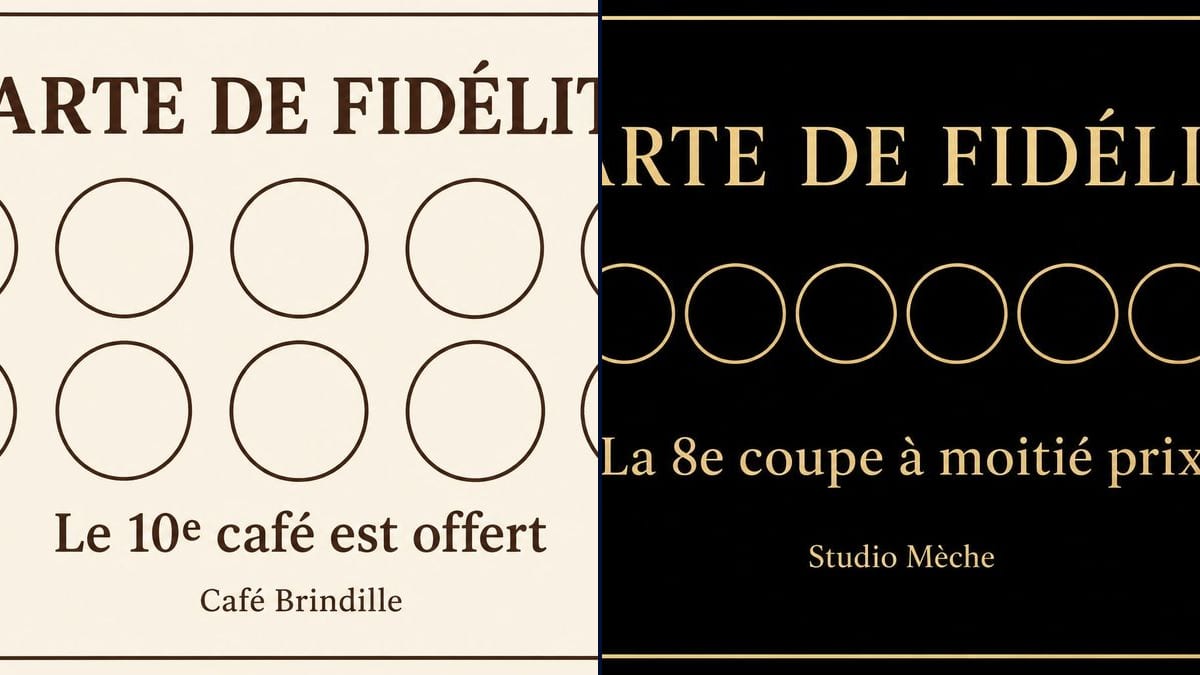
Real workflow (demo in French): a cream Café Brindille card with ten circles in two rows and a cup in the tenth, then a black and gold Studio Mèche card with eight circles in one row and scissors in the last, each with its offer underneath.
At a glance
A stamp card is still what brings a customer back to the corner café instead of the chain across the road. You just need one that looks like your counter, not the printer's free template. This workflow takes your offer and your name and gives you two cards ready to print: a light one for a coffee shop and a black and gold one for a salon.
The hard part is getting everything right at once: the number of spaces, which space holds the reward, the wording. An image model left to itself often miscounts by one circle or makes up terms. The prompt does the counting and puts each line in quotation marks. GPT Image 2.5 Sunburst keeps count, spells correctly and is the cheapest model in the catalogue.
To sell gifts as well, add the gift voucher; for the back of the card, start from the business card. Both cards cost six credits.
These are the files of the workflow above, exactly as the models produced them, unretouched. The starting point is shown when there is one.
Render
Cafés, hair salons, bakeries, food trucks and small shops that want their customers to come back.
The reward, the number of spaces and which one holds the symbol, and the text in quotation marks: title, offer, shop name.
Set the reward
Tenth coffee free, half price on the eighth cut: a simple reward that regulars reach within a few weeks.
Give the number of spaces
Write it out, with the number of rows and which space carries the reward symbol.
Put the text in quotation marks
Title, offer, shop name, each in quotation marks, with "No other words" at the end of the prompt.
Print at card size
On heavy card, at least 300 gsm, at business card size. Try your stamp on a first copy before you order a hundred.
The same canvas, tuned for different needs: each variation is two or three lines of prompt away.
The owner watches regulars drift to the chain with an app. A cream card with ten spaces, stamped with each coffee and a free cup on the tenth, does the same job without a phone.
The manager wants to reward clients who come back every six weeks. Eight spaces, half price on the eighth cut, on a black and gold card that matches the shopfront.
A free croissant after ten purchases, for the parents and children on the morning school run. The card lives in a wallet, and the stamp goes on while the change is counted.
It parks somewhere different every weekday. The card reminds customers to find it, with a tenth meal free, and can carry the weekly schedule of locations on the back.
Five washes, the sixth free. The manager prints cards in the station's colours, which customers keep in the glovebox with the parking tickets and pull out on every visit.
For students who don't want a membership: a ten-class card, the eleventh free. The teacher ticks it at the door of each session, no booking software needed.
Twenty stamps for one free coffee and nobody finishes the card. Aim for a reward regulars reach within a month or two.
Eight circles in a single row, as on the salon demo, come out under a centimetre at card size. For a stamp, ask for two rows.
A card with no name ends up at the bottom of a bag and nobody remembers where it came from. The name at the bottom, even small, brings it back to the counter.
"Some circles to stamp" lets the model choose, and it draws nine or twelve. Give the exact count and the reward space.
In the demo, yes: the title with its accents, the offer and the shop name are exact on both cards. Proofread before it goes to the printer.
In the demo, yes: ten circles for the café, eight for the salon, with the symbol in the last space. Count them on the image anyway before printing.
Yes, in another node: address, opening hours, phone number, in quotation marks. Keep the same background so both sides match.
Six credits, three per render on GPT Image 2.5 Sunburst at medium quality. A third version, with another offer or other colours, costs three more.
Because it spells correctly, accents included, sticks to the number of spaces you ask for and is the cheapest model in the catalogue. In the demo, gold on black stayed crisp.
The prompt asks for 16:9 and the render comes out at 3:2, 1536 by 1024 pixels. A business card is slightly longer, so let the printer trim a thin strip.
Add a line "Name: .........." in quotation marks in the prompt. Customers fill it in themselves, and lost cards find their way back more often.
You can send the image by message, but the stamp stays at the counter. For a card that lives in the phone, you need a loyalty app.
Make a printable loyalty card with AI
Use this workflowFree account, no card required. The workflow opens pre-filled in your canvas.
 GPT Image 2.5 Sunburst
 Nano Banana 2.1
 Recraft V4.1