The beautician before Christmas
Clients want to treat their mum or a friend. She prints a stack of blush pink vouchers, writes the name at the till and slips each one into a gold envelope.
A gift voucher ready to print with your treat, a line for the recipient and the expiry, in two styles. Workflow visible here, no account needed.
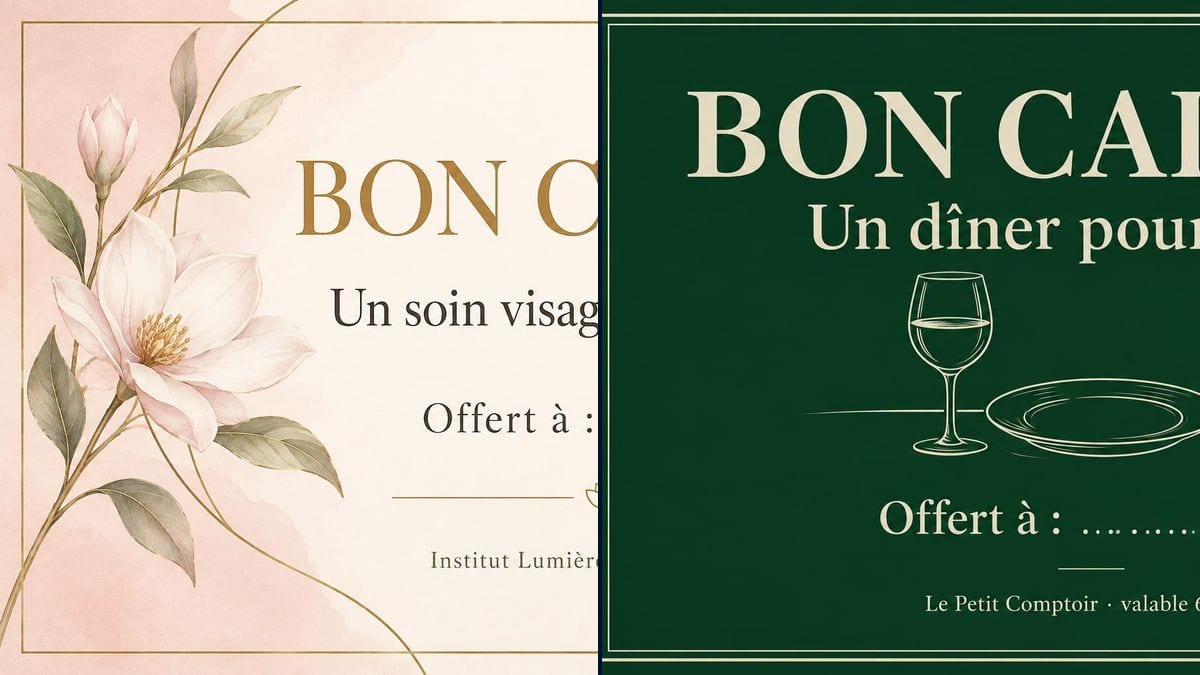
Real workflow (demo in French): a voucher for a 60-minute facial at Institut Lumière, blush pink with a watercolour flower and gold lines, then a voucher for dinner for two at Le Petit Comptoir, cream on deep green with a glass, a plate and cutlery drawn in line.
At a glance
Every December, and again before Mother's Day, customers ask for gift vouchers, and you end up writing on the back of a business card. This workflow takes your treat, your business name and how long the voucher is valid, and gives you two vouchers ready to print: a soft one for a salon and a quieter one for a restaurant.
The hard part is exact text and nothing more. An image model left to itself invents terms, an amount or a serial number, and you end up honouring something you never wrote. The prompt puts each line in quotation marks and shuts the door on the rest. GPT Image 2.5 Sunburst spells correctly and is the cheapest model in the catalogue.
To bring people back after the first visit, follow up with the loyalty card; for your contact details, the business card. Both vouchers cost six credits.
These are the files of the workflow above, exactly as the models produced them, unretouched. The starting point is shown when there is one.
Render
Salons, restaurants, shops and independents who sell gift vouchers, and anyone giving a homemade present.
The treat on offer, the recipient line, the business name and the validity, each in quotation marks.
Name the treat
Precise and short: "A 60-minute facial", "Dinner for two", "A pottery workshop". It is the line the recipient will remember.
Keep the recipient line
"For:" followed by dots or a line, so you can write the name in pen when you sell it.
State the validity
Six months, a year, or a date. With your business name on the same line, small, at the bottom.
Print on heavy card
250 to 300 gsm gives a card that holds its shape. Slip it in an envelope and log the voucher in your book.
The same canvas, tuned for different needs: each variation is two or three lines of prompt away.
Clients want to treat their mum or a friend. She prints a stack of blush pink vouchers, writes the name at the till and slips each one into a gold envelope.
Dinner for two as a gift, on a card in the dining room's colours. The vouchers sell at the counter in February and fill tables in March, when service is quieter.
Tandem flights are a popular present. He makes a voucher with the flight and the season it is valid for, and emails it as a PDF to customers who buy online the night before a birthday.
No budget, just a promise: a weekend of babysitting, a massage, a home-cooked meal. A neat voucher printed at home gives weight to something that costs nothing.
The company treats its staff to an experience at a partner business. The voucher in the partner's name, with the expiry, goes out with the end-of-year card.
A fifty-pound voucher for people who can't guess the right size. The owner prints it in the shop's colours and tucks it into a sleeve with the receipt.
A voucher with no date comes back three years later, after your prices have changed. Write a duration or an end date, in full.
"A treatment" with no length or type, and the client books the most expensive thing on the menu. Name the exact service and how long it lasts.
The image is the same for every voucher. Note each one you sell, with the name and date, so you know which have been used.
On the restaurant demo, the dots are uneven and there is little room for a long name. Ask for a solid line that is long enough, or write the name straight into the prompt.
In the demo, yes: all four lines are exact on both vouchers, accents included. Read every version before you send it to print.
Yes: replace the line with "Worth £50", in quotation marks. The model writes the figure you give it and nothing else.
Better to write or stamp it by hand when you sell the voucher. A number printed by the image would be the same on every copy.
Six credits, three per render on GPT Image 2.5 Sunburst at medium quality. A third version, for another treat, costs three more.
Because it spells correctly, accents included, and it is the cheapest model in the catalogue. In the demo it handled cream text on deep green as well as dark text on pink.
The prompt asks for 16:9 and the render comes out at 3:2, 1536 by 1024 pixels. That is exactly the shape of a 6 x 4 inch card, which fits a standard envelope.
It commits whoever sells it, like any gift voucher. Rules on minimum validity and refunds depend on where you trade, so check them before you set an expiry.
Yes, in another node: terms, address, phone number, in quotation marks. Then print double-sided, checking both faces run the same way.
Make a printable gift voucher with AI
Use this workflowFree account, no card required. The workflow opens pre-filled in your canvas.
 GPT Image 2.5 Sunburst
 Nano Banana 2.1
 Recraft V4.1