The sleep-deprived parents
The baby is four months old, nights are short, and the christening date is set. One evening is enough for both invitations, printed the next day at the photo counter in town.
A christening invitation ready to print with the name, date, time, church and what follows, in two styles: watercolour, or ivory and gold. Workflow visible here, no account needed.
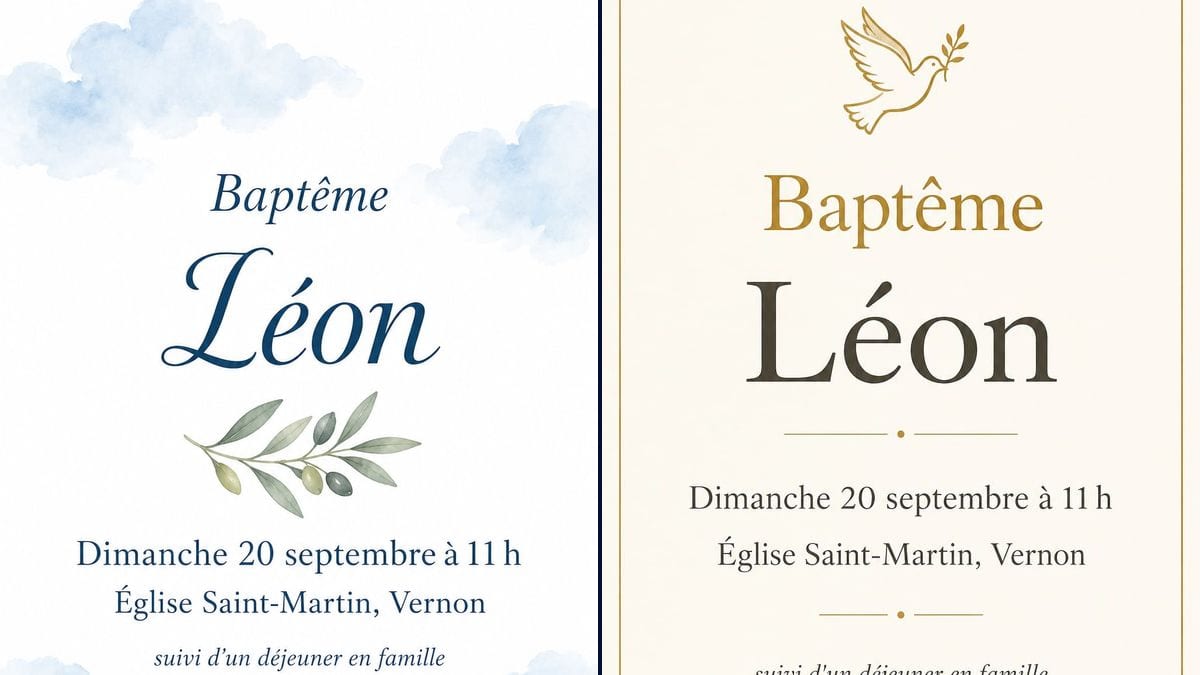
Real workflow (demo in French): an invitation to Léon's christening on 20 September at Saint-Martin church in Vernon, first on white with blue watercolour clouds and an olive branch, then on ivory with a thin gold frame and a dove.
At a glance
Christening invitations need to go out about six weeks ahead, right when you are still sorting the venue and asking the godparents. Card websites push their own templates and their own print times. This workflow takes the name, the date, the church and what happens afterwards, and gives you two invitations ready to print: a soft watercolour one and a classic ivory and gold one.
The hard part is error-free text on a card people keep. An image model left to itself adds lines, invents names or drops an accent. The prompt gives every line in quotation marks with its size, and shuts the door on the rest. GPT Image 2.5 Sunburst spells correctly on light backgrounds and is the cheapest model in the catalogue.
If the baby has just arrived, start with the birth announcement; for a party with friends before the birth, see the baby shower invitation. Both invitations cost six credits.
These are the files of the workflow above, exactly as the models produced them, unretouched. The starting point is shown when there is one.
Render
Parents and grandparents planning a christening or naming ceremony, and parish offices helping families.
The name, day, time, church and town, and what follows the service, each line in quotation marks.
Gather the details
Name, day, time, church and town, then what follows the service: lunch, afternoon tea, drinks at home.
Quote every line
In the order they should appear, with the size: the name big, the lunch line smaller.
Choose the style
Watercolour and script for a gentle card, ivory and gold for something more formal. One node per style.
Proofread and print
Check the name, the date and the day of the week, then print at 4 x 6 inches on heavy card.
The same canvas, tuned for different needs: each variation is two or three lines of prompt away.
The baby is four months old, nights are short, and the christening date is set. One evening is enough for both invitations, printed the next day at the photo counter in town.
She wants to post the cards to family who live far away. The ivory and gold version, printed on good paper, looks like the kind of invitation people keep in a drawer.
No church, a civil naming ceremony at the town hall instead. Swap the church line for the venue and the title for "Naming ceremony": same layout, same care.
A six-year-old who wants to choose the colours herself. Keep the structure of the prompt, switch to green or pink, and she sees her name in big letters before anyone else.
Part of the family lives abroad and won't make it. The same invitation goes out as an image on the family group chat, and the printed cards are kept for the guests.
The parish secretary prepares a simple template that families reuse by changing the name and the date, so everyone gets a neat invitation even on a tight budget.
Sunday 20 September is only a Sunday in some years. Check the day against a calendar: the model writes what you give it, mistakes included.
There is a St Martin's in hundreds of towns. Naming the town saves guests a search the night before.
Bible verse, order of service, godparents, directions: the card turns unreadable. Keep the essentials on the front and put the rest on a second card or in a message.
Without "No other words", the model may add a quote or made-up names. That closing line matters as much as the baby's name.
In the demo, yes: all five lines are exact on both invitations, accents included. Always read them through before printing.
Yes: add a line in quotation marks, for example "Godparents: Harry and Clara", and say where it goes. One more line still reads well.
Yes: change the name, put both names on two lines, and change the colours if you want something other than blue.
Six credits, three per render on GPT Image 2.5 Sunburst at medium quality. A third version, in other colours, costs three more.
Because it spells correctly on light backgrounds, accents and spacing included, and it is the cheapest model in the catalogue. In the demo it even held a name in script without mangling the accent.
The prompt asks for 3:4 and the render comes out at 2:3, 1024 by 1536 pixels. That is exactly the shape of a 4 x 6 inch card, the usual size for invitations.
For 4 x 6 inches, yes. For anything larger, run the render through the Enhance node first, and read our guide to enlarging for print.
Yes, in another node, in the same style: "Please reply by 1 September" and a phone number or email, in quotation marks.
Make a christening invitation with AI
Use this workflowFree account, no card required. The workflow opens pre-filled in your canvas.
 GPT Image 2.5 Sunburst
 Nano Banana 2.1
 Recraft V4.1