A letter to Santa to print on A4, with your own lines: name, age, tick boxes, wish list, a frame for a drawing. One colour version, one to colour in. Workflow visible here, no account needed.
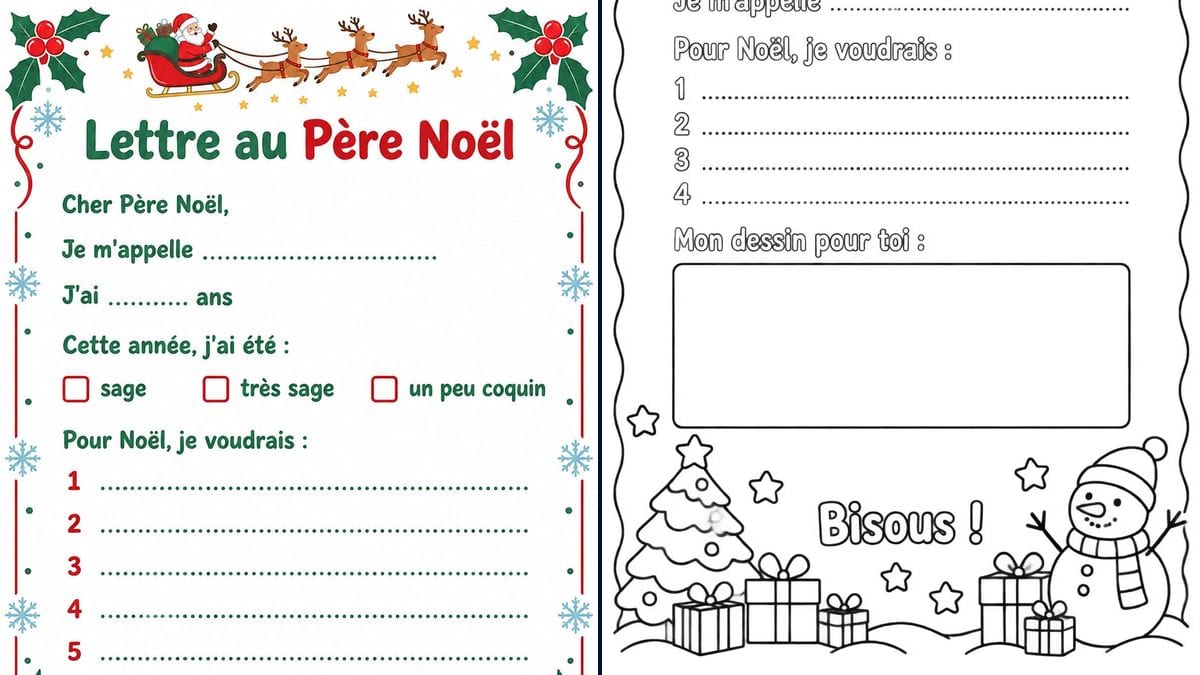
Real workflow (demo in French): "Lettre au Père Noël" (Letter to Santa) in green and red under the sleigh and its three reindeer, in a holly frame, with "sage", "très sage" and "un peu coquin" tick boxes (good, very good, a little naughty) and five wish lines, then the black and white colouring version, every line in hollow letters, four wish lines, a big empty frame for the drawing, and a tree, presents and a snowman along the bottom. In the colouring page title, the "l" in "Noël" leans a little.
At a glance
You provide
a text or a brief
What the workflow produces
2 images in 3:4
Canvas structure
5 nodes wired by 2 connections
Models wired in
GPT Image 2.5 Sunburst
Cost of one full run
about 6 credits, roughly $0.07
Account
The demo is visible without an account; generating requires a free account, trial credits included
Late November, the letter to Santa has to be written, and a preschooler can't write a whole sentence yet. A sheet that's already laid out helps: the start of each line is printed, and what's left is a name, an age and a few wishes to write on dotted lines, or to dictate. This workflow gives you two A4 letters: one in colour, with holly, snowflakes and Santa's sleigh across the top, and one in black and white to colour in, with a big empty frame for a drawing.
A ready-made letter found online keeps someone else's wording. Here you write every line yourself, in quotation marks in the prompt, and the model copies it letter for letter: the greeting, "my name is", three tick boxes for how good the child has been. GPT Image 2.5 Sunburst got every line of the colour letter right on the first try. The colouring page took a second go: the first one left out the sign-off and put the tree on top of the drawing frame. The demo is in French: replace the lines with yours, "Dear Santa," and so on, in your own language.
These are the files of the workflow above, exactly as the models produced them, unretouched. The starting point is shown when there is one.
Render
A colour "Lettre au Père Noël" (letter to Santa), "Lettre au" in green and "Père Noël" in red, under Santa's sleigh pulled by three reindeer, in a frame of holly with red berries, snowflakes and red ribbon, with "Cher Père Noël,", "Je m'appelle" and "J'ai ..... ans" on dotted lines, "Cette année, j'ai été :" and three tick boxes "sage", "très sage", "un peu coquin", "Pour Noël, je voudrais :" and five numbered lines, "Merci et bon voyage !" and "Signature :", snowy fir trees and a red bow at the bottom; every line exact, at 1054 x 1492 pixels, close to A4 rather than the 3:4 requestedGenerated with GPT Image 2.5 SunburstThe black and white letter to colour, in a wavy frame dotted with stars, every line in hollow letters and not just the title, the final "l" of "Noël" leaning in the title, "Cher Père Noël,", "Je m'appelle" on a dotted line, "Pour Noël, je voudrais :" and four numbered lines, "Mon dessin pour toi :" above a big empty frame, "Bisous !" between a tree, presents and a snowman to colour; second try, every line exact, at 1054 x 1492 pixelsGenerated with GPT Image 2.5 Sunburst
Who it is for
Parents and grandparents of young children, preschool and first-grade teachers, and holiday club leaders getting the letter to Santa ready who want a sheet with their own wording.
Which files to provide
The lines of the letter, each in quotation marks and in order: title, greeting, name or a blank line, age, tick boxes, number of wish lines, drawing frame, sign-off. No photo.
How it works
1
Pick colour or colouring
The colour version is quick to fill in, with its tick boxes and five lines. The colouring page keeps a child busy for longer: they write, colour the letters and draw in the frame. It also prints better on a black and white printer.
2
Write your lines in quotation marks
Replace the demo lines with yours, each in quotation marks, in the order they should appear. Keep it short: ten brief lines at most, as in the demo, in words a five-year-old understands. Keep "No other words, no date, no address" at the end.
3
Check the render word by word
Compare every line with the prompt, accents and apostrophes included. If a line is missing or a drawing runs over a dotted line, rerun the node for three credits. That's what happened to the colouring page in the demo.
4
Print on A4
The render has almost exactly the shape of an A4 sheet. In the print window, choose fit to page. On slightly thicker paper, 120 or 160 gsm, felt-tips don't bleed through.
Variations and use cases
The same canvas, tuned for different needs: each variation is two or three lines of prompt away.
The name already printed
For a child who can't write their name yet, or a letter the grandparents get ready: put exactly "My name is Tom" in quotation marks in place of the dotted line. All that's left is ticking a box and saying what they'd like. Not tested here.
One sheet per pupil for the class
In preschool or first grade, print the version with no name and photocopy it for the whole class: each pupil writes or dictates their name, then colours it in. For a sheet with each name already printed, count one render, so three credits, per child.
A letter from two siblings
Two children, one sheet: write "Our names are" followed by two dotted lines, then "For Christmas, we would like:" with three lines each. Keep the total under ten lines, or the writing shrinks. Not tested here.
A wish list with a drawing next to each gift
For a child who draws better than they write: ask for five numbered lines, each followed by a small empty box on the right. The parent writes the name of the gift on the line, the child draws it in the box. Not tested here.
The matching envelope
A third node with the same holly frame, in landscape: exactly "To Santa" and "North Pole" in quotation marks, with a stamp drawn in the corner. It's an envelope for the mantelpiece or under the tree, with no real postal address. Not tested here.
For a French class
The demo is already in French, so for a French lesson it works as it is: pupils read "Cher Père Noël," and "Je m'appelle", then fill in their name, age and wishes in French. One version, photocopied for the class, is enough. For another language, swap the quoted lines.
Common mistakes
Too much text
The more lines there are, the more likely the model is to drop one or get a letter wrong, and the smaller the writing gets. In the demo, the colouring page left out "Bisous !" on the first try, with only six lines of text. Ten short lines, as on the colour letter, is already a lot.
Forgetting the quotation marks
Without them, the model rewords: "Dear Santa" turns into "Dearest Father Christmas", and a date or an address appears. Quote every line and keep "No other words, no date, no address" at the end of the prompt.
Asking for a realistic photo of Santa
A photorealistic Santa at the top of the sheet takes up the room for the lines, drains the ink cartridge and can't be coloured in. The simple drawing in the demo is enough: a small sleigh in colour, or black lines the child fills in.
Printing without reading it through
A misspelt word on the sheet of a child who's learning to read is a mistake they learn along with it. Read every word on the render before printing thirty copies, especially names, apostrophes and accents.
On the colour version, yes, first time: "Cher Père Noël,", "Cette année, j'ai été :", "très sage", "un peu coquin" and "Merci et bon voyage !" are all right, accents included. The colouring page needed a second try, because the first one left out "Bisous !". Always read it through before you print.
Why is every line on the colouring page in hollow letters?
The prompt only asked for the title in hollow letters. Sunburst used the same style for every line, numbers included. So the child can colour all of it, but the lines read a little less easily than solid text. To get solid text, try adding "the other lines in thin solid black letters" and rerun: that wasn't tested here.
How is this different from a Christmas colouring page?
The colouring page is a picture to colour, with nothing to write. The letter has the start of each line, dotted lines for the name and the wishes, and a frame where the child makes their own drawing. The part to colour sits along the bottom of the page.
Can I print the letter on A4?
Yes. The renders are 1054 x 1492 pixels, almost exactly the shape of an A4 sheet, so the letter fills the page with no white bands. That's about 127 dots per inch, sharp on a home or school printer. For a print shop, upscale the image first.
Can I make the letter in English or another language?
Yes. The demo is in French: write the quoted lines in the child's language, for example "Dear Santa," and "My name is", and keep the rest of the prompt. Sunburst copies what's inside the quotation marks. Other languages weren't tested in the demo, so read every word.
Can the child's name be printed in advance?
Yes: replace "My name is" followed by a dotted line with exactly "My name is Leah", spelled exactly right. A name with an accent, a hyphen or a double letter deserves a second look on the render. The demo has no name, so this wasn't tested.
How much does the letter cost?
Three credits per render on GPT Image 2.5 Sunburst at medium quality, six for both versions. Another try costs three credits. The version with no name can be photocopied as often as you like: a whole class costs no more than a single letter.
Does the black and white version use less ink?
Yes, a lot less: black lines on white, with no solid colour. It also works on a black and white laser printer or the school photocopier. The colour version is mostly white too, but the holly, the sleigh and the trees need red and green.
 GPT Image 2.5 Sunburst
 Nano Banana 2.1
 Seedream 5 Pro