A week that starts on Sunday
For a US calendar, or a family that counts that way, put "Sun" in the first column and rewrite the row descriptions: 1 January 2027 then falls under the sixth column, with five empty boxes before it. Not tested here.
A printable 2027 monthly calendar, with a correct grid and a seasonal drawing for each month. January in watercolour with a fox, February in pastels with a notes box. Workflow visible here, no account needed.
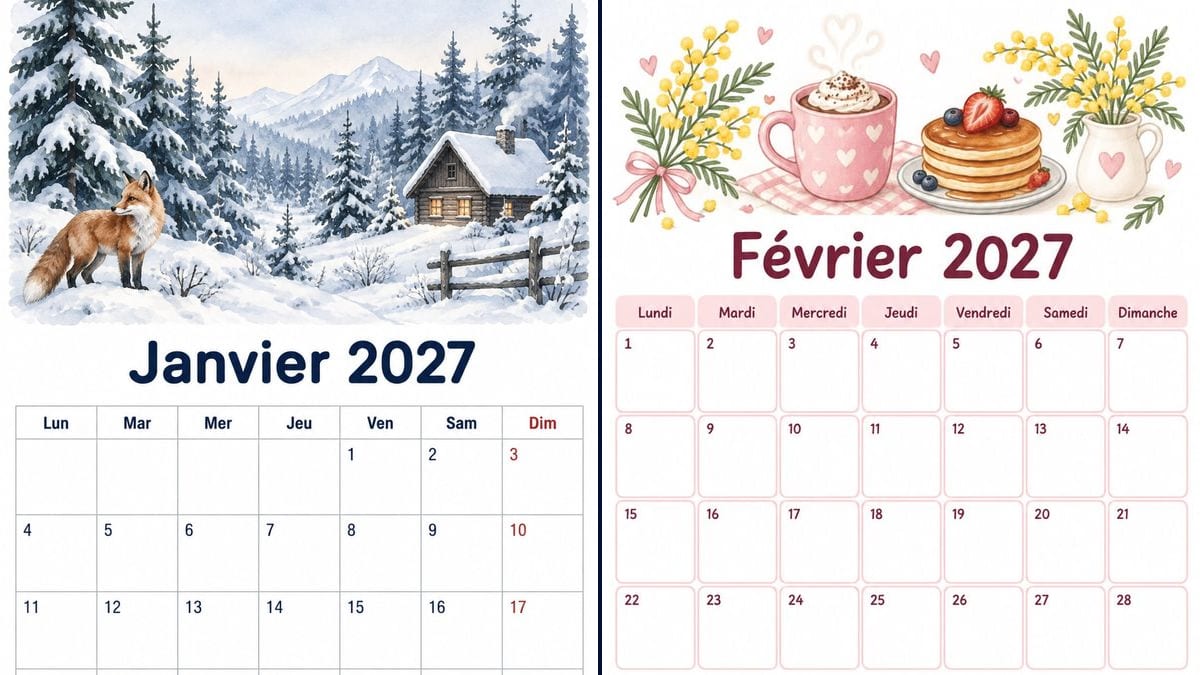
Real workflow (demo in French): a January 2027 page with a watercolour of a snowy forest, a red fox and a cabin, plus mountains, a smoking chimney and a fence the prompt didn't ask for, then "Janvier 2027" in navy and a correct grid, the 1 under Friday, the 31 under Sunday, Sundays in red; then a pastel February page, hot chocolate, pancakes with berries and mimosa, "Février 2027" in plum, four full rows from 1 to 28 and a "Notes" box.
At a glance
It's the end of the year, and the kitchen calendar stops at 31 December. This workflow makes the 2027 pages one at a time: a seven-column grid, boxes big enough to write in, and a seasonal drawing at the top. The demo shows two months at A4. January in watercolour, with a snowy forest, a fox and a cabin. February in pastels, with hot chocolate, mimosa and a box for notes.
Then there's the grid. The prompt says which weekday the 1st falls on, what each row holds, and forbids any other word. With that, GPT Image 2.5 Sunburst got both grids right on the first try, the accent in "Février" included. It did add some scenery of its own: mountains, a smoking chimney and a fence in January, berries and whipped cream in February. The demo is in French: put your own month and day names in the quotes, and still check every number before you print twelve pages.
To plan the week rather than the month, with meals or activities, see the printable weekly planner. For December and its 24 doors, there's the Advent calendar. With kids, the routine chart and the chore chart print the same way. The two demo months cost six credits.
These are the files of the workflow above, exactly as the models produced them, unretouched. The starting point is shown when there is one.
Render
Families, teachers, freelancers and small teams looking for a printable 2027 calendar at the end of the year, one month per page, with a correct grid, boxes to write in and a drawing they like, to hang on the wall, the fridge or by the desk.
The month and year, the weekday the 1st falls on, checked in a real calendar, what each row of the grid holds, the language of the days, the first day of the week, the drawing and colours you want, and if needed a few dates to write in, one short line per box. No photo.
Check the weekday of the 1st in a real calendar
Before writing, look up which day the 1st of the month falls on: 1 January 2027 is a Friday, 1 February a Monday. Put it in the prompt, then what each row holds, from which number to which. The model copies a grid you describe far better than it works one out.
Pick the month's drawing and colours
One scene per month at the top of the page: snow in January, mimosa in February, cherry blossom in April. Keep the same technique from month to month, watercolour or pastel, so the twelve pages look right together on the wall. Say whether Sunday should be red, too: without being told, February didn't get it.
Check the grid box by box
Count the empty boxes in the first row, check the last day and the number of rows. Everything is right in the demo, but a six-row month, like May 2027, leaves more room for mistakes. If a number is missing or repeated, rerun the node for three credits.
Print at A4 or A5
At A4 or US letter, the page makes a wall calendar that reads fine at home. At A5 it's sharper and fits on a fridge or the corner of a desk. Slightly thick paper, around 120 gsm, holds up better to pens and tape.
The same canvas, tuned for different needs: each variation is two or three lines of prompt away.
For a US calendar, or a family that counts that way, put "Sun" in the first column and rewrite the row descriptions: 1 January 2027 then falls under the sixth column, with five empty boxes before it. Not tested here.
One node per month, the same style sentence copied into all twelve prompts, and only the drawing, the title and the grid changing. Twelve nodes, 36 credits. Only January and February were rendered for the demo, the other months are not tested.
Twelve small grids on one sheet, for a desk or a binder. That's 365 numbers to place: the risk of mistakes goes up, and the digits get tiny at 1055 x 1491 pixels. Not tested here, so check every month if you try it.
To put a photo of your kids or your holidays at the top of each month, switch to Nano Banana with an input photo, and keep the demo's grid description. Faces and a grid on the same page have not been tested here.
For a class or a team, write the dates that matter into the prompt yourself, holidays, meetings, deadlines, one short line per box. Start in September for a school year. Check every date against the official calendar. Not tested here.
Ask for a black line drawing on white, no colour or grey, like a colouring page, and keep the grid. Kids colour in the month's drawing at the start of the month, and your printer saves on colour ink. Not tested here.
Writing only "March 2027 calendar" asks it to know which weekday the 1st falls on. It can shift the whole month by a column. Give the weekday of the 1st and what each row holds, as in the two demo prompts.
If you reuse the January prompt for March, change the title, the weekday of the 1st, the number of rows and the last day. March 2027 starts on a Monday like February, but it has 31 days, so a fifth row with three boxes.
Asking for "US holidays" or "UK bank holidays" lets the model guess the dates, and Easter or Thanksgiving move every year. Write each date yourself, checked against an official calendar, or leave the boxes blank and add them in pen.
The more words in the grid, the more likely a letter slips or a number vanishes. One short line per box, three or four filled boxes a month at most. The rest gets written in pen once the page is on the wall.
No, on purpose: the prompt says "No holidays". Left to itself, the model can get a date wrong or make up a holiday. If you want them, write them into the prompt yourself, for example "New Year's Day" under the number 1, checking every date against an official calendar.
The weekly planner shows a single week, with room for meals, activities or times. The monthly calendar shows the whole month on one page, a number per box and a seasonal drawing. The month goes on the wall, the week gets filled in on the fridge.
One month per node, three credits each: twelve nodes for the year, so 36 credits. The demo only rendered January and February. Allow a few extra credits to rerun a month whose grid comes out wrong.
The renders are 1055 x 1491 pixels, the proportions of an A4 sheet. At A4 or US letter that's about 127 dots per inch: the grid and numbers stay readable for a home print, but the watercolour looks a little soft up close. At A5 it rises to about 180 dots per inch. For a professional printer, it isn't enough.
Yes, just change the quoted text: "January 2027", "Mon", "Tue" and so on. Only French was tested in the demo. Check letters specific to each language, like the "ä" in the German "März".
Sunburst fills in the scenery when the prompt leaves room: mountains, a smoking chimney and a fence in January, a strawberry, blueberries, whipped cream and a pink bow in February. For a plainer drawing, add "nothing else in the illustration".
Yes, as long as you ask. In January the prompt said "the Sunday column in soft red" and the red is there, header and numbers included. In February it said nothing, and the Sundays stayed plum like everything else.
The render is an image, not a file you can retype. To change a number or a word, rerun the node with the corrected prompt, three credits. For an appointment that comes up mid-month, a pen is still the easiest: that's what the boxes are for.
Make a printable monthly calendar for 2027 with AI
Use this workflowFree account, no card required. The workflow opens pre-filled in your canvas.
 GPT Image 2.5 Sunburst
 Nano Banana 2.1
 Recraft V4.1