Lunch that ends up indoors
Once the sun is on the paving, the wooden table is useless and everyone goes inside. The owner wants to see what an awning or a sail would do to the back of the house before asking for a quote.
A photo of your patio with a retractable awning, then with a triangular shade sail. To choose the fabric and where it goes before you buy. Workflow visible here, no account needed.
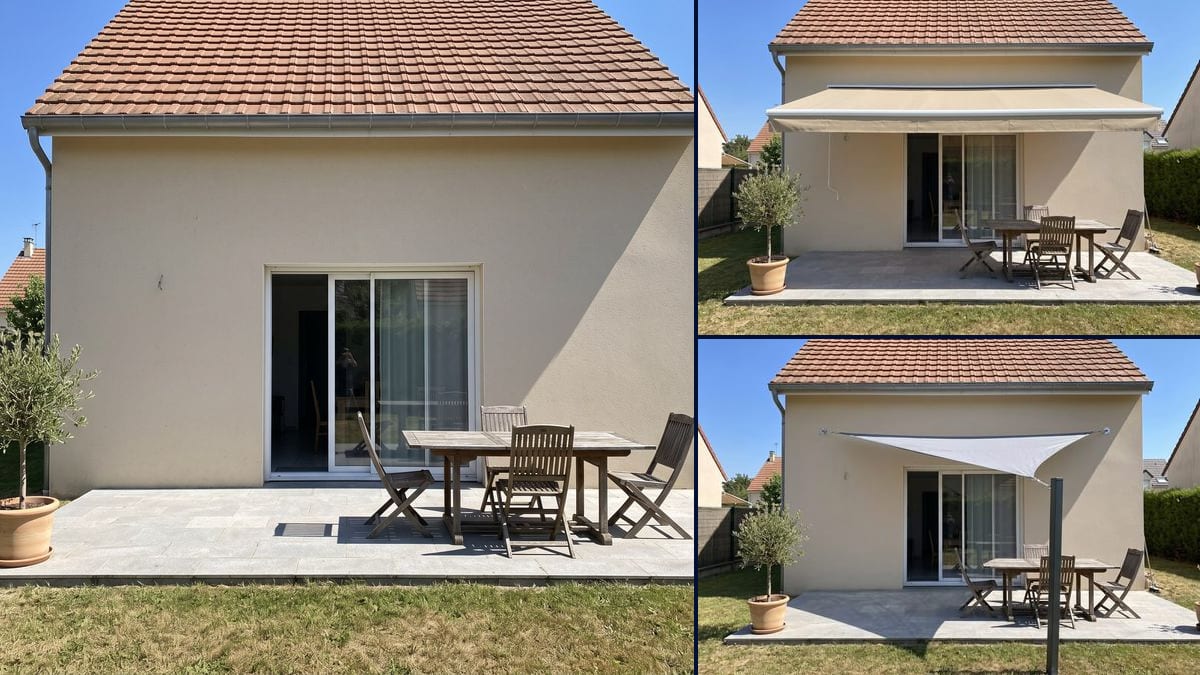
Real workflow: the back of a house with beige render, a sliding patio door and a paved patio in full sun, then the same patio with a sand beige retractable awning, and with a light grey triangular shade sail on an anthracite post.
At a glance
A paved patio, a wooden table, four folding chairs, and on a summer afternoon nobody stays out there long. Before you call in an installer or order a sail, this workflow takes a photo of YOUR patio and shows you both: a retractable awning fixed above the patio door, then a triangular shade sail stretched between the wall and a post.
The hard part is the shade. The prompt asks for a shadow over the table, and neither render draws it: the table and chairs stay in the sun in both pictures. Before that, Flux Kontext added a white box to the wall and turned the sail into a rectangle on two posts. Nano Banana 2.1 gets the shape and the fixings right. The demo shows the result as it came out: judge the fabric, its colour and its width, not the shade.
For a fixed structure, see the pergola; to hide from the neighbours, the balcony privacy screen. Around the patio, garden design and outdoor lighting; for the house, the facade and shutter colours. Both renders cost fourteen credits.
These are the files of the workflow above, exactly as the models produced them, unretouched. The starting point is shown when there is one.
Starting point
Render
Homeowners with a patio in full sun, awning and shade sail installers and sellers showing an installation on the client's own house.
A photo of the patio taken straight on from the garden with the whole wall above the door in frame, the kind of shade you want, the fabric colour and where each point is fixed.
Shoot straight on from the garden
Step back onto the lawn until the whole wall above the door is in frame, gutter included. The model needs to see where the cassette or the sail corners will be fixed.
Pick: awning or sail
For an awning, give the fabric colour, the cassette colour and how wide it is compared with the door. For a sail, its shape, its colour and how many corners it has.
Say where each point is fixed
Cassette under the gutter, sail corners on the wall, post at the corner of the patio. In the demo the post stands in front of the table because the prompt put it there: choose the spot before you write.
Check it against the photo
Look at the wall, the door, the table and the chairs. If something new appears, like the white cable left of the door in the demo, ban it in the prompt and run it again.
The same canvas, tuned for different needs: each variation is two or three lines of prompt away.
Once the sun is on the paving, the wooden table is useless and everyone goes inside. The owner wants to see what an awning or a sail would do to the back of the house before asking for a quote.
One wants an awning that rolls away when it rains, the other a sail stretched to a post. Two pictures taken from the same spot on the lawn show what each option does to the same wall.
On a beige wall, a sand canvas blends in and a grey one stands out. The owner runs the prompt again with two or three colours to see which one works with the render and the roof tiles.
The installer photographs the client's patio and comes back with the proposed awning on that very wall, fabric colour included. That says more than a swatch book or a catalogue photo.
The neighbour already has an awning, and estate rules may cover colours on the front of houses. The owner attaches the picture to the question for the council or the managing agent, so they can see what is meant.
The house is right, the patio is scorching at noon. Before making an offer, the buyer photographs the back of the house and looks at what an awning above the patio door would do.
The prompt asked for a shadow over the table; both renders leave the table and chairs in full sun. The picture shows the fabric and where it sits on the wall, not how much ground it will cover at noon.
In the demo, the sail post stands in the lawn in front of the table, where the prompt put it, and cuts the patio in two from the garden. Write "post at the front right corner of the patio".
The prompt asked for perspective and the awning came out seen straight on: you see its width, not its depth. Decide how far it projects with a tape measure on the patio, not from the picture.
If the gutter falls outside the picture, the model doesn't know where to fix the cassette or the sail corners, and it makes it up. Step back until the whole wall above the door is in frame.
Not much in the demo: wall, door, roof, paving, table, chairs, olive tree and the houses next door are the same. The wall hook becomes a thin white cable in the awning version, and both renders come out smaller than the photo.
Yes: change the fabric, the cassette or the width in the prompt, "blue and white striped canvas", "anthracite grey cassette", "as wide as the door". The end of the prompt stays the same.
Same idea: give the shape, the number of corners and where each one is fixed, wall or post. Then count the corners in the render: a corner floating in mid-air was the mistake on the very first try.
Fourteen credits, seven per render on Nano Banana 2.1 at 1K. A third version, in another fabric colour for instance, costs seven more.
It was tried twice. It added a white box to the wall that nobody asked for and drew no shade. For the sail, one corner floated in mid-air on the first try, and on the second the sail turned rectangular, with two posts. On the third try, Nano Banana 2.1 gave a triangular sail with all three corners fixed and no box.
The prompt asks for a shadow over the table and chairs, and neither render draws one. The picture shows the fabric, its colour and its width on your wall. Real shade depends on the time of day, which way the patio faces and how far the awning projects: that is for the installer to work out.
From the small hook in the wall in the original photo. In the awning version, the model turned it into a thin hanging cable. If a detail on your wall changes, add "keep the wall hook exactly as it is" and run it again.
4:3 like the photo, but smaller: 1200 x 896 pixels in the demo, against 2400 x 1792 for the original. Enough to compare on screen or show the installer, not to print large.
Patio awning visualizer with AI
Use this workflowFree account, no card required. The workflow opens pre-filled in your canvas.
 Nano Banana 2.1
 Flux Kontext
 GPT Image 2.5 Sunburst