The man on the fence
His temples have been creeping back for three years and he combs a strand over the top. Two pictures on his own portrait help him decide: keep what's left, or take the clippers to it this weekend.
Your portrait with a clean-shaved head, then with natural thinning on top, on the same face. To decide whether to shave or wait. Workflow visible here, no account needed.
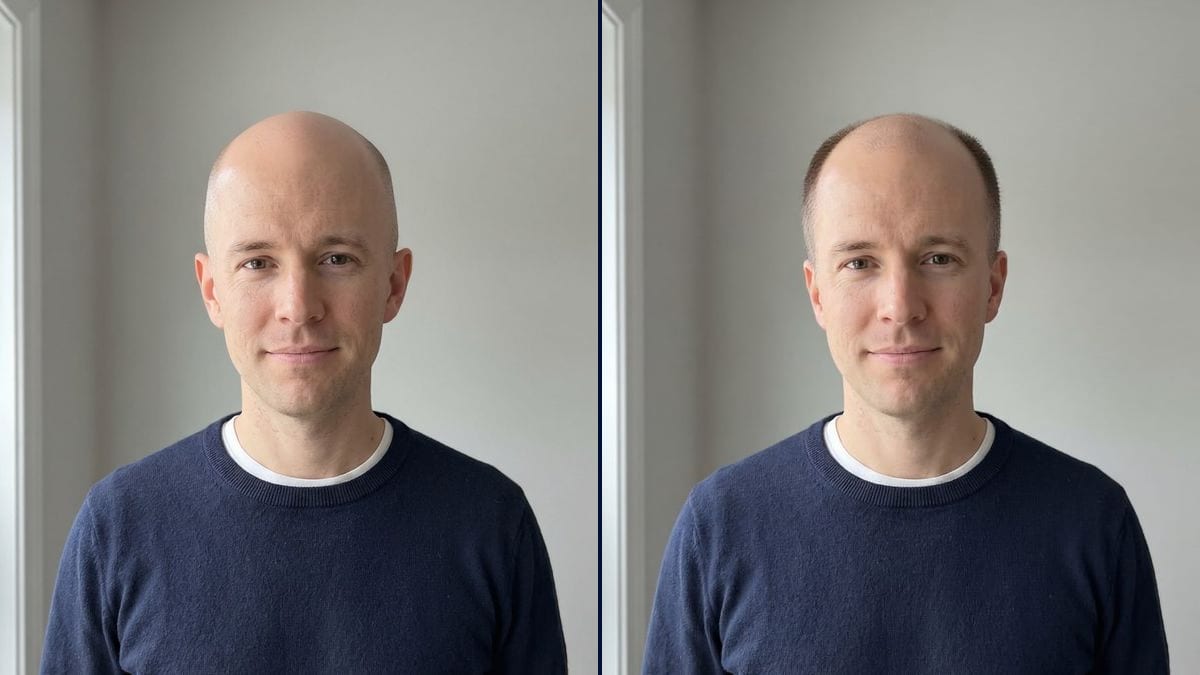
Real workflow: a portrait of a dark-haired man in a navy sweater, then the same man with a clean-shaved head and with thinning hair on top and short sides. Face, sweater and grey wall stay the same.
At a glance
When the hair starts to go, a lot of men spend months on the same question: shave it now or hang on. Others just want to know what their head looks like with nothing on it. This workflow starts from YOUR portrait and shows two versions: a clean-shaved head, and natural thinning with the sides kept short.
The hard part is touching only the hair. A model that rebuilds the image rounds the skull, changes the ears or adds ten years, and the comparison is worthless. Flux Kontext takes the hair away and keeps the face, the expression and the sweater exactly as they are in the photo.
If you'd rather see a cut than a bare scalp, try the hairstyle changer; a beard often balances a shaved head, and the beard try-on shows it. Both renders cost twelve credits.
These are the files of the workflow above, exactly as the models produced them, unretouched. The starting point is shown when there is one.
Starting point
Render
Men wondering whether to shave, barbers who show the result before the clippers, actors and people preparing for hair loss.
A front-facing portrait with forehead and ears visible, and the version to see: clean-shaven or how much thinning.
Face the camera
Front-facing portrait, soft light, forehead clear. A phone photo is enough as long as your ears show.
Pick the version
Clean-shaven, clipper buzz with a shadow, temples only, thin on top: describe the one you want to see.
Set how far it goes
Write "slightly receding" or "advanced hair loss". Without it, the model tends to go a long way, as in the demo.
Step back and look
Show both pictures to someone close or to your barber. A new head gets familiar fast on a screen, slower in the mirror.
The same canvas, tuned for different needs: each variation is two or three lines of prompt away.
His temples have been creeping back for three years and he combs a strand over the top. Two pictures on his own portrait help him decide: keep what's left, or take the clippers to it this weekend.
The client asks whether he should shave it all off. The barber takes a photo in the chair and shows him the shaved version first, since that is not a decision you undo in ten minutes.
Hair loss is on the way. Seeing your own face with a shaved head, quietly, at home, helps some people prepare and choose to shave first. Only if they want to, and when it feels right.
A role calls for a shaved head. The actor and the casting director see the look on his real face before choosing between the clippers and a bald cap from the makeup department.
Before meeting a clinic, he wants to see both ends: where the thinning goes if he does nothing, and how he looks shaved. The picture predicts nothing; it helps him ask better questions.
For a birthday, the friends turn the guy with the famous mane into a smooth dome. Same face, same sweater, and the joke lands because it really is him in the picture.
Head shape is judged from the front. At an angle, the model invents the back of the head and the shape stops looking like yours.
"Thinning" on its own often gives advanced hair loss, as in the demo. Say how far: temples, crown, thin on top.
A hat hides the skull, and long hair over the ears does too. The model guesses, and you end up judging an invented head.
How your hair will actually change can't be read from a picture. It shows a look; the future of your hair is a conversation for a dermatologist.
No: same eyes, nose, ears, expression and sweater. Only the hair changes, and in the demo the face is identical in both versions.
Yes, that's the most common case: the shaved version shows what the next step would look like. Start from a recent photo.
Yes: ask for "hair clipped to 3 millimetres" instead of a smooth scalp. One node per length.
Twelve credits, six per render on Flux Kontext. A third version on the same photo, a 3 mm buzz for example, costs six more.
Because it edits one area of the image and keeps the rest: face, ears and sweater stay yours, only the hair goes or thins.
In the demo, yes: smooth scalp with a soft reflection, a faint shadow of regrowth on the sides, ears unchanged. The skull shape under the hair is still the model's estimate.
Yes: swap "him" for "her" and keep the list of what stays the same. Useful before a solidarity shave or a treatment.
The format of your photo, here 3:4, a vertical portrait like the ones phones take.
See yourself bald with AI
Use this workflowFree account, no card required. The workflow opens pre-filled in your canvas.
 Flux Kontext
 Nano Banana 2.1
 GPT Image 2.5 Sunburst