The couple who can't agree
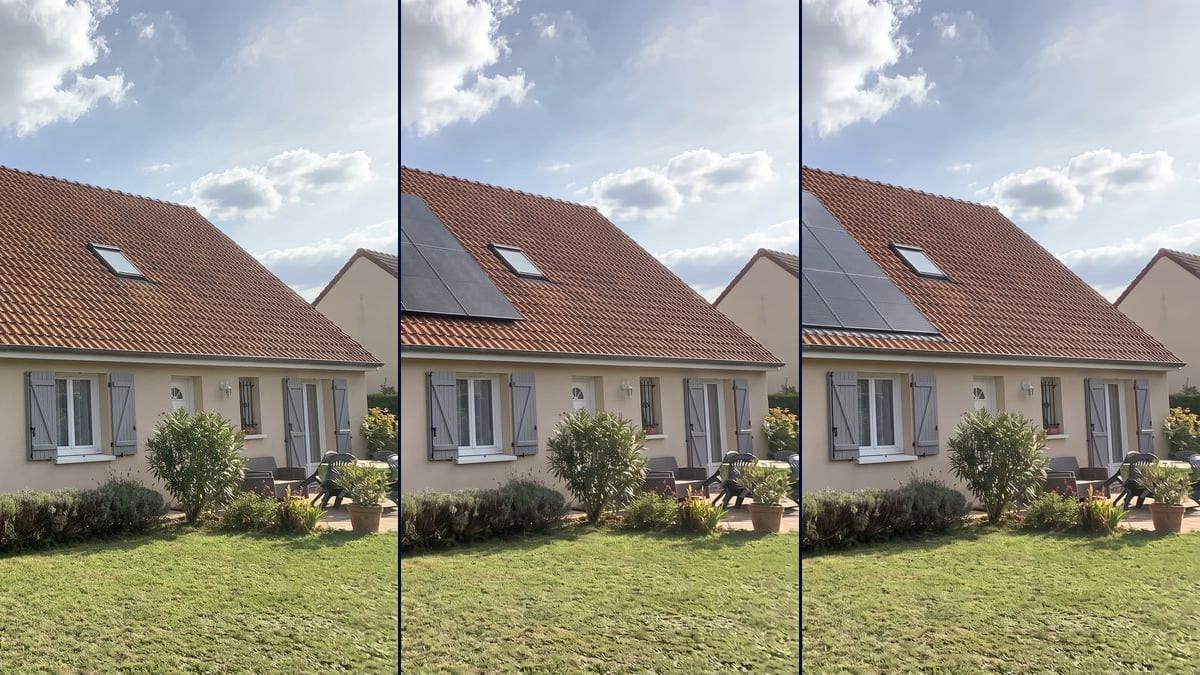
One wants panels, the other is afraid the house will look spoiled. Two pictures on a photo of their own roof, and the conversation moves from "yes or no" to "all-black or in-roof".
A photo of your house with black panels mounted on the tiles, then an in-roof solar array, at the right scale. To make up your mind before the quote. Workflow visible here, no account needed.
Real workflow: a photo of a house with orange clay tiles seen from the garden, then the same house with twelve black panels in two rows and with eighteen panels set into the roof. Chimney and roof window stay clear.
At a glance
Plenty of homeowners put off solar panels because they can't picture the house afterwards. The quote shows a top-down view, rectangles on a satellite image, nothing like your roof seen from the garden. This workflow starts from a photo of YOUR house and shows you two installations: black panels mounted on the tiles, and an in-roof array.
The hard part is scale and alignment. A panel is roughly 1.7 by 1.1 metres, and an image model left to itself draws them too big, staggered, or over the roof window. The prompt gives the number of panels, the layout and what must stay clear. Nano Banana Pro holds the rectangle and leaves the rest of the house alone.
To see a repainted facade at the same time, chain it with the facade makeover; for the entrance, with the front door visualizer. Both renders cost thirty-eight credits.
These are the files of the workflow above, exactly as the models produced them, unretouched. The starting point is shown when there is one.
Starting point
Render
Homeowners weighing an installation, installers who attach a picture to the quote, building boards preparing a vote.
A photo of the house with the whole roof pan in view, the number of panels and what must stay clear.
Photograph the roof
From the garden or the street, the whole roof pan in view, in daylight. The pan that gets the most sun is the one that counts, usually the south-facing one.
Say how many and how
Number of panels, number of rows, frame colour. With today's panels, six to eight make roughly 3 kWp.
Name what stays clear
Chimney, roof window, aerial, vent pipe: list them, or the model may cover them.
Compare the two mountings
On-roof or in-roof: see which one you like, then ask for the quote with this picture in hand.
The same canvas, tuned for different needs: each variation is two or three lines of prompt away.
One wants panels, the other is afraid the house will look spoiled. Two pictures on a photo of their own roof, and the conversation moves from "yes or no" to "all-black or in-roof".
The salesperson photographs the house during the site visit and attaches the equipped roof to the quote. The customer sees what they are signing, not a satellite view with blue rectangles.
The board shows the owners the building's roof with and without panels, so the vote is about a concrete picture rather than a technical drawing.
Near a listed building, the planning officer looks at appearance. An all-black in-roof render helps prepare the discussion, even though it does not replace the drawings the application needs.
Rather not touch the house roof? The same prompt works on a photo of a carport, a garage or a garden shed, with fewer panels.
The seller of a house without panels shows buyers what an installation would look like, next to the energy certificate, to answer the question about bills before it is asked.
"Add solar panels" lets the model decide: it covers the whole roof or draws rectangles of different sizes. Give the count and the rows.
In our first tries, the panels went right over it. Name every element that must stay clear: roof window, chimney, aerial.
Panels on the north pan or under a big tree make a nice picture and an installation that produces little. Photograph the pan that gets the most sun.
How many panels really fit depends on safety distances, the roof structure and local rules. The installer measures; the picture helps you choose.
No: same walls, same shutters, same garden, same sky. Only the roof gets the panels, and the chimney and roof window stay clear.
Yes for slate: write "slates" instead of "tiles" in the prompt. On a flat roof, ask for tilted panels on frames, in spaced rows.
No. It is a picture to help you decide. Output depends on orientation, pitch and shading, and an installer calculates it.
Thirty-eight credits, nineteen per render on Nano Banana Pro. A third variant on the same photo costs nineteen more.
We tried both on the same house. Kontext staggered the rows and covered the roof window; Nano Banana Pro kept two straight rows of six and left the roof window clear.
On-roof panels are fixed above the tiles, the most common mounting. In-roof panels replace part of the roof covering and sit flush with it, with a metal flashing around them.
Yes: all-black, silver aluminium frames, or bluish cells. Write it in the prompt, one node per variant.
The format of your photo, here 4:3. A house seen from the garden is shot in landscape.
Visualize solar panels on your roof with AI
Use this workflowFree account, no card required. The workflow opens pre-filled in your canvas.
 Nano Banana Pro
 Flux Kontext
 GPT Image 2.5 Sunburst