Before asking for a quote
You see whether the pool fits in the garden and how much lawn is left around it, before inviting three pool builders to price it.
Your garden photo with a rectangular pool and then a natural swimming pond, to scale, house and hedge unchanged. To picture it before the quote. Workflow visible here, no account needed.
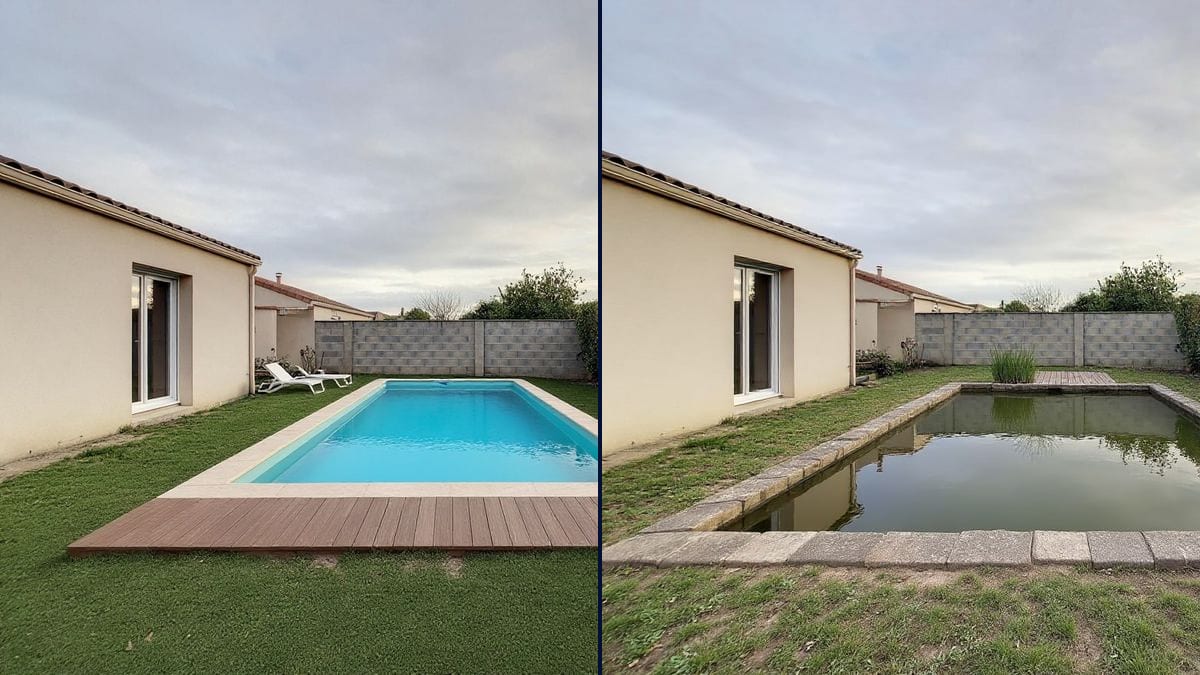
Real workflow: a lawn behind a house, then the same garden with an 8 × 4 m pool and timber deck and with a natural swimming pond. House, wall and hedge don't move.
At a glance
A pool gets decided on a plan and on photos of gardens that aren't yours. This workflow starts from a photo of your garden and shows two pools in it, a classic pool with a timber deck and a natural pond, so you can see how much room they take.
The hard part is scale. Left to itself, a model draws a pool too big or askew. The prompt gives the size, 8 by 4 metres, and the place, in the middle of the lawn and parallel to the house; Flux Kontext leaves house, wall and hedge as they were.
To design the rest of the garden, see garden design; for the house front, the house front simulation. Both pools cost twelve credits.
These are the files of the workflow above, exactly as the models produced them, unretouched. The starting point is shown when there is one.
Starting point
Render
Homeowners considering a pool, pool builders presenting a project, sellers and landlords of houses with gardens.
A photo of the garden taken from the house, and the size, place and style of the pool wanted.
Photograph the garden
From the house or terrace, the whole lawn visible, in daylight. That's where you'll look at the pool from.
Give the size and place
8 by 4 metres, middle of the lawn, parallel to the house. Without dimensions, the pool comes out too big or askew.
Describe the pool and surroundings
Turquoise or natural water, stone coping, timber deck, sun loungers, edge planting: that's where the style comes from.
Compare and share
Two pools in the same garden, to show the family or the pool builder before the quote.
The same canvas, tuned for different needs: each variation is two or three lines of prompt away.
You see whether the pool fits in the garden and how much lawn is left around it, before inviting three pool builders to price it.
The classic pool and the natural pond side by side, in the same garden, to settle a family debate with concrete pictures.
The tradesperson photographs the garden during the visit and shows the client their pool on the spot, before even drawing the plan.
A picture of the garden with a possible pool helps sell a house with a big plot, making clear it's a project and not an existing pool.
The owner of a holiday home sees the effect of a pool on the garden before investing, and what the listing would gain.
The pool first, then the terrace and beds around it with garden design, for a complete project.
Without a size, the model draws a pool that swallows the garden or a paddling pool. Give the length and width.
Without a place, the pool can sit askew or too close to the house. Middle of the lawn, parallel to the house.
A hose, toys or a mower stay in the picture. Ask for them to be removed in the same prompt.
The picture gives a mood, not a layout. Distance rules and site access are checked with a professional.
No: house, sliding door, back wall and hedge stay those of the photo. Only the lawn gets the pool.
They're believable, not measured. For the real position, distances to boundaries and machine access, you need a pool builder.
Yes: describe an above-ground pool in wood or steel, its shape and height, with the same sentence about the place.
Twelve credits, six per pool on Flux Kontext. A third pool on the same photo costs six credits more.
Because it adds an element while keeping the rest of the photo pixel for pixel: you see YOUR garden and YOUR house.
In the demo, yes: same house, same back wall, same hedge. The hose is removed and the lawn stays around the pool.
The format of your photo, here 4:3. A vertical photo stays vertical.
Yes: add "in the evening, underwater lighting" to the prompt, or run the picture through day to night.
Visualize a swimming pool in your garden with AI
Use this workflowFree account, no card required. The workflow opens pre-filled in your canvas.
 Flux Kontext
 Nano Banana Pro
 GPT Image 2.5 Sunburst