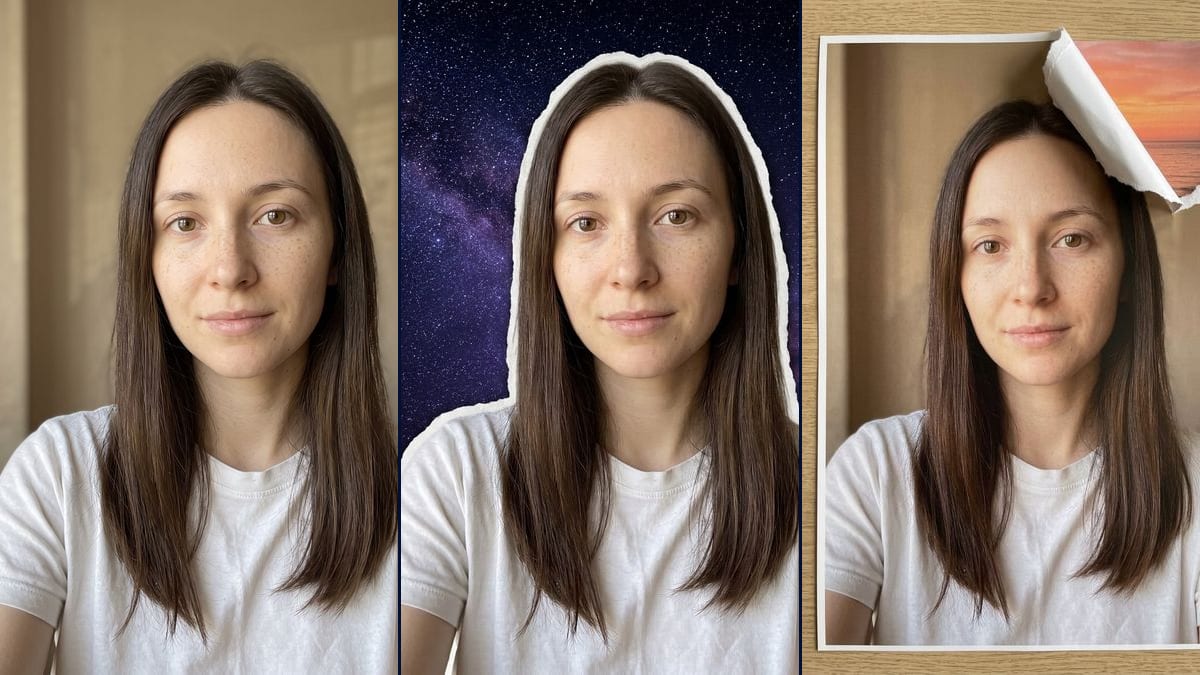
Real workflow: a woman in a white T-shirt against a beige wall, then the same woman with a white paper edge and a starry sky where the wall was, and as a print on an oak desk with a torn corner showing a sunset. The flap runs over the top of her hair.
At a glance
You provide
1 photo · a text or a brief
What the workflow produces
2 images in 3:4
Canvas structure
6 nodes wired by 4 connections
Models wired in
Nano Banana 2.1
Cost of one full run
about 14 credits, roughly $0.17
Account
The demo is visible without an account; generating requires a free account, trial credits included
The torn paper effect keeps the person exactly as they are and rips away everything else, as if the photo were a sheet of paper. The videosi.io tracker lists it among the trends that are spreading (page seen on 6 November 2026), Dreamina, CapCut's image tool, has a page about it, and CapCut put out torn paper portrait templates in July 2026. Here you start from your own photo and an image model makes the tear.
You get two pictures. In the first, the wall behind you is gone, a white paper edge stays around your head and shoulders, and a violet galaxy shows behind. In the second, your photo becomes a print lying on a desk, with the top right corner torn open on a sunset. On the demo, the face did not move. The galaxy edge reads more like a sticker than a real tear, and the sunset flap cuts into the hair.
These are the files of the workflow above, exactly as the models produced them, unretouched. The starting point is shown when there is one.
Starting point
Your photo
Render
The same woman, face and freckles untouched, in front of a violet and blue starry sky with the Milky Way where the beige wall was, with a white paper edge around her head, hair and shoulders; the edge reads more like a sticker outline than a real tear, with hardly any fibres, and the framing pulled back a littleGenerated with Nano Banana 2.1The same woman's photo printed and lying flat on a light oak desk, seen from above, the top right corner torn open with a curled white paper flap and visible fibres over an orange and pink sunset on the sea; the flap runs over the top of her hair and the print is longer than the photoGenerated with Nano Banana 2.1
Who it is for
People who want to try the torn paper trend on their own portrait for Instagram, TikTok or a profile picture, creators looking for a thumbnail that stands out, digital scrapbooking fans.
Which files to provide
A sharp photo of you or of someone who agrees, ideally against a plain background, and a description of their face and outfit in the prompt (glasses, beard, hair colour). The photo is optional.
How it works
1
Pick a photo with a plain background
A plain wall separates easily from the person. On a busy background, the model is unsure what to tear away and may cut off a strand of hair or a shoulder.
2
Adjust the description in the prompts
The prompts describe a woman with long dark brown hair, freckles and a white T-shirt. Put in your glasses, your beard or your sweater, or the model may change them.
3
Choose the scene inside the tear
The galaxy and the sunset are only examples. A city at night, a field of flowers or a photo of you as a kid work too: just change the end of the prompt.
4
Check the edge and the flap at full size
On the demo, the galaxy edge is too smooth and the sunset flap runs over the hair. Zoom in before you post, and rerun for 7 credits if it bothers you.
Variations and use cases
The same canvas, tuned for different needs: each variation is two or three lines of prompt away.
A different scene inside the tear
Replace the galaxy or the sunset with a city at night, a field of flowers, or even a photo of you as a child plugged in as a second image. Keep one idea per scene, or the tear gets hard to read. Not tested on the demo.
A horizontal strip torn across
Instead of a corner, ask for a strip ripped across the photo at chest height, with the new scene showing underneath. Say the strip must not touch the face: the demo shows the model spills over easily. Not tested.
Several layers of paper
Describe two or three sheets torn one over the other, each with its own scene: the wall, then a beach, then the sky. The picture gets busier and the model may mix the layers, so keep the scenes very different. Not tested on the demo.
A photo of a couple or a pet
Change "the woman" to "the couple" or "the dog" and describe each one in the prompt. With two people, ask for a single paper edge around both of them, or the model may cut out a gap between them. Not tested.
The reveal animated with a Video node
Start from the print picture and plug in a Video node: describe a hand tearing off the corner of the paper and the scene appearing underneath. A short, simple movement gives more believable paper. Not tested on the demo, and paid separately.
A real torn edge instead of a sticker
The demo's galaxy render has an edge that is too smooth. Push the prompt towards thick paper, white fibres sticking out and a jagged border, or start from the print version, which is more convincing on that point. Not tested.
Common mistakes
Starting from a photo with a cluttered background
Furniture, other people or a window behind you blur the line between you and the background. The model may keep a piece of furniture or tear off a shoulder.
Assuming the flap will stay clear of the hair
The sunset prompt asked for a corner away from the face and hair, and the flap still ran over it. Check that spot before you post.
Cropping before you see the output format
The galaxy render pulled the framing back a little, and the print came out longer than the photo, closer to 2:3. Wait for the render before you pick your crop.
How is this different from a plain background swap?
A background swap replaces the scene cleanly, with no trace. Here you are meant to see the tear: a white paper edge, a flap curling up, a shadow.
Will my face be retouched?
On the demo, Nano Banana 2.1 kept the face, freckles and hair as they were. The prompts ask for nothing to change on the person, only the background.
Can the tear be animated as a video?
Yes, by plugging a Video node into the picture and describing the paper ripping open to reveal the scene. We did not test it on the demo, and the video costs extra credits.
How much do the two images cost?
14 credits, 7 per render on Nano Banana 2.1 at 1K. Both demo pictures were kept on the first try.
896 x 1200 pixels, portrait, in a 3:4 ratio. Enough for a story or a post, a bit small for a print.
Where does the torn paper effect come from?
We do not know who started it. videosi.io lists it among the trends that are spreading on 6 November 2026, Dreamina has a page on it and CapCut has offered templates since July 2026. Imaginode has no link with these sites.
Do I have to provide a photo?
The photo is optional in the canvas, but without it the model invents a person. For the tear to wrap around your face, you need your photo.
 Nano Banana 2.1
 Flux Kontext
 Seedream 5 Pro