Emma and Hugo's rustic wedding
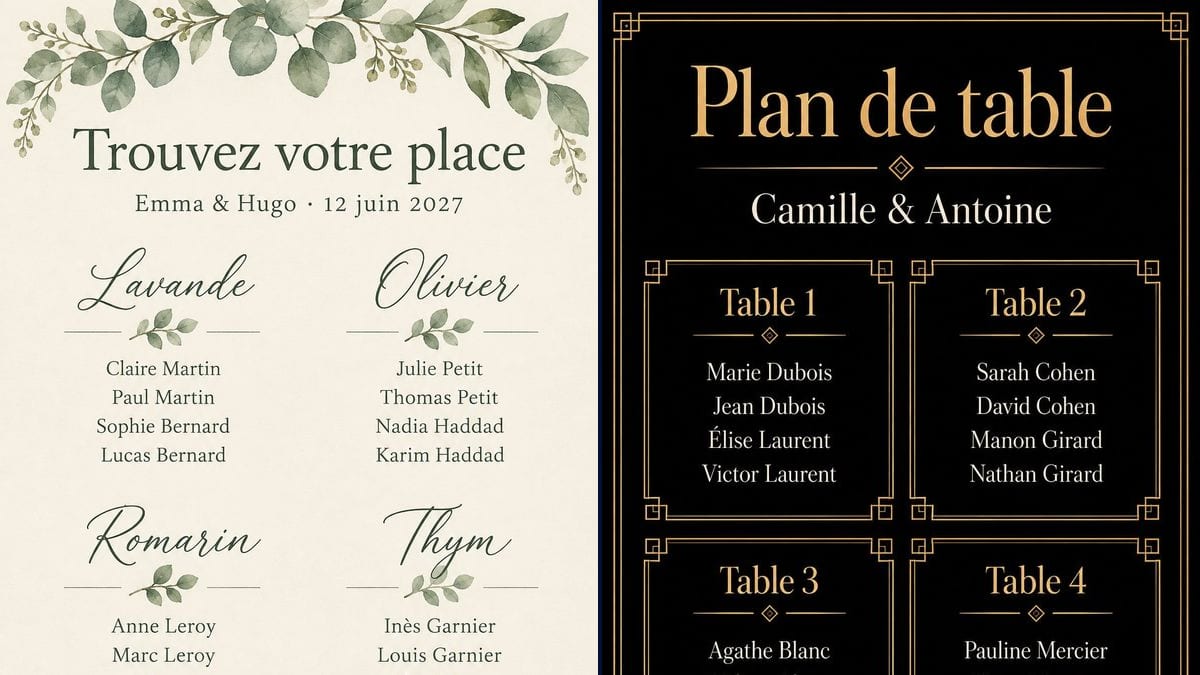
Four tables named after plants, Lavande, Olivier, Romarin and Thym, on cream paper with eucalyptus. The poster sits on a wooden easel next to the barn door.
A rustic or black and gold seating chart poster, with your table names and every guest spelled letter for letter. Workflow visible here, no account needed.
Real workflow (demo in French): a chart for Emma and Hugo on cream paper with watercolour eucalyptus at the top and bottom and four tables named after plants, Lavande, Olivier, Romarin and Thym, then a chart for Camille and Antoine in gold on black, four numbered tables each in its own art deco frame.
At a glance
A seating chart keeps changing until the last week. A couple drops out, two cousins can't sit together, a table of eight turns into a table of six, and every version goes back through a layout app. This workflow starts from your list: the table names, who sits at each, your names and the date. It gives you two portrait posters, one rustic and one elegant, ready for an easel at the door.
The tricky part is the names. Every guest looks for their own, and a missing accent or a misspelled surname gets noticed. An image model left to itself makes those mistakes, or invents an extra guest. The prompt puts every name in quotation marks, table by table, and forbids the rest. In the demo, GPT Image 2.5 Sunburst copied all thirty-two names with no mistakes, on the first try.
For the rest of the stationery, see the welcome sign and the menu card; after the day, the thank you card. Both posters cost six credits.
These are the files of the workflow above, exactly as the models produced them, unretouched. The starting point is shown when there is one.
Render
Couples getting the reception room ready, bridesmaids, best men and family members in charge of the stationery, wedding planners, and families planning a sit-down meal for a golden anniversary or a christening.
Your names, the date if you want it, then each table with its list of guests, each one in quotation marks.
Write the tables one by one
For each table, its name and then its guests, each one in quotation marks. Paste the names from your guest list instead of typing them again: you keep the spelling you already checked.
Keep table names short
Numbers, plants, places you've travelled to: the table name goes in large letters, the guests underneath. A short word holds up better in script than a full phrase.
Put your names and the date at the top
A title like "Find your seat" or "Seating chart", then your names. If you write the weekday next to the date, check that the two match on a calendar.
Print at 2:3
The render comes out at 2:3, the shape of a 40 x 60 cm or 24 x 36 inch poster. For A2 or 18 x 24 inches, crop a little off the height. For a large print, upscale the image first.
The same canvas, tuned for different needs: each variation is two or three lines of prompt away.
Four tables named after plants, Lavande, Olivier, Romarin and Thym, on cream paper with eucalyptus. The poster sits on a wooden easel next to the barn door.
Numbered tables, each in its own gold frame. Gold on black reads from across the room, and the chart stays legible when the lights go down later in the evening.
Cities you've travelled to, neighbourhoods you've lived in, local wines: the table name gets people talking. Put them in quotation marks, the same way as the guests.
With a lot of guests, the names shrink and the risk of a typo goes up. Make one poster per group of tables, say the hall side and the terrace side, with the same style and title.
Fewer people, a shorter chart: two or three tables, or one long table split into two sides. The same canvas works, you only change the title and the list.
Any sit-down family meal needs the same chart. Swap your names for the couple's or the child's, and the title for the name of the party.
A guest who cancels means a name to remove and a new render at three credits. Wait until the list is final before you generate the poster you'll print.
The model copies what you give it, typos included: an extra letter in the prompt ends up on the poster. Paste the names straight from your guest list.
The more names there are, the smaller the letters and the higher the risk of a typo. Past twenty or so names, split the list across several posters and check each one.
Without that sentence at the end of the prompt, the model happily adds a quote, a greeting or a date. Keep it, and leave every name in quotation marks.
In the demo, yes: all thirty-two names on the two posters are exact, the accents on "Léa", "Inès", "Chloé", "Élise", "Hélène" and "Zoé" included, and no word was added. Still check every name against your list before you print.
The demo has sixteen, four tables of four. Past twenty or so names, make several posters, or check each name carefully: the more text there is, the smaller the letters and the higher the risk of a typo.
Yes, the style is described at the start of the prompt: background, colours, ornaments, lettering. Reuse the colours of your invitation so the seating chart fits with the rest.
Six credits, three per render on GPT Image 2.5 Sunburst at medium quality. A corrected version after a guest cancels costs three more credits.
Because it copies text letter for letter, accents included, and it is the cheapest model in the catalogue. In the demo it got thirty-two guests and eight table names right without a single mistake.
The prompt asked for 3:4, but Sunburst doesn't follow the shape: the renders come out at 1024 x 1536 pixels, which is 2:3. That fits a 40 x 60 cm or 24 x 36 inch poster; for A2 or 18 x 24 inches, crop a little off the height. To print large, run the image through the photo upscaler first.
In the demo, an empty black band sits under the tables, inside the frame. On an easel it reads as a margin. If it bothers you, ask in the prompt for the tables to reach the bottom of the frame.
Yes, the poster shows whatever you put in quotation marks. First names are enough for a small wedding; if you have two Julies or two Thomases, keep the surnames.
Make a printable wedding seating chart with AI
Use this workflowFree account, no card required. The workflow opens pre-filled in your canvas.
 GPT Image 2.5 Sunburst
 Nano Banana 2.1
 Recraft V4.1