The rustic dinner in Provence
Emma and Hugo are marrying at a farmhouse with olive trees in the garden. The kraft card with lavender and olive sits on every linen napkin, printed at home on recycled stock.
Two menu cards for your wedding dinner, rustic or elegant, with your dishes and names spelled right, ready to print. Workflow visible here, no account needed.
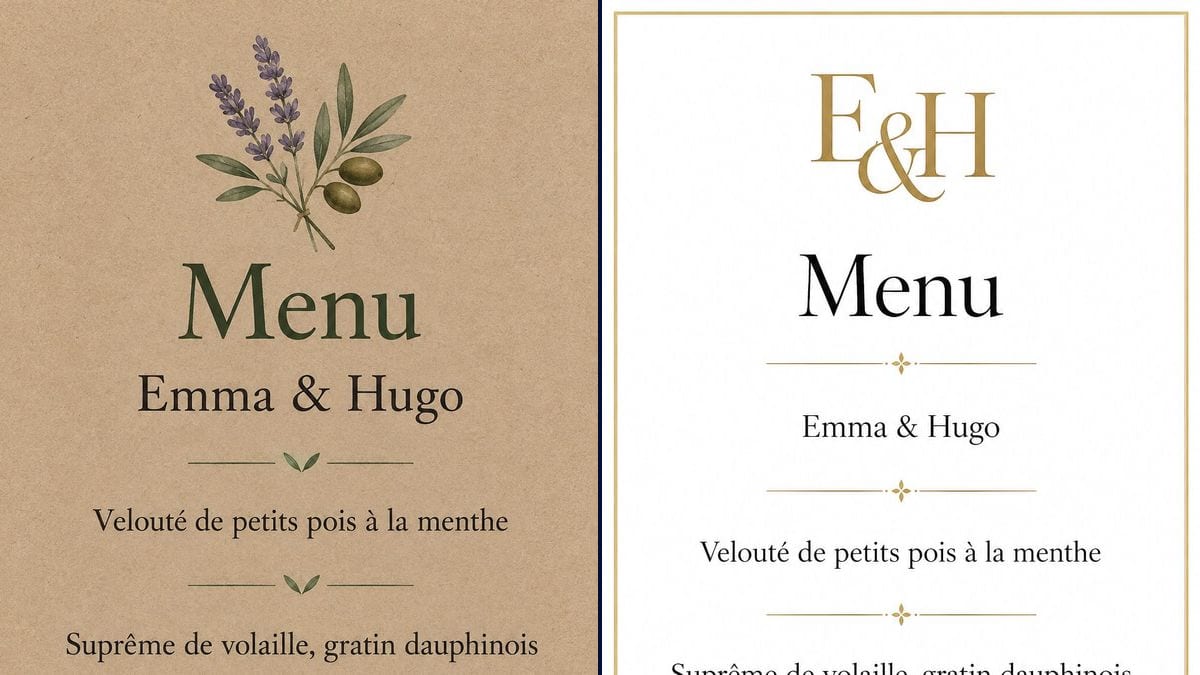
Real workflow: a menu card on kraft paper with a sprig of lavender and olive, then a white card with a thin gold frame and a gold E&H monogram. Same names, same three courses on both.
At a glance
The menu card on the plate is a small thing guests read as they sit down, and sometimes take home. The caterer emails the dish names, and someone still has to lay them out in the wedding's style. This workflow gives you two cards, rustic and elegant, with your dishes and names, ready to print.
The hard part is the text: long dish names, often with French accents, and an image model that likes to fill gaps with a wine or a palate cleanser. The prompt gives each line in quotes in serving order and forbids the rest. GPT Image 2.5 Sunburst copies them letter for letter.
For the entrance, see the welcome sign; for after the day, the thank you card. Both menus cost six credits.
These are the files of the workflow above, exactly as the models produced them, unretouched. The starting point is shown when there is one.
Render
Couples preparing the tables, caterers offering the card, families celebrating a golden anniversary.
Your names and the list of dishes in quotes, in serving order.
Get the dish names
Ask the caterer for the exact name of each course, then shorten: one line per dish reads better than a description.
Replace the lines
Names and dishes in quotes, in place of the demo ones. Add a line per course if your menu has more.
Check the accents
Velouté, dauphinois, crème brûlée: every accent counts. Compare the image with the caterer's email.
Print and trim
The 2:3 render makes a 4 x 6 inch card exactly. Print on heavy card stock, kraft or white.
The same canvas, tuned for different needs: each variation is two or three lines of prompt away.
Emma and Hugo are marrying at a farmhouse with olive trees in the garden. The kraft card with lavender and olive sits on every linen napkin, printed at home on recycled stock.
White tablecloths, gold-rimmed plates. The elegant version with the monogram picks up the couple's initials, and the caterer tucks a card under every glass.
The parents want a separate card for the children's table. Same layout, the dishes become "Homemade nuggets" and "Vanilla ice cream", and a small drawing goes on top.
No plated service, a buffet instead. The same card, run through the Enhance node, prints at A2 or 18 x 24 inches and stands on an easel next to the food.
A caterer offers every couple a free menu card in their wedding style. Changing the dishes and names takes five minutes, and the card goes out with the deposit invoice.
Fifty years married, lunch at the village restaurant. The elegant card carries their names, the date and the menu picked with the owner, so the family keeps something from the day.
"Free-range chicken supreme with a thyme reduction and old-style gratin dauphinois" takes three lines. Keep the core, one line per dish.
A vegetarian main planned for some guests but missing from the card raises questions at the table. Add a line or make a second card.
The model got them right on the demo, but a missing accent on a hundred printed cards is the same mistake a hundred times.
A card on regular printer paper curls and stains at the first spilled glass. Use heavy card stock, or thick kraft for the rustic version.
On the demo, yes: all five lines, accents included, match the prompt on both cards. Proofread anyway before printing.
Yes: one quoted line per addition. Past seven lines the card gets crowded; go for a taller format instead.
Yes, but that means one render per guest: add a line with the name. For a hundred guests, separate place cards cost less.
Six credits, three per render on GPT Image 2.5 Sunburst at medium quality. One more card, the kids' menu for instance, costs three credits.
It spells accurately on light backgrounds, French accents included, and it is the cheapest model in the catalogue. A menu card is mostly text on a light background.
The prompt asks for 3:4 and the render comes out in 2:3, portrait. That fits a 4 x 6 inch or 10 x 15 cm card.
Yes: replace "E&H" with your initials in the elegant prompt. Two letters and an ampersand; three initials read less well.
That is how the demo works: both prompts share the same lines of text. Edit them in both nodes to keep the cards matching.
Make a wedding menu card with AI
Use this workflowFree account, no card required. The workflow opens pre-filled in your canvas.
 GPT Image 2.5 Sunburst
 Nano Banana 2.1
 Recraft V4.1