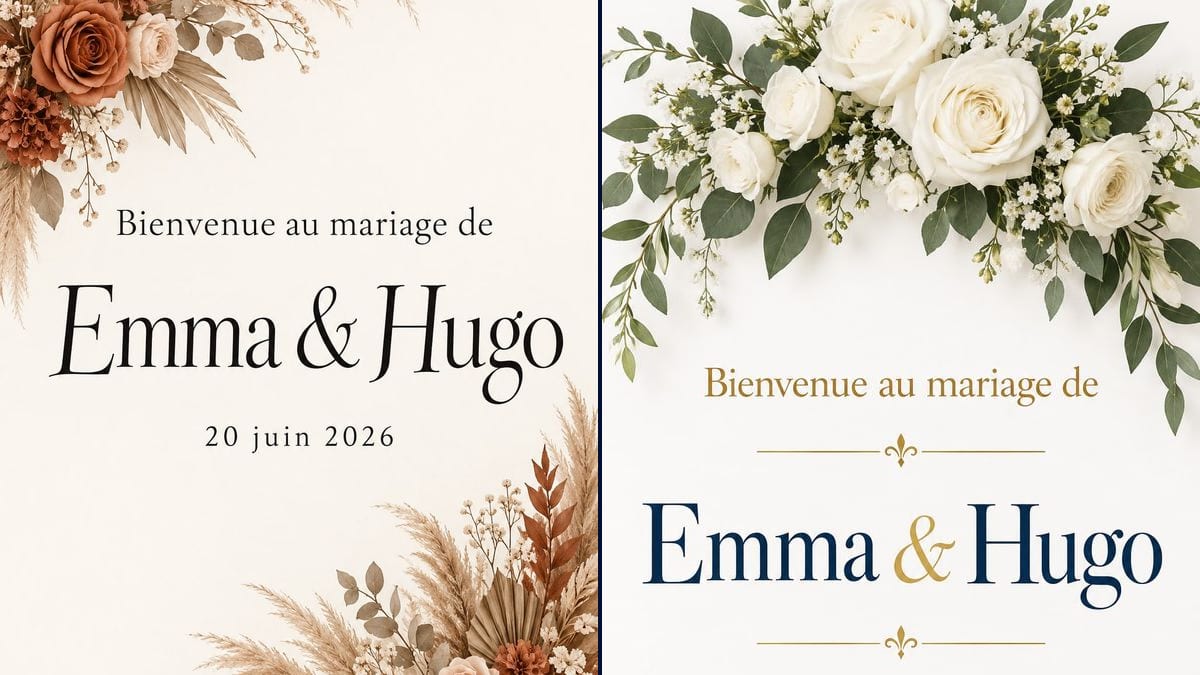
The rustic barn wedding
Emma and Hugo are getting married in a converted barn full of pampas grass and dried flowers. The boho sign goes to the printer at 24 x 36 inches and stands on a wooden easel at the entrance.
Two welcome signs for your wedding, boho or classic, with your names and date spelled right, ready to print large. Workflow visible here, no account needed.
Real workflow: an off-white boho sign with pampas grass and terracotta roses in two corners, then a classic sign with an arch of white roses at the top and "Emma & Hugo" in navy and gold.
At a glance
The welcome sign is what guests photograph on the way in, propped on an easel at the door of the venue. Ordered from a designer it takes a few rounds of edits; done yourself, the layout is where it stalls. This workflow gives you two signs with your names, one boho and one classic, ready for the print shop.
The hard part is getting the names right and nothing else. Image models like to add a quote or a looping "Love", and an unusual name gets mangled quickly. The prompt gives the three lines in quotes and forbids a fourth. GPT Image 2.5 Sunburst copies them exactly.
To keep the same look throughout, carry on with the wedding menu and the wedding invitation. Both signs cost six credits.
These are the files of the workflow above, exactly as the models produced them, unretouched. The starting point is shown when there is one.
Render
Couples preparing their decor, bridesmaids and best men in charge of the welcome, wedding planners.
Your names and date in quotes, and the style that goes with your decor.
Choose the style
Boho with pampas and dried flowers, or classic with white roses. Match the colours of your table decor.
Put in your names
Replace "Emma & Hugo" and the date in each prompt. Keep the "No other words" sentence.
Proofread letter by letter
Especially an unusual name or one with an accent. A typo on a three-foot sign is the one thing everyone notices.
Upscale and print
Run the render through the Enhance node, then print on foam board, at 18 x 24 or 24 x 36 inches.
The same canvas, tuned for different needs: each variation is two or three lines of prompt away.
Emma and Hugo are getting married in a converted barn full of pampas grass and dried flowers. The boho sign goes to the printer at 24 x 36 inches and stands on a wooden easel at the entrance.
A couple goes for the classic style, white roses and navy lettering to match the table linen. The caterer sets the sign at the foot of the staircase where drinks are served.
The bride's best friend promised to handle decorations. She makes the sign on a weeknight, sends it to the couple for approval and has it printed at the local copy shop.
Thirty guests and dinner at a restaurant. No need for a big board: the sign prints on A3 or tabloid and sits in a frame on the welcome table next to the guest book.
Twenty-five years on, the parents throw another party. The first line becomes "Welcome to the silver anniversary of", and the classic sign carries the date of the day.
A wedding planner shows two styles with the couple's names at the first meeting. The decor gets chosen from a picture of their own sign rather than a catalogue page.
Without upscaling, the letters go soft at that size. Use the Enhance node first, and read our guide to enlarging for print.
Order of the day, hashtag, a quote: from across the room none of it reads. A welcome sign is names and date.
Without that sentence, the model happily adds a "Love" or a stock phrase. Leave it in the prompt.
A terracotta sign against pink walls clashes. Look at a photo of the room before choosing the style.
On the demo, yes: all three lines are exact on both signs. Always proofread your own before sending to print.
Yes: add a quoted line and say where it goes. Stay at four lines at most; the sign is read from a distance.
Yes: change the first line, for example "Welcome to the engagement party of", and keep the rest.
Six credits, three per render on GPT Image 2.5 Sunburst at medium quality. A third version, in your own colours for example, costs three credits.
It spells accurately on light backgrounds, accents and ampersands included, and it is the cheapest model in the catalogue for a design with text.
The prompt asks for 3:4 and the render comes out in 2:3, portrait. That is exactly the shape of a 24 x 36 inch or 60 x 90 cm sign.
Up to A3 or tabloid, the render is enough. Beyond that, run it through the Enhance node before it goes to the printer.
On the boho demo, the names came out in serif italics. For a more flowing hand, ask for "hand-lettered connected script, pointed-pen calligraphy" on the names line.
Make a wedding welcome sign with AI
Use this workflowFree account, no card required. The workflow opens pre-filled in your canvas.
 GPT Image 2.5 Sunburst
 Nano Banana 2.1
 Recraft V4.1