Back from the honeymoon
Emma and Hugo get home after two weeks with eighty guests to thank. The eucalyptus card goes to the printer at 4 x 6 inches, and they write a few words on the back of each.
Two thank you cards for after your wedding, watercolour eucalyptus or minimal, with your names spelled right and ready to print. Workflow visible here, no account needed.
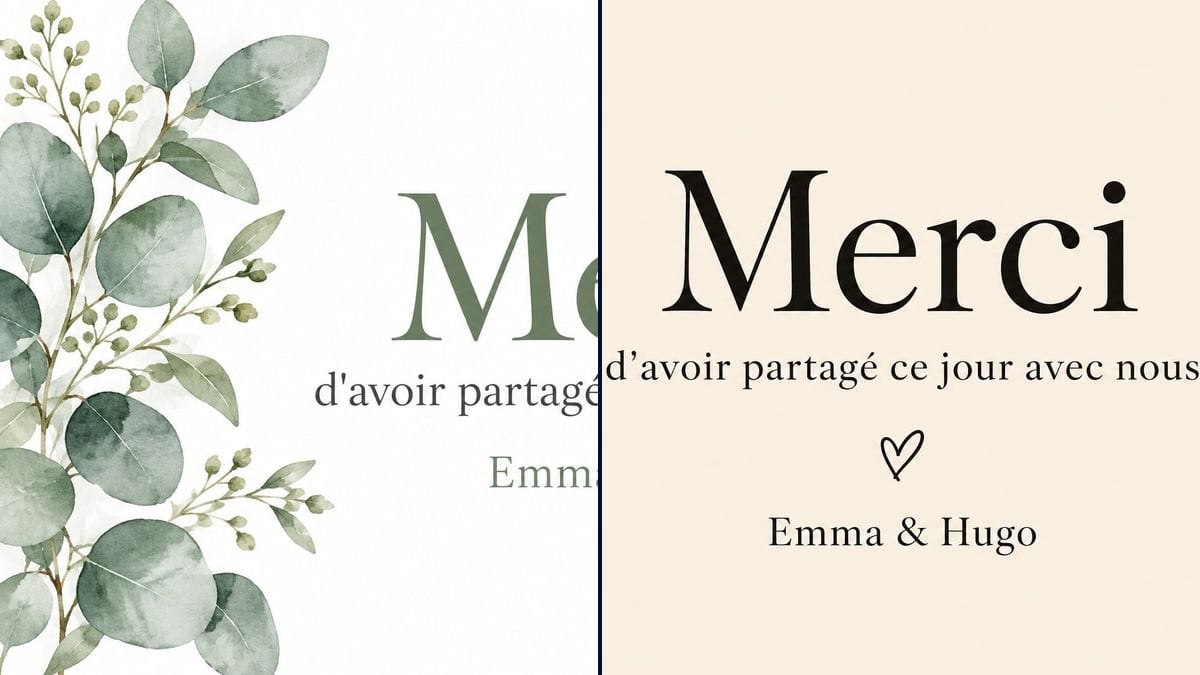
Real workflow: a white card with watercolour eucalyptus branches on the left and "Merci" in sage green, then a minimal beige card with "Merci" in large black serif letters and a small hand-drawn heart.
At a glance
After the wedding come the thank you notes, put off week after week because you first need a card. Shop cards don't carry your names, and stationery sites make you rebuild everything in their editor. This workflow gives you two cards with your names, one with eucalyptus and one minimal, ready to print or send as an image.
The hard part is restraint. Image models like to scatter hearts, add a date, or tack on a line nobody wrote. The prompt gives the three lines in quotes and forbids the rest. GPT Image 2.5 Sunburst writes them letter for letter.
To keep the same thread, see the wedding invitation and the menu card. Both cards cost six credits.
These are the files of the workflow above, exactly as the models produced them, unretouched. The starting point is shown when there is one.
Render
Newlyweds thanking their guests, families after a christening or a civil partnership.
Your names and the thank you sentence in quotes.
Pick the style
Watercolour eucalyptus if your wedding was full of greenery, minimal if you want room for a handwritten note.
Put in your names
Replace "Emma & Hugo" in each prompt. The sentence can change too, as long as it stays on one line.
Proofread
Names, apostrophes, accents. A typo on a card sent to a hundred people gets noticed.
Print postcard size
The 3:2 render fits a 4 x 6 inch card exactly. Write a personal note on the back before posting.
The same canvas, tuned for different needs: each variation is two or three lines of prompt away.
Emma and Hugo get home after two weeks with eighty guests to thank. The eucalyptus card goes to the printer at 4 x 6 inches, and they write a few words on the back of each.
For friends far away and colleagues, a printed card isn't needed. The minimal version goes out as an image in the group chat, next to a photo from the day.
A green arch, eucalyptus bouquets, wooden tables. The card repeats the same watercolour branches, so the thank you looks and feels like the party your guests remember.
The same prompt works for a christening or a civil partnership: keep "Thank you", change the sentence to "for being there for Leo's christening" and the signature.
A separate card for the people who carried the day. The sentence becomes "for everything you did", and it goes with a framed print of a favourite photo.
The couple also thanks the caterer, the photographer and the DJ, along with an online review. The minimal version looks professional and attaches easily to an email.
The later the card arrives, the more it looks like a chore. Prepare it before the wedding and print it when you get back.
A long sentence on the front kills the card. The front says thank you; the back carries the personal note, by hand.
Without that sentence, the model happily adds a date or a stock phrase. Keep it in each prompt.
Pens don't write on glossy paper. Pick a heavy matte card stock so you can write on the back.
On the demo, yes: all three lines, apostrophe included, are exact on both cards. Proofread your own.
Not in this canvas, which has no input photo. Print the photo on the back, or place it beside the text in your layout tool.
Yes, but that means one render per card. Simpler: one shared card, and a handwritten line on the back for each gift.
Six credits, three per render on GPT Image 2.5 Sunburst at medium quality. One more version, with a different sentence for instance, costs three credits.
It spells accurately on light backgrounds, apostrophes and accents included, and it is the cheapest model in the catalogue. A thank you card is three lines on a light background.
The prompt asks for 4:3 and the render comes out in 3:2, landscape. That is exactly a 4 x 6 inch postcard.
Yes: switch the Image node to portrait and ask for "eucalyptus branches along the top" instead of on the left.
Yes: replace "sage green" or "warm beige" with your wedding colour, terracotta, dusty blue, burgundy.
Make a wedding thank you card with AI
Use this workflowFree account, no card required. The workflow opens pre-filled in your canvas.
 GPT Image 2.5 Sunburst
 Nano Banana 2.1
 Recraft V4.1