Three-quarter angle
Also called3/4 angle, 45-degree angle, two-thirds view
The three-quarter angle places the camera at roughly 45 degrees from the subject's face, between a straight-on and a profile view. It reveals both the volume of the face and a sense of depth, giving the viewer a more three-dimensional, natural read of the subject than a flat frontal shot.
What it tells
Directors reach for the three-quarter angle when they want a subject to feel present and dimensional rather than flat or confrontational. It softens the directness of a straight-on shot while keeping enough of the face visible for emotional nuance, making it the default choice for dialogue, interviews and character introductions. Because one side of the face recedes into shadow or turns slightly away, the angle also lets a cinematographer sculpt mood through light without hiding the performance, striking a balance between intimacy and observation that a viewer reads as natural conversation.
How it is shot
To set a three-quarter angle, position the camera about 45 degrees off the subject's nose, halfway between a full front view and a profile. The far eye and cheekbone stay visible but compressed, while the near side of the face fills more of the frame. Lenses between 35mm and 85mm keep facial proportions natural; wider glass at this angle can distort the nose and cheek. Eye line should still meet the camera or a co-star just off-axis. On set, this is the standard angle for the A camera in a two-person dialogue scene, with the B camera capturing the reverse three-quarter on the second actor. Key light typically comes from the same side as the camera offset, defining the cheekbone and jaw.
When to use it
- Filming dialogue or interviews where a flat frontal shot would feel stiff or overly confrontational.
- Introducing a character for the first time and wanting a natural, dimensional first impression.
- Shooting a two-person conversation where each actor needs their own flattering camera angle.
- Photographing product or portrait setups that need to show depth without a full side profile.
Not to be confused with
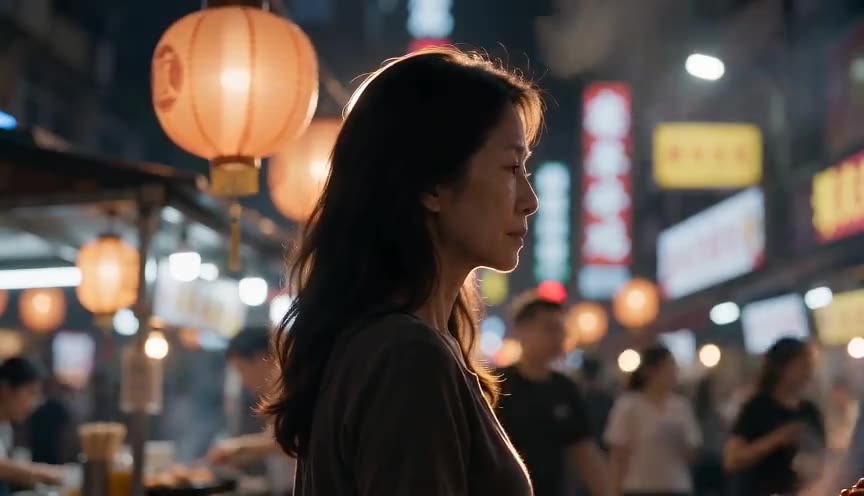
A profile shot pushes the camera to a full 90 degrees, showing only the side of the face with a flat, silhouette-like read, while the three-quarter angle stops short of that, keeping both eyes and more facial volume visible.
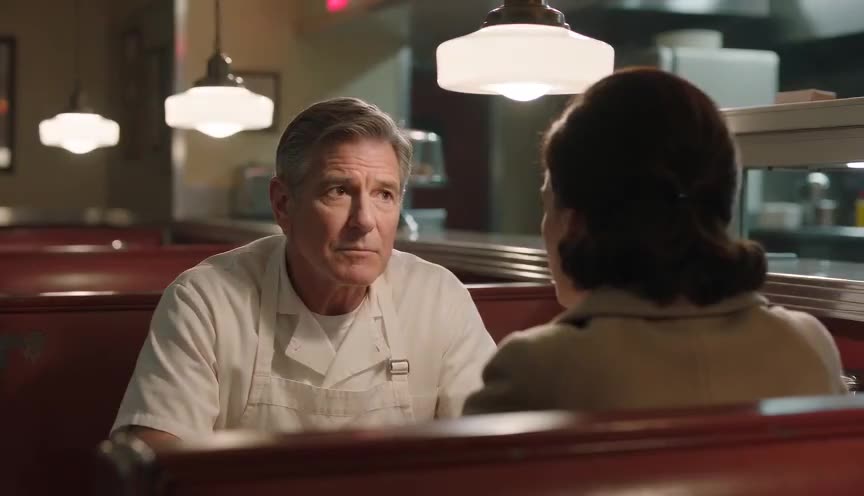
A reverse angle is a cut to the opposite side of the axis, typically to show the other participant in a conversation, while the three-quarter angle describes a fixed camera position relative to one subject, not a cut between viewpoints.
In film
Citizen Kane (1941)
Gregg Toland often frames Kane at a three-quarter angle with one side of the face falling into shadow, suggesting hidden motive beneath a public persona.
The Thin Blue Line (1988)
Errol Morris shoots interview subjects at a slight three-quarter angle rather than straight on, a documentary convention that keeps them present without staring into the lens.
The prompt
Name the angle directly: 'three-quarter angle' or '45-degree angle on the face' reads more reliably than vague camera descriptions. Specify which side faces the lens (left three-quarter or right three-quarter) so the model doesn't default to a flat frontal or full profile. Add a static or locked-off camera unless you want the angle to drift, and mention the light source's side to reinforce the geometry. Avoid crowding the prompt with conflicting angle words like 'front view' or 'side view', which can push the model toward eye level instead.
The exact prompt that rendered the video on this page. Keep the description of the move, change the subject and the setting.
Three-quarter angle shot of a middle-aged woman standing by a frosted window inside a snowy mountain cabin, camera locked off at a 45-degree angle to her face, favoring her left side while her right cheek recedes into soft shadow. Warm firelight from an unseen hearth rakes across her features, and cold blue daylight spills through the window on the far side, mixing warm and cool tones on her skin. She turns her head slightly toward the window, keeping both eyes visible to the lens as snow drifts silently outside. The camera holds perfectly still for the full four seconds. No text.
Common mistakes
Drifting into profile
Letting the camera creep past 45 degrees until the far eye disappears turns the shot into a profile, losing the dimensional read the angle is meant to give.
Wrong lens choice
Using an ultra-wide lens at this angle exaggerates the near-side cheek and nose, distorting proportions that a 35mm to 85mm lens would keep natural.
Flat, matching light
Lighting both sides of the face evenly cancels out the depth the angle creates; a slight falloff on the far side is what sells the three-dimensional shape.
Frequently asked questions
What is a three-quarter angle?
It's a camera position set at roughly 45 degrees from the subject's face, between a full frontal shot and a profile, showing most of the face with a natural sense of depth. It's the standard angle for dialogue, interviews and portraits.
Is three-quarter angle the same as three-quarter view in photography?
Yes, the term comes from portrait photography and painting, where it describes the same 45-degree head position. Film simply adopted the vocabulary for camera placement relative to an actor's face.
Which side should the camera favor, left or right?
There's no universal rule. Directors often choose the side that shows the more expressive side of an actor's face, or the side that matches the eyeline of a scene partner in the cut.
Can I get a three-quarter angle from an AI video generator?
Yes. Naming the angle explicitly and specifying which side faces the camera works well in tools like those built into Imaginode, and adding a fixed lens and consistent lighting description helps the model hold the geometry for the whole clip.