The printed announcement
Printed cards posted to family and friends, with a photo from the first days and every measurement exactly right.
Your baby's photo becomes two birth announcements, watercolour or minimal, with the name, date, weight and length without a mistake. To print or to send. Workflow visible here, no account needed.
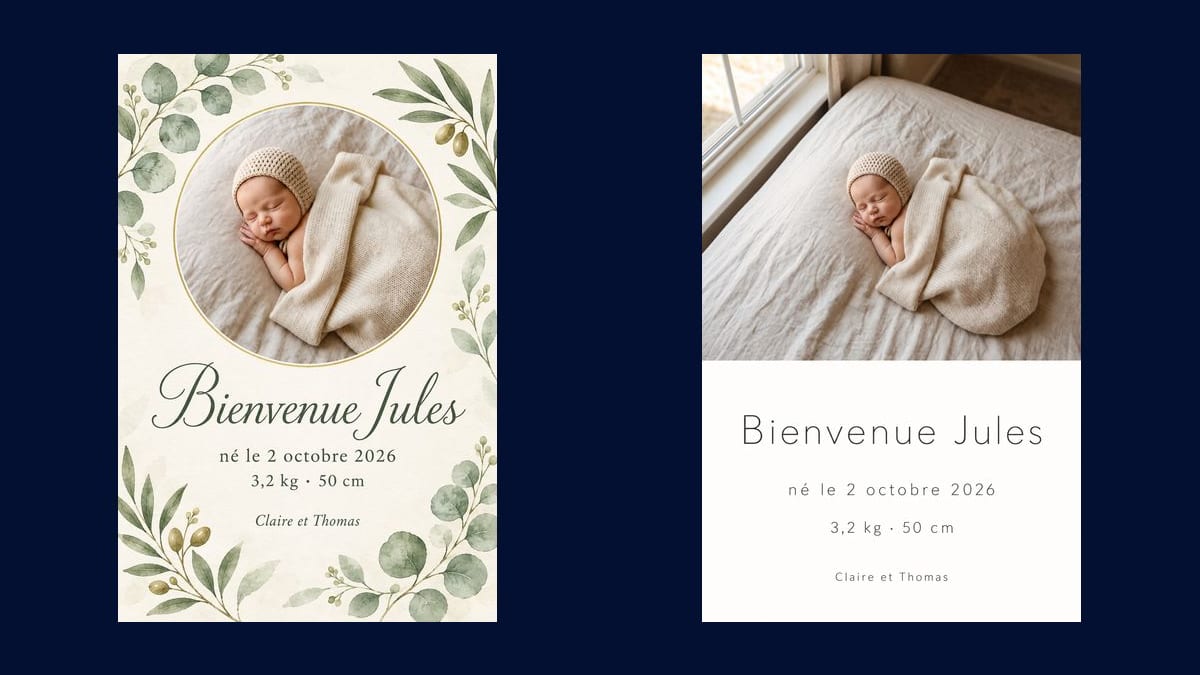
Real workflow: a photo of a sleeping newborn, then two 3:4 announcements, watercolour leaves with a round photo and minimal with the photo on top, "Bienvenue Jules" and every line exact.
At a glance
The first weeks leave little time to lay out a birth announcement. This workflow starts from your baby's photo and makes two, watercolour leaves and minimal, with their name, date of birth, weight and length.
The hard part is twofold. The text has to be right: each line is given in quotes, in order, and nothing else is written. And the baby has to be yours: the photo is asked for as it is, not redrawn. Sunburst does both on a light background.
To announce a wedding, see the wedding invitation; for a first birthday, the invitation. Both announcements cost eighteen credits.
These are the files of the workflow above, exactly as the models produced them, unretouched. The starting point is shown when there is one.
Starting point
Render
New parents, adoptive families and newborn photographers preparing a birth announcement.
A sharp photo of the baby, and the four lines of the announcement: name, date, weight and length, parents.
Pick the photo
A sharp, gentle photo of the baby, well lit, without flash. The announcement uses it as it is, without redrawing it.
Write the four lines
The name, date of birth, weight and length, the parents. Each line in quotes, in order.
Choose the style
Watercolour leaves, minimal and modern, stars, soft colours: keep a light background for crisp text.
Proofread and print
3:4 portrait, to print as a card or send to family by message. Check every number before printing.
The same canvas, tuned for different needs: each variation is two or three lines of prompt away.
Printed cards posted to family and friends, with a photo from the first days and every measurement exactly right.
The same design sent to loved ones in a messaging app or posted on social media, in a portrait shape that reads well on a phone.
A few weeks later, the same layout to say thank you for the gifts, with another photo and a line of thanks.
The arrival of an adopted child is announced the same way, with their name, the date they arrived and a photo chosen by the family.
Along with the shoot, the photographer gives the family two announcement designs ready to print, made from their own photos.
The announcement framed in the child's room, with the photo, the name and the measurements from day one.
The model rephrases or adds a sentence. Each line in quotes, in order, and "nothing else".
Without that sentence, the model may draw a baby who looks like yours. Ask for the photo reproduced as it is.
Sunburst writes poorly on a dark flat colour. Keep a light background, cream, white or pastel, for crisp text.
A date, a weight or a length is worth checking before printing a hundred cards. A second of checking saves a reprint.
In the demo, yes: same face, same bonnet, same blanket. The prompt asks for the photo reproduced as it is, not redrawn.
In the demo every line is. Still proofread before printing: a rare or double-barrelled name can come out with a typo.
Yes: add a second Media node with the other photo, wired into each Image node, and write both names in quotes.
Eighteen credits, nine per announcement on Sunburst at high quality. A third style costs nine credits more.
Because it writes the text letter for letter on a light background and places a reference photo without remaking it, measured on this announcement.
3:4 portrait, which prints well as a 5 × 7 inch card or A6 with a small margin.
It stays in your space, like all your media, and is only used for your own generations.
Yes: write the four lines in the language you want, in quotes. The model copies them as they are.
Make a birth announcement with AI
Use this workflowFree account, no card required. The workflow opens pre-filled in your canvas.
 GPT Image 2.5 Sunburst
 Nano Banana Pro
 Flux 3
 Seedream 5 Pro