The tiler and the quote
The tradesperson photographs the room at the first visit and shows the customer two floors that same evening, before pricing the square metres and the subfloor work.
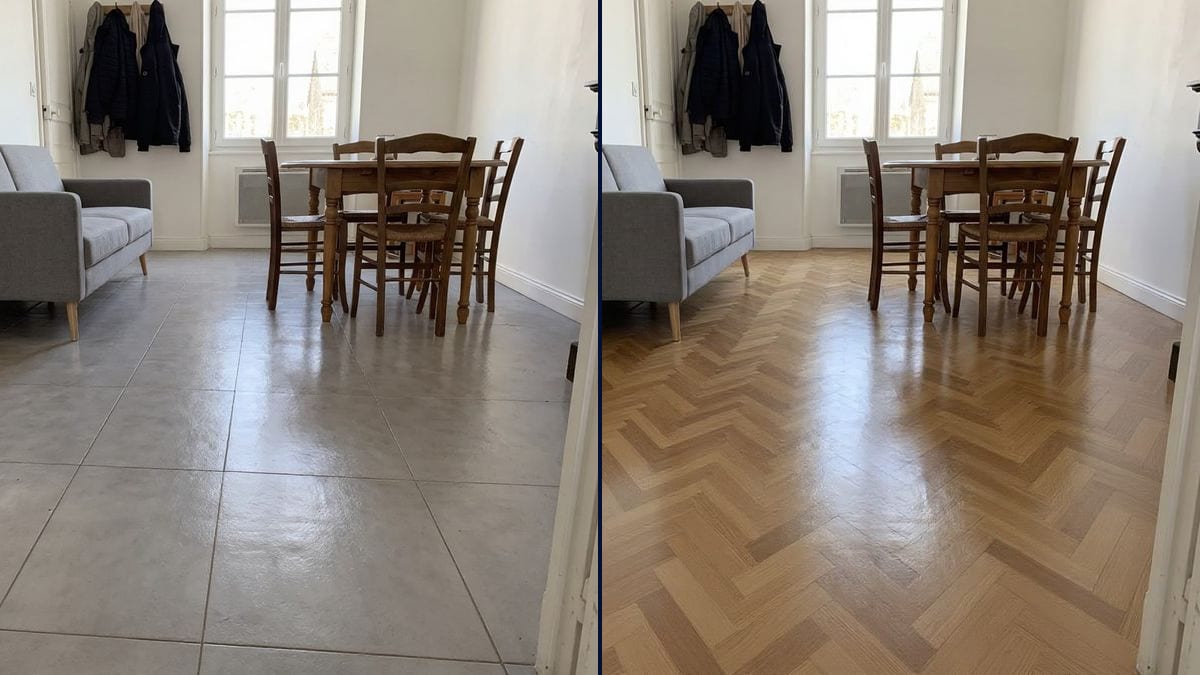
The photo of your room with large concrete-look tiles and then oak herringbone parquet, walls and furniture unchanged. To decide before the quote. Workflow visible here, no account.
Real workflow: the photo of a living room with old 1990s beige tiles, then the same room in large grey concrete-look tiles and in oak herringbone parquet. Sofa, table and chairs don't move.
At a glance
A floor gets picked from a thirty-centimetre sample laid on the showroom floor, and then you live with it for twenty years. This workflow starts from a photo of YOUR room and shows you two floors laid everywhere, under the furniture, up to the skirting boards, to judge the whole effect before signing the quote.
The hard part is keeping the room. A model that recomposes the image moves the sofa or changes the window. Flux Kontext only changes the floor: the prompt runs it under the furniture legs and stops it at the skirting boards, and the tile size is given in centimetres.
For the walls, see the paint colour test; for the whole kitchen, the kitchen makeover. Both floors cost twelve credits.
These are the files of the workflow above, exactly as the models produced them, unretouched. The starting point is shown when there is one.
Starting point
Render
Homeowners renovating, buyers picturing a home, tilers, flooring fitters and showrooms presenting a quote.
A photo of the room taken standing, floor well visible, and the floor you want with its material and size in centimetres.
Photograph the room
Standing at the door, the floor visible right up to the back wall, in daylight, without a rug if you can.
Describe the floor
Material, colour, size in centimetres, finish, laying pattern. "Large tiles" is not enough, "120 x 120 cm" is.
Say what stays
The furniture standing on it, the skirting boards where the floor stops, the walls and window that don't move.
Compare the two floors
Tiles and parquet in the same room, side by side. Add a node for a third idea.
The same canvas, tuned for different needs: each variation is two or three lines of prompt away.
The tradesperson photographs the room at the first visit and shows the customer two floors that same evening, before pricing the square metres and the subfloor work.
Old tiles that put buyers off at the viewing, and the same room in light parquet to picture yourself there, before making an offer and pricing the work.
The salesperson lays the chosen tile on the customer's photo at the counter, and the decision is made on the room, not on the sample.
One floor for both spaces or two materials that echo each other: both options on the photo of the whole room, to see where the line falls.
The landlord compares laminate and hard-wearing tiles on the photo of the empty flat, before choosing what will last between two tenants.
Wooden decking or porcelain slabs on the photo of the patio, garden furniture standing on it, before calling the landscaper.
"Large tiles" and the model may keep the grid of the old floor. Give the size in centimetres, and run it again if the old grid comes back.
Without it in the prompt, the floor may cover the table legs. Say what stands on it.
Seen from above, the floor loses its perspective and the laying pattern no longer reads. Shoot standing, at eye level.
Kontext keeps the reflections of the photo: an old glossy floor gives a glossy new one. Judge the material and pattern, not the finish.
No: sofa, table, chairs, walls and window stay those of the photo. Only the floor changes, and runs under the furniture legs.
Yes: add the photo of the tile in a Media node wired into the Image node, and ask for it on the floor at the given size.
Yes: bathroom, kitchen, hallway, outdoor patio. Name what stays on the floor, bathtub, cabinet or garden furniture.
Twelve credits, six per floor on Flux Kontext. A third floor on the same photo costs six more credits.
Because it changes a surface while keeping the photo pixel for pixel: you see your room, measured on wall colours and murals too.
Not in our tests: asked for chevron, Kontext lays herringbone. So the demo asks for herringbone, which comes out right.
The format of your photo, here 4:3. A portrait photo stays portrait.
No: it is a mood preview. Square metres, waste and subfloor preparation are measured on site by the tradesperson.
Try new floor tiles or parquet on a photo of your room with AI
Use this workflowFree account, no card required. The workflow opens pre-filled in your canvas.
 Flux Kontext
 Nano Banana Pro
 GPT Image 2.5 Sunburst