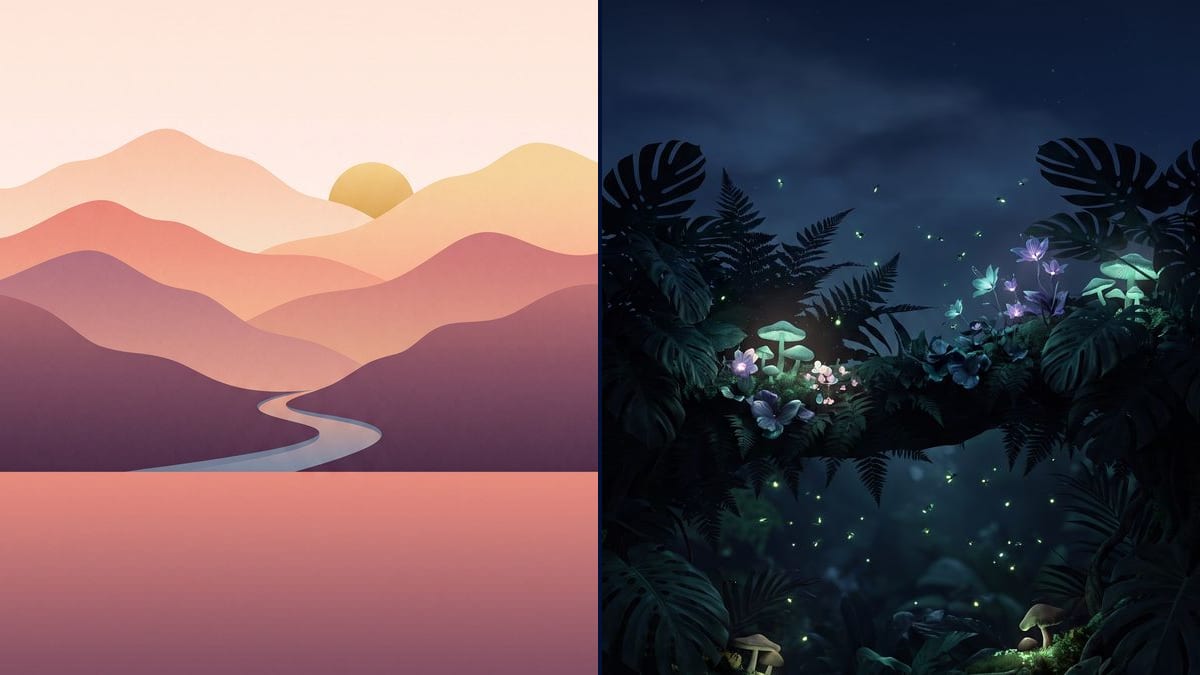
A wallpaper for each season
An autumn wallpaper in October, a snowy one in December, a flowery one in spring: the same composition sentence, a new subject each season.
Two made-to-measure vertical wallpapers, with the top left clear for the clock and the subject in the middle. Describe your idea, the workflow does the rest. Visible here, no account needed.
Real workflow: two prompts, two 9:16 wallpapers, flat-colour mountains at sunrise and a glowing night jungle, the top third clear for the clock.
At a glance
A wallpaper found online always has a flaw: the subject under the clock, a logo in a corner, a shape that crops badly. This workflow makes two made-to-measure ones from a simple description, in the shape of phone screens.
The hard part is the screen, not the picture. The clock takes the top, the icons the bottom. The prompt keeps the top third calm for the clock, puts the subject in the middle and rules out any text, numbers or drawn phone, which the model likes to add.
For a wallpaper from your own photo, see photo to painting; for a retro video game look, pixel art. Both wallpapers cost thirty-eight credits.
These are the files of the workflow above, exactly as the models produced them, unretouched. The starting point is shown when there is one.
Render
Anyone who wants a wallpaper to their taste, wallpaper creators and brands that give them to customers.
Describe the subject and palette
A landscape, a mood, colours: mountains at sunrise in plum and peach, a night jungle in teal. The style follows the description.
Keep the top clear
The composition sentence leaves the top third calm for the clock and puts the subject in the middle. Don't remove it when you change subject.
Rule out text and interface
No text, no numbers, no drawn clock: without that line, the model sometimes draws a phone or a time.
Download and set it
9:16, ready for the lock screen and home screen. Try it with your icons before choosing between the two.
The same canvas, tuned for different needs: each variation is two or three lines of prompt away.
An autumn wallpaper in October, a snowy one in December, a flowery one in spring: the same composition sentence, a new subject each season.
On an OLED screen, black pixels are switched off: a night jungle or a starry sky in dark tones lasts longer than a bright wallpaper.
Describe the colour of your phone case or watch and get a wallpaper in the same palette, for a set that looks consistent.
A wallpaper in a friend's favourite colours, with their pet or favourite landscape, sent by message for their birthday.
A series of wallpapers in one style, in several palettes, for an online shop or a community of followers.
A brand offers its customers a wallpaper in its visual world, with no intrusive logo, a small gift people keep on their screen.
A peak or a face in the top third vanishes under the clock and notifications. The subject goes in the middle, the top stays calm.
The model then sometimes draws a phone, a clock or icons. Rule out text, numbers and drawn interface.
A dense pattern everywhere makes the icons hard to read. Keep the bottom simple, with little detail behind the dock.
A square cropped to vertical loses half the picture. Stay in 9:16, the shape of screens.
9:16 covers most phones. On a taller screen the phone trims the edges slightly, which is why the subject sits in the middle.
Yes: add a Media node with your photo wired into the Image node, and describe the style you want. The model uses it as a reference.
Yes: switch the node to 16:9 and keep one side calm for the desktop icons instead of the top.
Thirty-eight credits, nineteen per wallpaper on Nano Banana Pro. A third one costs nineteen credits more.
Because it follows an imposed composition well, clear top and subject in the middle, and renders clean flat colours as well as detailed scenes.
In the demo, yes: a smooth pastel sky above the mountains, a plain night sky above the jungle. The clock reads easily.
2K in 9:16, sharp enough for a phone screen. The Enhance node can enlarge it for a tablet.
No: describe your own world. Characters and brand logos belong to their rights holders.
Make a phone wallpaper with AI
Use this workflowFree account, no card required. The workflow opens pre-filled in your canvas.
 Nano Banana Pro
 Flux 3
 GPT Image 2.5 Sunburst
 Seedream 5 Pro