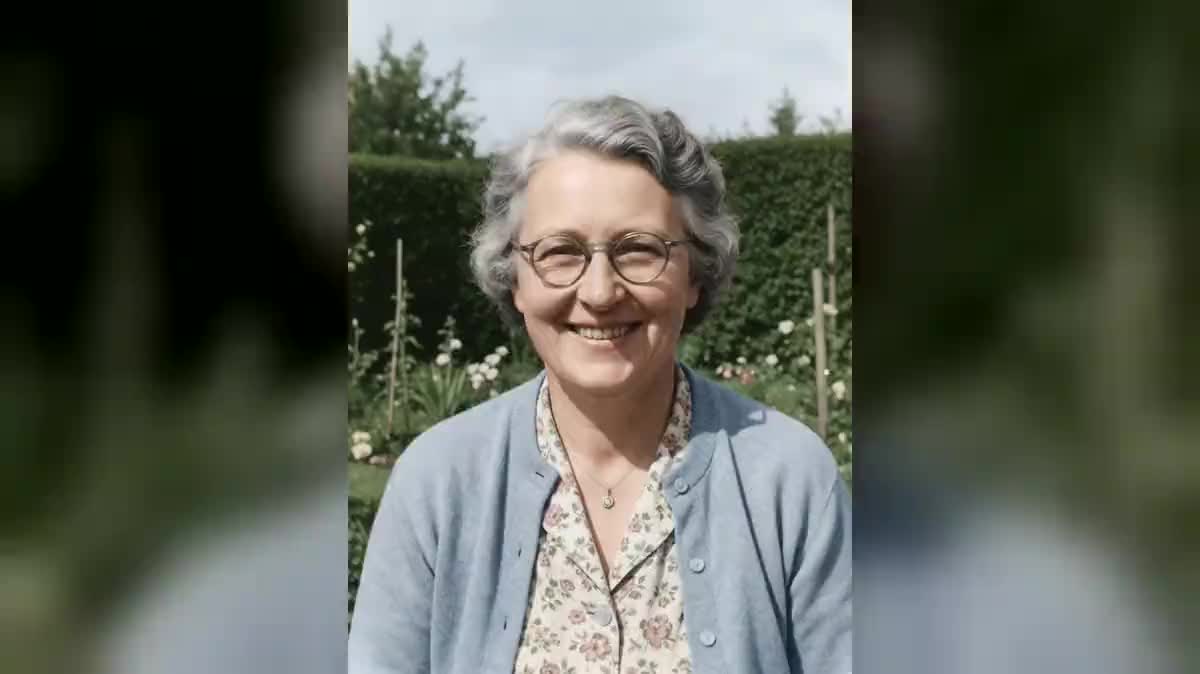
The birthday
Grandpa's or a friend's photo sings happy birthday with lyrics written for them, played during the party or sent by message that very morning.
A photo, even an old one, is restored then sings for ten seconds: voice, lyrics, music and lips in sync in a single video. The workflow is shown here, no account needed.
Real workflow: a black and white family photo from the sixties, restored and colourised, then ten seconds where the grandmother sings four lines of a ballad, a soft piano behind her.
At a glance
Making a photo sing is a social media trend and a birthday gift that brings tears: grandma on the old photo singing a gentle song, a friend on a selfie singing happy birthday. This workflow restores the photo, then makes it sing for ten seconds, voice and lips in sync.
Wan 3.0 returns everything in one go, the voice, the accompaniment and the lips on every word: no song to generate then sync. Restoration comes first, because on a scratched photo the scratches move with the face. The lyrics go in quotes, short and original.
To make a photo talk with a voice, see make a photo talk; for a full song, create a song. The restoration and the ten sung seconds cost one hundred and thirty-nine credits.
These are the files of the workflow above, exactly as the models produced them, unretouched. The starting point is shown when there is one.
Starting point
Render
Families, content creators and party organisers who want to make a portrait sing, old or recent.
A sharp front portrait with the mouth visible, and four lines of original lyrics.
Pick a front portrait
The whole face sharp, the mouth visible. An old photo works very well, a profile photo much less.
Restore the photo first
Scratches, creases and fading removed, natural colours of the era. The face, the expression and the framing stay the same.
Write short lyrics
Four lines in quotes for ten seconds. Give the style, the voice and the accompaniment: piano ballad, alto voice.
Keep the camera still
The portrait sings without the frame moving. A zoom or a tracking shot breaks the lip sync.
The same canvas, tuned for different needs: each variation is two or three lines of prompt away.
Grandpa's or a friend's photo sings happy birthday with lyrics written for them, played during the party or sent by message that very morning.
Grandma sings again, on the restored and colourised family photo. A video to share with the family first, before any publication.
Old photos that sing, one per episode, for a TikTok, Reels or Shorts series: a short format that gets reactions and is recognised instantly.
The newlyweds or new parents, on a photo, sing a short announcement: the wedding date, the baby's name, sent instead of a classic card.
An archive photo from a village or a museum sings a period song written for the exhibition, letting visitors hear the past in front of the screen.
A colleague, on their badge photo, sings a ballad written in their honour for their leaving party: a gift that makes the whole team laugh.
On a damaged photo, scratches and spots move with the face while it sings. Restore first.
Eight lines in ten seconds trip over each other and the lips fall out of sync. Four short lines are enough.
The lyrics of a known song cannot be reused without rights. Write your own.
Making a living person's photo sing is done with their consent, especially before publishing.
Yes: write the lyrics in that language, in quotes. Wan 3.0 sings in several languages; keep the lines short and simple.
Not the lyrics of a copyrighted song. Write original lyrics, or ask a Text node to write them.
Yes, up to thirty seconds on Wan 3.0, priced by duration. Beyond fifteen seconds, split into two verses.
One hundred and thirty-nine credits: nineteen for the restoration on Nano Banana Pro, one hundred and twenty for ten seconds of Wan 3.0 in 720p with sound.
Wan 3.0 returns the voice, the music and the lips together, in one step. A lip-sync first needs a song, then a second pass.
For a damaged photo, yes. For a recent sharp photo, cut the wire and connect the photo straight to the Video node.
Describe it in the prompt: warm alto, deep baritone, light voice. Wan 3.0 also accepts a reference voice as audio.
Yes, the same recipe works: the restoration cleans the photo without colourising it if it already is.
Make a photo sing with AI
Use this workflowFree account, no card required. The workflow opens pre-filled in your canvas.
 Nano Banana Pro
 Wan 3.0
 InfiniTalk
 Seedance 2.5