The micro drama for TikTok
One episode of ten to thirty seconds a day, the same hero, a cliffhanger every time: the format of vertical series that build a following.
Your character's reference sheet becomes the first episode of a vertical mini-series: two spoken shots, the same face, a cliffhanger. The workflow is shown here, no account needed.
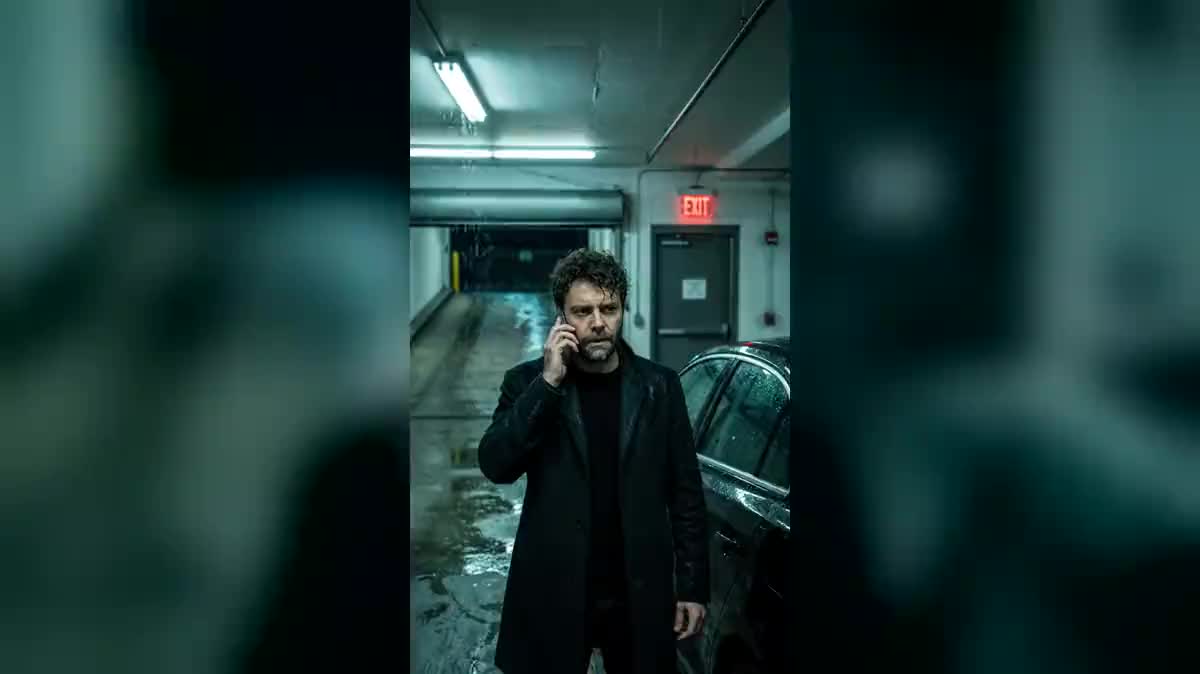
Real workflow: Frank's reference sheet, two shots of a thriller in an underground car park in the rain, each played with its line, then ten edited seconds ending on his shocked face.
At a glance
Vertical micro dramas, series in one-minute episodes made for the phone, have become a format of their own. Each episode ends on a twist that makes you want the next one. This workflow starts from a character's reference sheet and returns a first episode: two spoken shots, edited end to end.
The hard part is continuity. The same face, the same coat, the same setting from one shot to the next: the sheet goes into both images, and the second shot also receives the first. Wan 3.0 then plays each shot with its line, the rain and the tension, and the Montage assembles.
For a film in one piece, see the short film; to fix your character first, keep the same character. The two images and the two shots cost one hundred and fifty-eight credits.
These are the files of the workflow above, exactly as the models produced them, unretouched. The starting point is shown when there is one.
Starting point
Render
Vertical series creators, screenwriters, authors and brands that tell stories in episodes.
A reference sheet of the character, and for each shot a setting and a short line.
Fix the character on a sheet
Face, silhouette, outfit: the sheet goes into every image of the episode. Without it, the hero changes face in the second shot.
Write one shot per line
One short line in quotes per five-second shot. Two lines in one shot trip over each other.
Chain the shots
The second shot also receives the first as an image: same setting, same light, same coat.
End on a twist
A shocked face, a reflection, footsteps: the last shot does not answer, it asks the question of the next episode.
The same canvas, tuned for different needs: each variation is two or three lines of prompt away.
One episode of ten to thirty seconds a day, the same hero, a cliffhanger every time: the format of vertical series that build a following.
The first episode made in images before looking for a producer or a platform, to show the tone and the character.
A brand tells a story in episodes with its ambassador, one episode a week on social media, without a shoot.
An author stages the key moments of a book in vertical episodes to make people want to read what comes next.
A series of sketches with yourself as the lead, on the reference sheet made from your own selfie, one short episode a week.
A short script put into images in a few minutes to test a line of dialogue and a twist in front of an audience.
Without a sheet wired into every image, the hero changes face in the second shot, and the series loses its viewer.
Five seconds hold one short line. Beyond that, the voice rushes and the lips fall out of sync.
An episode that ends without a question does not make anyone want the next one.
Seedance refuses a real person as first frame: for a character in your likeness, use Wan 3.0.
As many as you want: duplicate an image and a Video node, wire them to the Montage. Three or four shots make a twenty-second episode.
Yes: write the line in that language in quotes. Wan 3.0 speaks several languages; keep sentences short.
Yes, with one sheet per character wired into the images where they appear, each named by their sheet.
One hundred and fifty-eight credits: nineteen per image on Nano Banana Pro, sixty per five-second shot on Wan 3.0 in 720p with sound. The Montage costs nothing.
It says the line written in quotes, word for word, with ambient sound, and accepts a real person as first frame, at half the price of Seedance. A whispered line barely moves the lips: for a clean sync, have the character speak out loud.
In the demo, yes, in both shots: the sheet is wired into both images.
Yes: wire a Music node to the Montage, low volume under the lines.
Switch the images, the videos and the Montage to 16:9: the same recipe gives a short film scene.
Create a vertical mini-series with AI
Use this workflowFree account, no card required. The workflow opens pre-filled in your canvas.
 Nano Banana Pro
 Wan 3.0
 Seedance 2.5
 Veo 3.1 Lite