Both images as a carousel
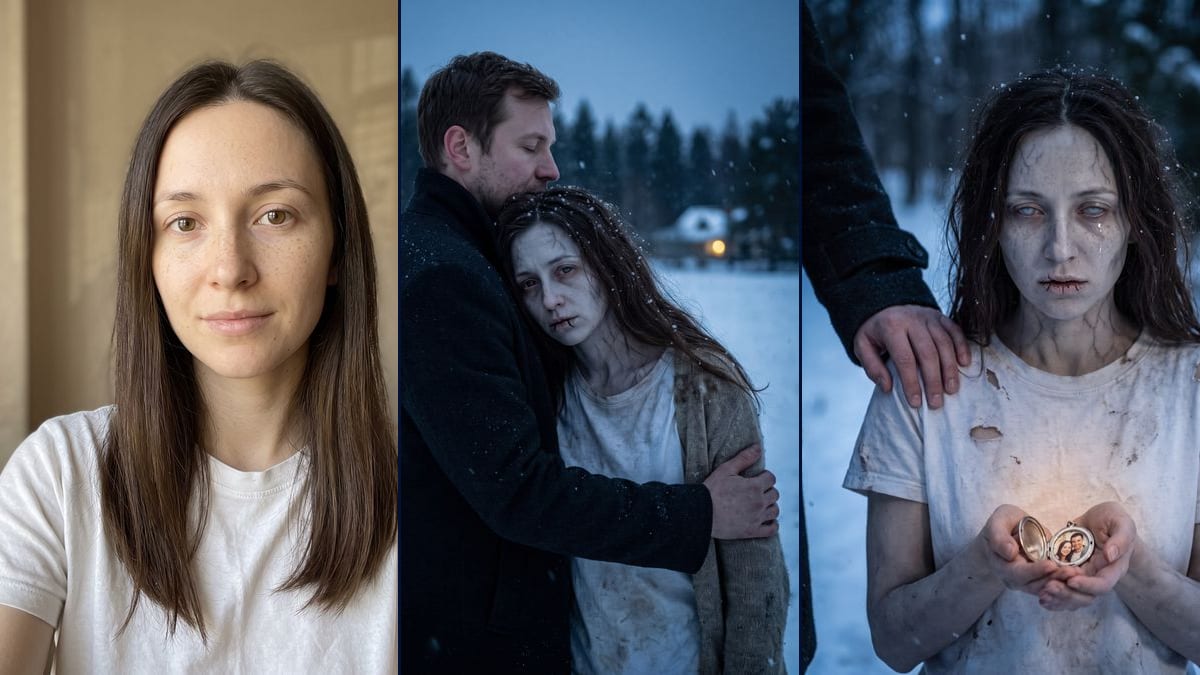
The hug first, the locket second: in that order the two images tell the story of the trend, the fear dropping away and then the memory coming back, without needing a caption.
Your photo as a zombie in the zombie hug trend: held in the snow instead of fled from, then a locket and a tear. No blood, the workflow is visible here.
Real workflow: a portrait of a woman with long dark brown hair and freckles, in a white t-shirt and no makeup, then the same woman as a zombie, grey skin and thin veins, held by a man in a black coat in a snowy field, and in a close-up with an open locket in her hands and a tear on her cheek. She is recognisable in both. The eyes don't follow the prompt: brown in the snow, completely white with the locket.
At a glance
The zombie hug is going around TikTok right now. Someone has turned into a zombie, a small detail reminds them of the person in front of them, and that person hugs them instead of running. Here, one photo goes in and two images come out. The first is the hug in a snowy field. The second is a close-up on an open locket, a tear running down and a hand resting on the shoulder.
No blood, no bites, no wounds: the prompt rules them out and sticks to grey skin, thin veins and cracked lips. The face is described feature by feature, and in the demo you recognise the woman from the portrait in both images. The model took liberties with the eyes, though: brown with red lids in the snow, completely white with the locket. It also put small dark lines on her lips that nobody asked for.
For a hug without the makeup, see the hug video. For a full costume there's the Halloween costume, and for heavier scars or damaged skin, the special effects makeup. The fallen angel plays in the same dark register. Both renders cost thirty-eight credits.
These are the files of the workflow above, exactly as the models produced them, unretouched. The starting point is shown when there is one.
Starting point
Render
People who want to do the zombie hug trend with their own photo, couples and friends preparing a post for Halloween or TikTok, content creators looking for a starting image to animate.
A sharp, well-lit front-facing photo of you or of someone who agreed, and the scene described with the person holding you, the zombie makeup and the setting.
Pick a front-facing photo
Sharp, in soft light, face clear, no sunglasses. A selfie is enough. Your photo, or one of someone who said yes.
Describe the other person the same way twice
Each image is generated on its own. If the man holding you should be the same person, copy his description word for word into both prompts: age, hair, beard, coat.
Set how much zombie you want
Grey skin, veins, cracked lips: that's enough for the effect. For the eyes, add "irises still visible, just clouded" if you don't want them fully white, which is what the locket demo got.
Compare with the photo
Put each render next to the original portrait. If the face aged too much or a detail bothers you, rerun that node on its own: nineteen more credits.
The same canvas, tuned for different needs: each variation is two or three lines of prompt away.
The hug first, the locket second: in that order the two images tell the story of the trend, the fear dropping away and then the memory coming back, without needing a caption.
Replace "the woman from the photo" with "the man from the photo" and adapt the list of features: short hair, beard or clean-shaven. The person holding him can become a woman, also described the same way in both prompts.
The trend is often about a couple, but it doesn't have to be. Write "her friend" or "her sister" instead of the man, and change the photo in the locket to two friends laughing together.
Keep the makeup and the list of features and change only the place: an empty street in the rain, an autumn beach, a wheat field at dusk. The light is described the same way, cold with a single warm source.
They recreate the effect on their own photo, then connect a Video node to the hug image to make the snow fall or the arms move. This page has no video demo, so the still image stays the starting point.
Add an Image node with the scene before: the other person sees her in the distance and stops instead of running. Reuse the same description of the makeup and the man so the three images follow on.
An actress, a singer, an athlete: no. This workflow is for turning yourself into the zombie, or someone who agreed and will see the picture.
The two nodes can't see each other. If the first prompt says "short brown hair" and the second says nothing, you get two different men. Copy the same sentence into both.
"Pale clouded eyes" gave brown eyes in one image and fully white ones in the other. If you want to keep your look, write that the irises stay visible and the same colour as in the photo.
The trend works because the zombie stays touching. With wounds and blood it turns into a horror film and the image no longer tells the same story. Keep the "no blood" from the prompt.
In the demo, yes: freckles, long dark brown hair, face shape. In the snow, the face looks a little thinner and older than in the photo, and the grey skin makes that stronger.
No. The prompt rules out blood, open wounds and bites. The locket render still has completely white eyes and dark lines on the lips that look like stitches, so it's the more unsettling of the two.
Not necessarily. The two images are generated separately, and you never see the man's face in the second one. To make him look the same across images, describe him exactly the same way in both prompts.
Thirty-eight credits, nineteen per render on Nano Banana Pro in 2K. Rerunning a single image costs nineteen more.
Because it holds a face from a single photo, even under grey skin. Flux Kontext, which costs less, retouches the features, and the effect falls flat if you don't recognise yourself as the zombie.
1792 x 2400 pixels, vertical 3:4. Both renders in the demo came out on the first try, neither was redone.
The template starts from a single photo. With that person's agreement, you can connect their photo as a second reference on both nodes and write who is who. The demo doesn't show this, so check the result.
Connect a Video node to the image you keep and describe the motion, falling snow or arms closing around her. This page has no video demo, so there is no promise on the result.
The AI zombie hug trend with your own photo
Use this workflowFree account, no card required. The workflow opens pre-filled in your canvas.
 Nano Banana Pro
 Seedream 5 Pro
 Flux Kontext