The funding application
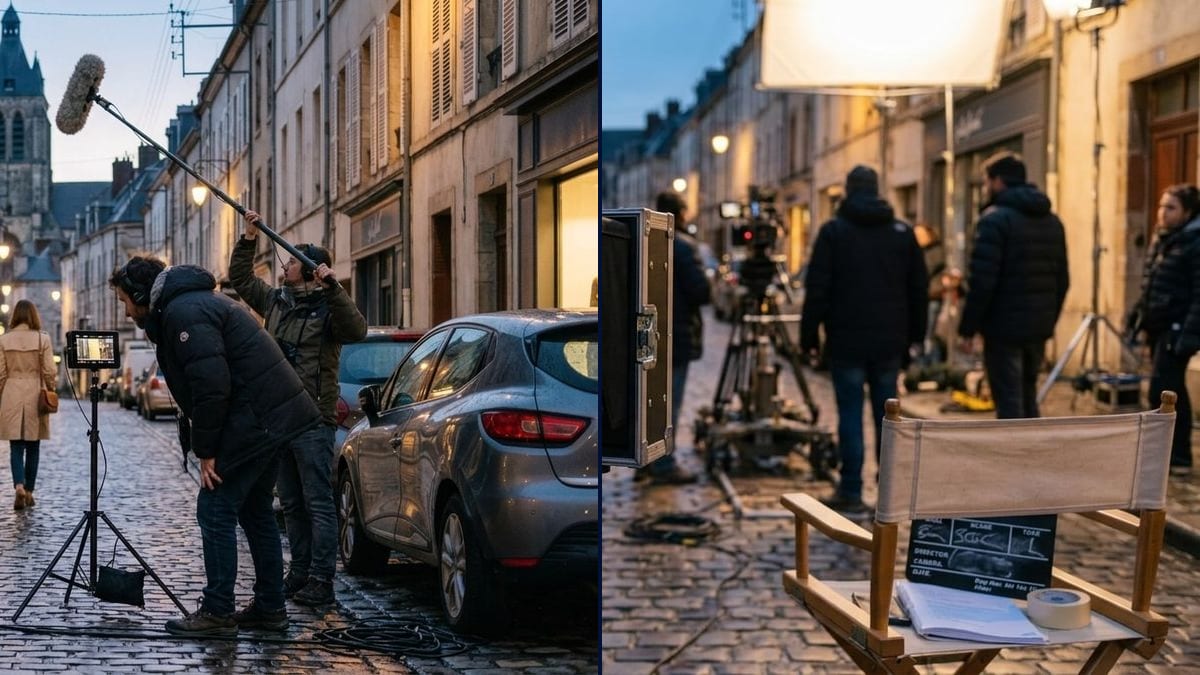
A director is applying for a regional film grant before the shoot. From her reference still, she shows the small crew she plans for the street scene, captioned clearly as a projection.
A still from your film becomes two set photos: the crew shooting the scene in the same location, then the director's monitor. Workflow visible here, no account needed.
Real workflow: a still of a wet cobblestone street at dusk, a woman in a beige trench coat walking toward a church tower, then the same street with an operator on a dolly, a boom op and a light, and a monitor showing the shot next to a director's chair.
At a glance
On a short film, nobody has time to take set photos. The DP is operating, the AD is running, and when it's time to put together the funding pack or the film's page, there's nothing to show how the scene was made. This workflow takes a still from YOUR film and puts it back in context: the crew shooting the shot, then the monitor playing it back.
The hard part is keeping the shot. An image model left to itself draws a generic film set in a street that looks nothing like yours. The prompt names the location, the actress and her costume, then the gear department by department. Nano Banana 2.1 reads the still and keeps the street, the church tower and the evening light. These are generated images, and they should be presented that way.
For the film itself, see the short film workflow; to announce the screening, the premiere poster. Both photos cost fourteen credits.
These are the files of the workflow above, exactly as the models produced them, unretouched. The starting point is shown when there is one.
Starting point
Render
Short film directors and AI filmmakers putting together a funding pack, a film page or a campaign without a set photographer.
A wide 16:9 still from the film, the gear and crew size to show, and an "AI-generated image" caption ready for publication.
Pick a wide shot
A 16:9 frame where the location reads: the street, the facade, the room. A close-up forces the model to invent everything around it.
Describe your real crew
Three people and a handheld camera, or a full crew on a dolly track: describe the shoot you're actually doing, not a studio feature.
Ban text and logos
Without that line, the model writes a brand on the camera or numbers on the slate. Keep "no text, no logos" in the prompt.
Caption it before posting
"AI-generated image" or "imagined behind the scenes" under the photo, in the pack and on social media. That's what lets you use it without misleading anyone.
The same canvas, tuned for different needs: each variation is two or three lines of prompt away.
A director is applying for a regional film grant before the shoot. From her reference still, she shows the small crew she plans for the street scene, captioned clearly as a projection.
A director is looking for a volunteer boom op and gaffer. The imagined set photo in the real location, posted with the call-out, shows the scale of the project better than a paragraph does.
A creator made his film entirely with generation. He posts an imagined behind-the-scenes shot, labelled as such, to show what a real shoot of the same shot would have needed in crew and gear.
A teacher takes a frame and shows students where camera, boom and light go to get that shot. The set view works as a realistic diagram, easier to read than a floor plan.
A short film's site has an empty behind-the-scenes section. The director puts the monitor view there, captioned "AI-generated image", until the crew's real phone photos come in.
A collective is raising money to shoot. The imagined set photo, in the scouted location, shows backers what their money pays for: the dolly, the lighting, the crew.
A generated photo in a press kit with no caption is a fake set photo. If a journalist runs it and it comes out, the film pays for it. Always caption it.
Twenty technicians and a crane for a short shot by five people looks wrong to anyone in the trade. Describe the crew and the gear you actually have.
With no location in frame, the model invents the whole street and the link to the film is gone. Use a wide or establishing shot from the scene.
Asking for your DP's face or a known actor makes a fake photo of a real person. Crew faces stay invented; for the real crew, use real photos.
In the demo, yes: the same wet cobblestones, the same church tower at the end, the same shutters and the same grey car on the right. The crew and gear are added around them.
Yes: Steadicam, handheld, drone, two people or fifteen. Replace the foreground list in the prompt, one item per department.
No. In the demo, the slate carries made-up letters and the monitor a few blurry marks. For a published image, blur the slate or ask for "a blank clapperboard".
Fourteen credits, seven per render on Nano Banana 2.1. A third view of the same shot, looking down from a window for instance, costs seven more.
Because it reads the still you give it and keeps the location: in the demo, the street, the church tower and the dusk light come from the shot. It also gives the grain of a documentary photo rather than a smoothed look.
Yes, as an illustration captioned "AI-generated image", never as a photo from the shoot. See the rules on using AI images.
The prompt asked for one; the model drew a barn-door fixture, which shows up more often in its film set images. If the detail matters, run it again with "a large square white softbox".
The format of your still, here 16:9, around 1376 x 768 pixels. Enough for a funding pack or a web page, not for a large print.
Make behind-the-scenes photos of your film with AI
Use this workflowFree account, no card required. The workflow opens pre-filled in your canvas.
 Nano Banana 2.1
 Flux Kontext
 GPT Image 2.5 Sunburst