The novelist publishing on KDP
She paid an illustrator for the front and has no budget left for the back. She uploads the cover, pastes her hook, and drops the matching back into the KDP paperback cover template.
Two back covers made from your front cover, one in the same scene and one stripped back, with your blurb written letter for letter. Workflow visible here, no account needed.
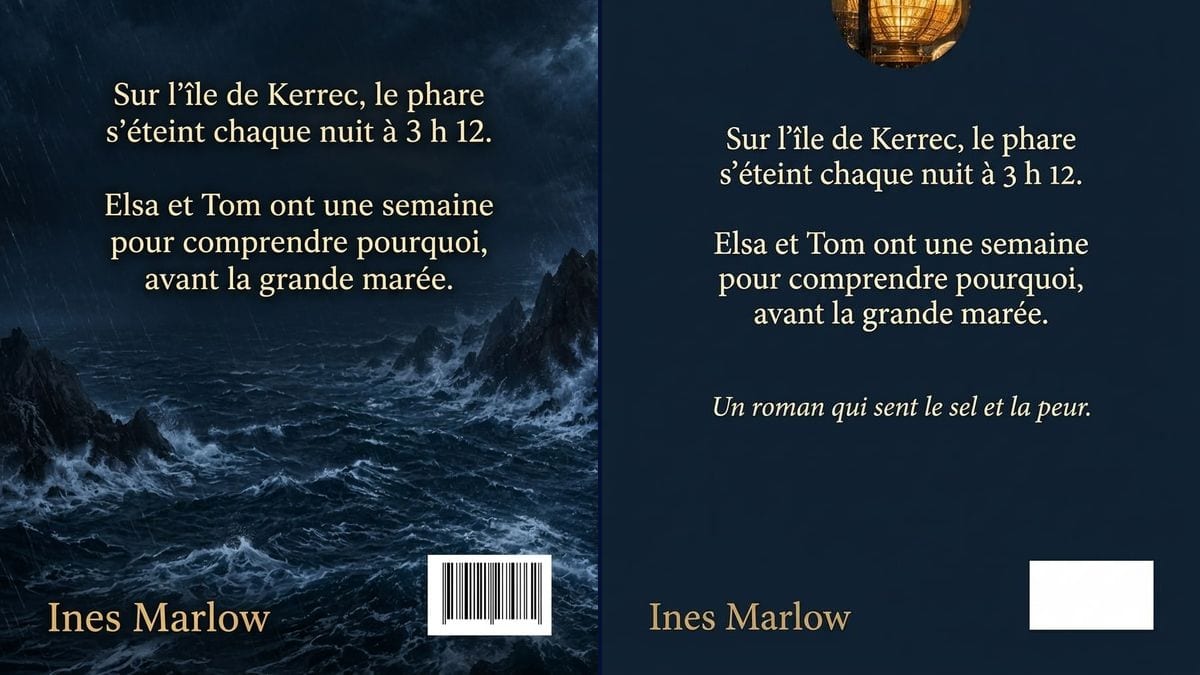
Real workflow: the cover of the made-up novel "North of Silence", then two back covers, one over the stormy sea and rocks, one on plain navy with the lighthouse lantern in a round inset, cream blurb and gold author name.
At a glance
Self-published authors often spend weeks on the front cover and do the back the night before uploading to KDP: a flat colour, the blurb in a default font, and a book whose back no longer looks like its front. This workflow starts from YOUR cover and gives you two back covers, one that carries on the artwork and one that's more restrained, with your blurb on both.
The hard part is continuity and text. The back has to pick up the colours and type of the front, and the blurb has to come out clean, accents and apostrophes included. The prompt quotes every sentence and keeps the barcode corner empty. Nano Banana 2.1 reads the cover you give it and spells accurately.
The front itself is made with the book cover tool, and a photo of the finished book with the book mockup. Both back covers cost fourteen credits.
These are the files of the workflow above, exactly as the models produced them, unretouched. The starting point is shown when there is one.
Starting point
Render
Novelists and self-published authors on KDP or print on demand, small presses, authors preparing a crowdfunding campaign.
The final front cover, two or three hook sentences in quotes, an optional quote and the author name.
Upload the cover
The final front cover file, title included. That's where the back gets its palette, light and type.
Write a short blurb
Two or three hook sentences, each in quotes. A ten-line block of copy comes out harder to read and is better set in your layout software.
Add a quote
A line from a reader, a fellow author or the book itself, in italics. Never quote a review or a paper that doesn't exist.
Build the full wrap
Upscale the render with the Enhance node, then place it in the KDP cover template or your printer's, with the spine and bleed.
The same canvas, tuned for different needs: each variation is two or three lines of prompt away.
She paid an illustrator for the front and has no budget left for the back. She uploads the cover, pastes her hook, and drops the matching back into the KDP paperback cover template.
Every book in the series shares one look. The plain version, solid background and a small inset from the front, carries from one title to the next by changing only the blurb and the quote.
The publisher shows the editorial team two possible backs for the next title before briefing the designer. The discussion is about a picture of the book, not a description of one.
The author wants a line from each story. The plain version leaves room for three short italic lines under the hook, as long as every one of them is given in quotes.
To pitch the book to backers, the author shows front and back side by side. Visitors see a finished object with a readable blurb before a single copy is printed.
At the end of the course, each writer drafts the hook for their project. The tutor generates a back cover on the front each person made, and the group judges whether it makes them want to open the book.
Ten lines of synopsis on the image and the model shrinks the type or slips a letter. Keep the hook on the image and set a longer blurb as live text in your layout software.
"A masterpiece", credited to a paper that never read the book, is misleading and readers notice. Quote a real line: yours, or a reader's who gave you permission.
Text or a rock in the bottom right corner and the barcode lands on top of it. Keep the white rectangle in the prompt, and erase fake bars if the model draws them.
The render is 3:4 at screen resolution. A printer wants your trim size at 300 dpi, with spine and bleed. Upscale, crop, then assemble.
In the demo, yes: both sentences and the author name are exact on both versions, apostrophes and accents included. Still read yours word by word.
No. The render keeps a white rectangle; on the matching version it has meaningless bars drawn in it, to erase. The real barcode comes from your ISBN, and KDP can place it for you.
Yes: essays, how-to books, poetry. Change the quoted text, and for a how-to book, ask for a short list of what the reader will learn.
Fourteen credits, seven per render on Nano Banana 2.1. A third version, with another blurb or quote, costs seven more.
Because it reads the cover you supply and keeps its palette, light and feel of the type, and it spells accurately. In the demo there isn't a single mistake in the blurb on either version.
No. It comes out at 3:4, 896 x 1200 pixels, while a 6 x 9 inch book is narrower. Use it as a mockup: upscale it, crop it, then place it in the cover template KDP generates from your page count.
Not in this workflow, which starts from the cover alone. Add your portrait later in the layout, or make one first with the professional headshot tool.
Yes, for your own book. Check your platform's terms on generated images and read the rules on commercial use.
Design your book's back cover with AI
Use this workflowFree account, no card required. The workflow opens pre-filled in your canvas.
 Nano Banana 2.1
 Flux Kontext
 GPT Image 2.5 Sunburst