A chapter or a synopsis in PDF dropped on the canvas: one Text node writes the voice-over, four others each write one shot, the shots are drawn then animated in seven seconds, a voice reads them, a music bed carries them, and the montage cuts thirty seconds of trailer together. The demo starts from an original chapter. The whole workflow is visible without an account.
The real workflow: the first chapter of a novel in PDF in a Media node, Claude Sonnet 5 for the voice-over and the four shots, Nano Banana Pro for the first frames, Wan 3.0 for the four seven-second videos, ElevenLabs v3 for the voice, ElevenLabs Music for the bed, a Montage node. The texts shown are the models' answers, untouched.
At a glance
You provide
1 PDF · a text or a brief
What the workflow produces
4 images in 16:9 · 4 videos of 28s in 720p, 16:9 · 1 audio track, 30 s in total · 1 voice-over
Canvas structure
19 nodes wired by 25 connections
Models wired in
Claude Sonnet 5.5, ElevenLabs v3, ElevenLabs Music, Nano Banana Pro, Wan 3.0
Cost of one full run
about 436 credits, roughly $5.23
Account
The demo is visible without an account; generating requires a free account, trial credits included
A book trailer fits in thirty seconds: a place, a character, a threat, a title. The PDF of your chapter or synopsis goes into a Media node, and five Text nodes read it through their "Image or PDF to analyze" port. The first writes the voice-over in four sentences, the last one on the title. The other four each write a seven-second shot, with the same style block on top: that is what gives the trailer one light and one texture.
Each shot becomes a first frame on Nano Banana Pro, then a seven-second video on Wan 3.0, silent: the voice and the music arrive through the montage. The Voice-over node reads the four sentences with ElevenLabs v3, the Music node composes a thirty-second bed from a wired brief. The Montage chains the four shots, places the voice half a second after the start and the music at low volume.
The demo starts from "North of Silence", the first chapter of an original novel written for the example: a lighthouse keeper, an official sent to switch off the lamp, a storm. Replace the PDF with yours, put your title in the voice-over instruction, and the rest follows. One more shot is one more row of nodes. The whole thing costs about 350 credits, the videos being two thirds of it.
Actual renders from the demo
These are the files of the workflow above, exactly as the models produced them, unretouched. The starting point is shown when there is one.
Render
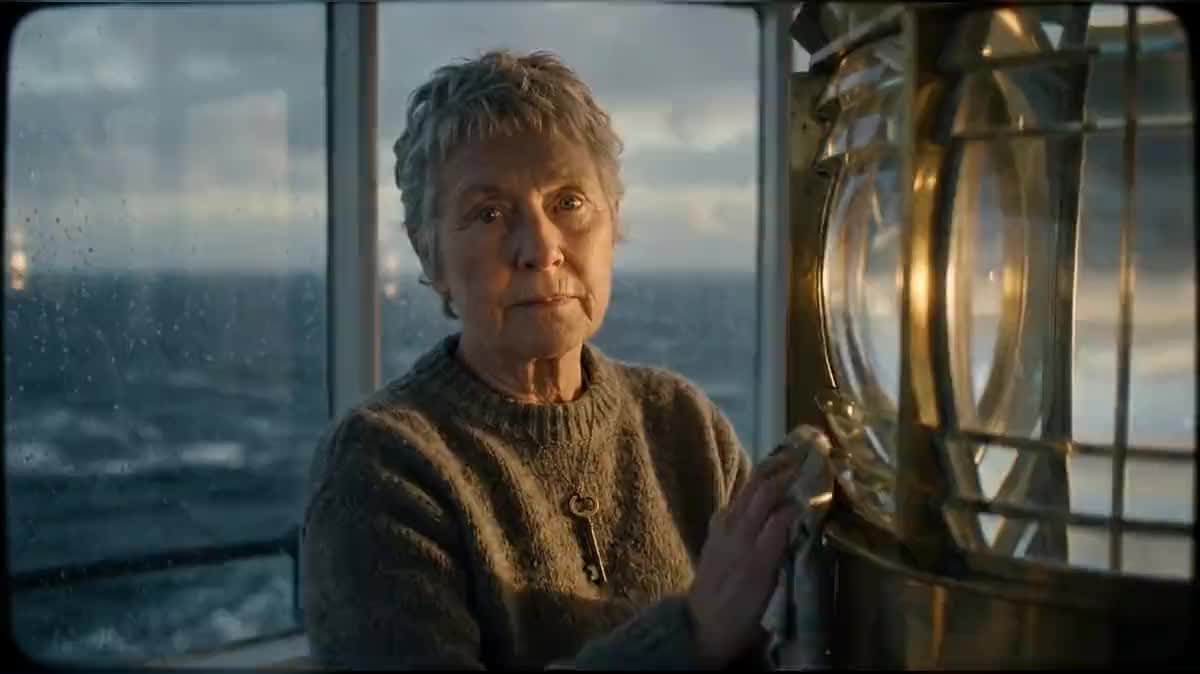
The four-sentence voice-over, read by ElevenLabs v3 from the wired textGenerated with ElevenLabs v3The thirty-second bed composed by ElevenLabs Music from the wired briefGenerated with ElevenLabs MusicFirst frame of shot 1: the lighthouse on its black rock at duskGenerated with Nano Banana ProFirst frame of shot 2: the keeper polishing the lensGenerated with Nano Banana ProFirst frame of shot 3: the stranger landing at the jetty in the sprayGenerated with Nano Banana ProFirst frame of shot 4: the lamp lit by hand during the stormGenerated with Nano Banana ProShot 1 animated by Wan 3.0 from its first frame, seven secondsGenerated with Wan 3.0Shot 2: the keeper and the lens, seven secondsGenerated with Wan 3.0Shot 3: the arrival at the jetty, seven secondsGenerated with Wan 3.0Shot 4: the storm and the lamp, seven secondsGenerated with Wan 3.0The edited trailer: four shots, the voice-over and the bed, thirty seconds
Who it is for
Authors and publishers who want a thirty-second video for a book launch, without a shoot.
Which files to provide
A chapter or a synopsis in text PDF, two pages are enough: the models read the whole document and take the place, the character and the stakes from it.
How it works
1
Drop the chapter or synopsis PDF
A Media node receives it. One chapter is enough for a trailer, so is a one-page synopsis: the models read the whole document and take the place, the character and the stakes from it.
2
Let the Text nodes write the voice-over and the shots
Five nodes read the PDF. The first writes four voice-over sentences; the other four each write one shot with the shared style, the set or the character, the light, one camera movement. Change the title and the shot cues in the instructions for your book.
3
Generate the first frames, then the videos
Each shot has its Image node, then its Video node set to seven seconds, silent. Look at the four images before animating: that is where a set or a character gets fixed for two credits, not afterwards.
4
Read the voice and compose the bed
The Voice-over node receives the text by cable and reads it with the voice picked from the list. The Music node composes thirty seconds from the wired brief, instrumental by default. Both arrive in the Montage on their own track.
5
Cut and export
The four shots follow each other in cable order, the voice starts half a second in, the music stays low and fades out. The montage renders in the browser, no credits, and exports as mp4 for social networks and the book's page.
Variations and use cases
The same canvas, tuned for different needs: each variation is two or three lines of prompt away.
The trailer of a novel
This is the demo: four shots, a four-sentence voice-over, a bed. Replace the PDF with your first chapter, put your title in the voice-over instruction, and keep the shot cues (place, character, stranger, storm) or rewrite them for your story.
The teaser of an essay or a practical book
No character: ask the four shot nodes for situation images (the problem, the gesture, the result, the book on a table) and the voice-over for three sharp questions then the title. The same graph makes a non-fiction teaser.
The vertical version for social networks
Switch the four Image and Video nodes to 9:16 and the Montage to 9:16: the same shots reframe for stories and shorts. Generate the images first, a wide-framed set does not always work vertically.
One more shot, or one less
One row of nodes per shot: duplicate the last one for a fifth shot, delete one for a twenty-second teaser. The Montage follows the cables, the voice-over still has to be written for the final number of shots.
The trailer with the real characters
Generate the character sheets from the manuscript first, then wire them to the image port of the shot Image nodes: faces hold from one shot to the next, as in the film template.
Common mistakes
Shots that do not match
The four instructions must repeat the same style block on top: film stock, palette, grain. A shot without that block goes into another light and the trailer looks cut from four films.
A voice-over that is too long
Four seven-second shots make twenty-eight seconds; a voice-over of more than fifty-five words runs over and the Montage cuts it. Ask for forty to fifty-five words, one sentence per shot.
Sound in the shots and in the montage
The Video nodes are set to silent: the voice and the music come from the Montage tracks. Turning the shots' audio back on stacks ambiences and covers the voice. If you want the sound of the place, lower the bed.
About 350 credits for the demo: four seven-second videos in 720p on Wan 3.0 (about 60 credits each), four first frames (around ten each), the thirty-second bed (about fifty), the voice-over and the PDF reading (a few credits). The price is shown on every node before you click.
Can I use excerpts of the text instead of a voice-over?
Yes: replace the Voice-over node's instruction with "copy three sentences from the chapter that make you want to read on". The voice reads whatever is wired to it. For text cards on screen, add Image nodes on GPT Image 2.5 Flare, which writes a short title inside the image.
In which language is the voice-over?
In the language asked by the Text node's instruction, English in the demo. ElevenLabs v3 reads fourteen languages: write the instruction in yours and pick a voice that speaks it well.
Do I need a whole chapter or a synopsis?
Both work. A chapter gives precise images and sentences to quote; a synopsis gives the whole arc, useful for a teaser that tells the stakes. A two-page PDF is enough.
Can I pick another voice?
Yes, in the Voice-over node's list: about twenty ElevenLabs v3 voices, or a voice cloned from your library. The demo uses Daniel, a deep narrator.
How do I put the title on screen?
Add an Image node on GPT Image 2.5 Flare with the title as its prompt, and place it as the last clip of the Montage, three seconds, with a fade. Flare writes a short title without distorting it.
Is the music royalty free?
It is composed for you by ElevenLabs Music from the wired brief, instrumental by default: no existing track, no licence to ask for. Change the brief for another colour.
 Wan 3.0
 Claude Sonnet 5.5
 ElevenLabs v3