The author narrating her own novel
She recorded her book in a wardrobe turned vocal booth. What's missing is the square cover, and the version with the "read by" band tells listeners straight away that it's her voice.
Your book cover recomposed as a square audiobook cover, title readable as a thumbnail, with or without a "read by" band. Workflow visible here, no account needed.
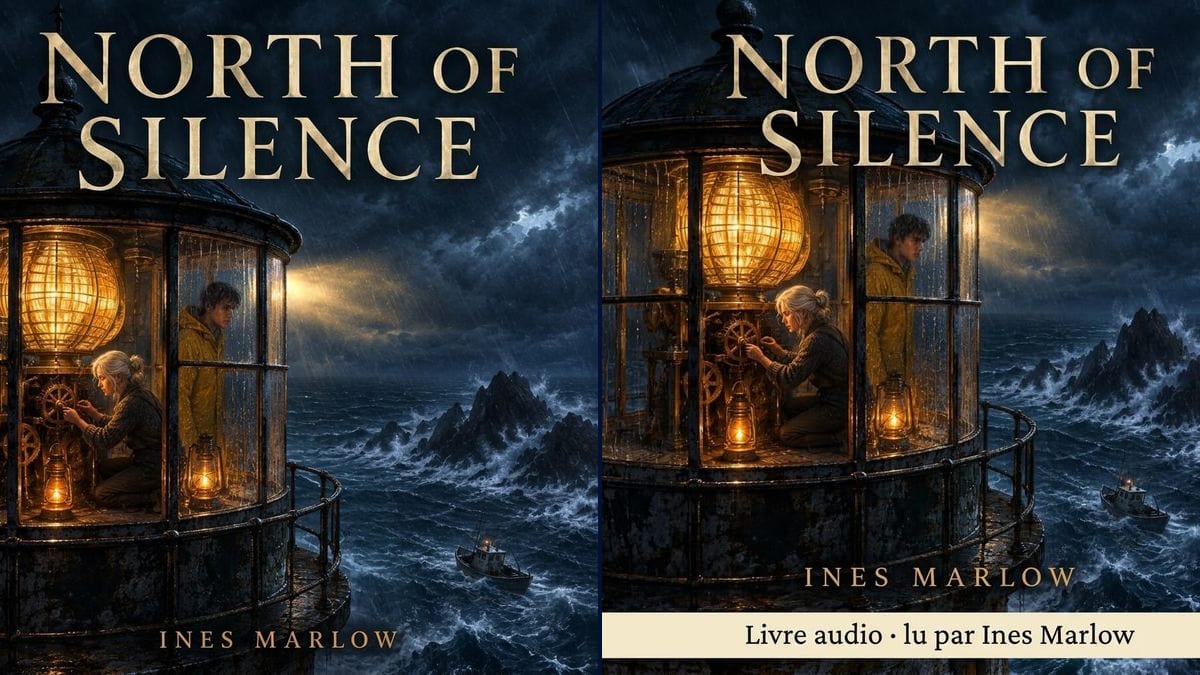
Real workflow: the portrait cover of the made-up novel "North of Silence", then the same scene recomposed as a square with the gold title at the top, and a version with a cream band reading "Livre audio · lu par Ines Marlow".
At a glance
The audiobook is recorded and the distributor wants a square cover. Cropping the print cover to a square loses the top of the title or a character, and new artwork means a second commission from the illustrator. This workflow starts from YOUR cover and recomposes it as a square, keeping the scene, the type and the light.
The hard part is filling the square without betraying the image. A model left alone invents another scene or shrinks the title to a line nobody can read as a thumbnail. The prompt asks for the sky and sea to be extended, keeps the key elements and quotes the title and author. Nano Banana 2.1 works from the cover you supply.
To record the book itself, see the audiobook tool; to announce it on video, the book trailer. Both covers cost fourteen credits.
These are the files of the workflow above, exactly as the models produced them, unretouched. The starting point is shown when there is one.
Starting point
Render
Self-published authors releasing an audiobook, narrators, small publishers, authors serialising fiction as a podcast.
The front of the print cover, the title and author name in quotes, and the band line if you want one.
Upload the print cover
The final front, title included, in good resolution. That's what the model extends into a square.
Say what must stay
The elements nobody crops: here the lantern, the characters, the sea. Add yours, a face or a key object.
Add a band if you want one
"Audiobook", the narrator's name, "unabridged": one line only, in quotes, and check that your platform allows it.
Test it as a thumbnail
Shrink the image to icon size on your phone. If the title stops being readable, ask for it bigger.
The same canvas, tuned for different needs: each variation is two or three lines of prompt away.
She recorded her book in a wardrobe turned vocal booth. What's missing is the square cover, and the version with the "read by" band tells listeners straight away that it's her voice.
The author hired an actor to read. The band carries the narrator's name, which matters to listeners who follow a favourite voice from one book to the next and search for it by name.
Every print volume has its own portrait cover. The same prompt squares them all with the title in the same place, so the series is recognisable in the app library.
An author releases his novel as episodes. The square cover without a band becomes the podcast artwork, and the title stays readable in the tiny app icon.
The print book came out two years ago and the illustrator isn't available. Recomposing keeps their artwork rather than commissioning a new illustration.
A children's author records her picture books. The square keeps the main character whole, and the cream band shows who reads, for parents choosing a story.
A square cut out of a 2:3 cover loses a third of the image, often the top of the title. Ask for the scene to be extended instead of cut.
The cover is mostly seen as a thumbnail in an app. A thin one-line title disappears: keep it large, at the top, on two lines if needed.
Audiobook, unabridged, narrator, price, runtime: the square turns into a sticker. One band line, or none.
The render is 1024 pixels square. Most audiobook distributors ask for more, often around 2400 or 3000 pixels: check and upscale before you upload.
In the demo, yes: "NORTH OF SILENCE", "INES MARLOW" and the French band "Livre audio · lu par Ines Marlow" are exact, middle dot included.
No: the model widened the sky and sea around the lantern instead of stretching the image. Both characters and the boat keep their proportions.
Yes: ask for the background, colour or texture to be extended, and for the title to be reset on two lines for the square.
Fourteen credits, seven per render on Nano Banana 2.1. A third version, with another narrator's name for instance, costs seven more.
Because it reads the cover you supply and recomposes it as a square while keeping the style, the type and the characters, and it spells the title and band accurately. In the demo nothing was invented or cut.
The render comes out at 1:1, 1024 x 1024 pixels. Distributors usually want a much larger square: run the image through the Enhance node, then check the exact size in their guidelines.
No, and some platforms restrict what you can print on the cover. The narrator is listed on the audiobook's page either way.
Check your contract: it sometimes covers the print edition only. A recomposition is still an adaptation of their work, so it's worth asking them.
Make a square audiobook cover from your book cover with AI
Use this workflowFree account, no card required. The workflow opens pre-filled in your canvas.
 Nano Banana 2.1
 Flux Kontext
 GPT Image 2.5 Sunburst