The launch post on Instagram
A self-published author is planning her release-day post. The paperback by the cup of tea gets more attention than the flat cover, and she reuses it as a story on the day.
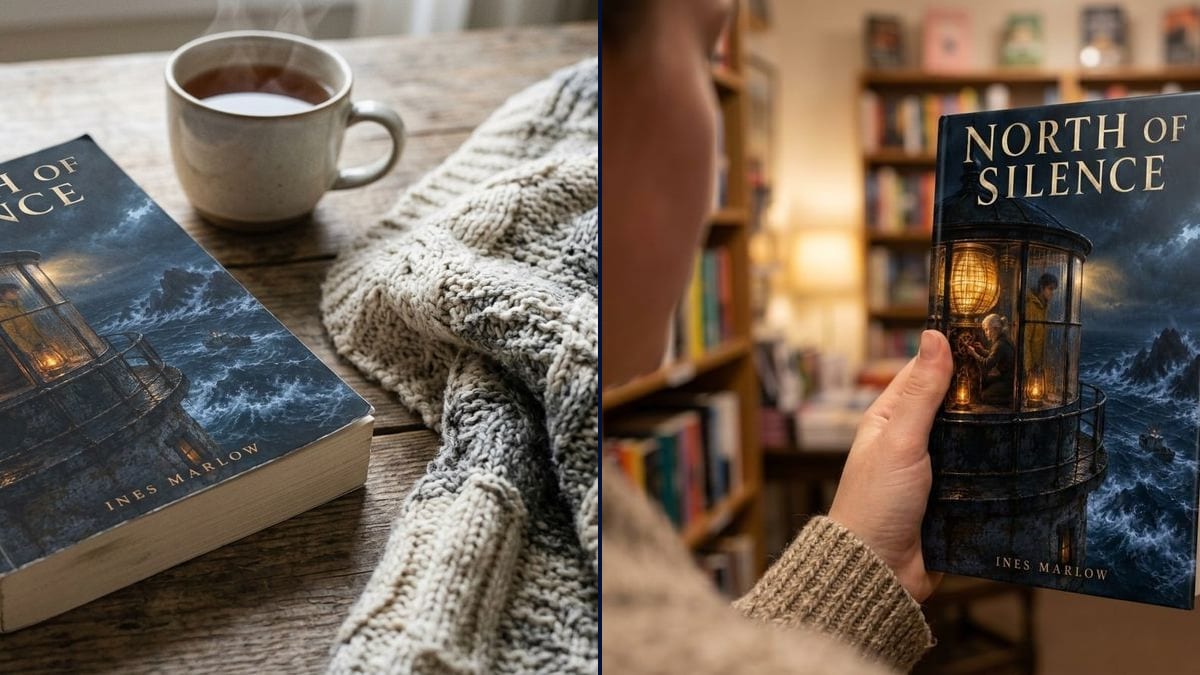
Your cover as a photo of a real book: a paperback on a table by a cup of tea, and a hardcover held in a bookshop. Workflow visible here, no account needed.
Real workflow: the cover of the made-up novel "North of Silence", then the paperback lying at an angle on a wooden table with a cup of tea and a blanket, and the same book as a hardcover held up in front of blurred shelves.
At a glance
A flat cover doesn't sell a launch: it looks like a file, not a book. Free mockups mean Photoshop and smart objects, and every book in them sits on the same marble desk. This workflow starts from YOUR cover and hands you two photos: a paperback on a table, and a hardcover held in a bookshop.
The hard part is staying faithful. An image model left to itself redraws the artwork or rewrites the title, and the book in the photo isn't yours any more. The prompt demands the same illustration and quotes the title and author. Nano Banana 2.1 takes the cover you supply and sets it in perspective, with real thickness and a spine.
For the back of the book, see the back cover tool; for a bookshop event, the book signing poster. Both photos cost fourteen credits.
These are the files of the workflow above, exactly as the models produced them, unretouched. The starting point is shown when there is one.
Starting point
Render
Self-published authors announcing a release, novelists opening preorders, small presses preparing title sheets.
The front cover alone, the title and author name copied in quotes, and the scene you want.
Upload the front
The final cover, with no bleed or crop marks. A JPEG or PNG at least 1000 pixels wide is enough.
Copy title and author
Letter for letter, in quotes, in the prompt. That's what stops the model rewriting the title its own way.
Pick the scene
Table, bed, beach, shelf, hand: choose a setting your readers recognise. A thriller sits better on a dark desk than on a floral tablecloth.
Check the cover
Compare the photo with your file: title, name, artwork details, spine text. Run it again if anything moved.
The same canvas, tuned for different needs: each variation is two or three lines of prompt away.
A self-published author is planning her release-day post. The paperback by the cup of tea gets more attention than the flat cover, and she reuses it as a story on the day.
The author opens preorders before the author copies arrive. The mockup shows a finished object on the sales page until there are real photos of the printed book.
The main image on the product page stays the flat cover. The mockups go into the A+ modules and the ads, where a book photographed in a setting stands out more.
A novelist announces book two to his subscribers. The hardcover held up in a bookshop sits next to the preorder link and gives readers a feel for the object.
A small press sends booksellers the sheet for an upcoming title. The mockup on the table makes the new release feel real next to the blurb and the publication date.
The author can't decide between two covers and polls her readers. Two photos of a real book, same setting and angle, make for a fairer vote than two flat files.
Back, spine and front in one file, with bleed: the model no longer knows which part goes on the front. Upload the front alone, cropped to trim size.
Without the title in quotes, the model may rewrite it, change a letter or the font. Quote title and author exactly as they appear on the cover.
If the book only exists in paperback, a hardcover photo misleads readers. Stick to the formats you actually sell, paperback, hardcover or both.
A mockup that changes one detail of the artwork slips by at first and shows next to the real book. Put the photo and your file side by side before posting.
In the demo, yes for everything that matters: the lighthouse, both characters, the boat, the title and the name are faithful. Small details soften a little with perspective, as they would in a real photo.
On the demo paperback, it wrote the title there unprompted. If your real spine is different, give its text in quotes in the prompt.
Yes: ask for "an e-reader held in one hand showing the cover" or "a phone with the square cover in a listening app".
Fourteen credits, seven per render on Nano Banana 2.1. A third scene, a beach or a bedside table for instance, costs seven more.
Because it uses the cover you supply instead of inventing one, and sets it in perspective with believable thickness and a spine. In the demo, title and name are exact on both photos.
Yes, to present your own book on social media, your website or in ads. Check each platform's rules and read the rules on commercial use.
For a launch, yes. Once your copies arrive, a real photo also shows the paper and the finish, matte or gloss, which a mockup can't promise.
4:3 landscape, 1200 x 896 pixels in the demo. For a vertical story, ask for 9:16 or crop around the book.
Make a book mockup with AI
Use this workflowFree account, no card required. The workflow opens pre-filled in your canvas.
 Nano Banana 2.1
 Flux Kontext
 GPT Image 2.5 Sunburst