The first flat
Two flatmates have just signed their lease. The colourful invitation goes to their old uni group, with the floor number, so nobody rings the downstairs neighbour by mistake.
A housewarming invitation with the date, time and your new address spelled right, in a colourful or a chic version, to print or send. Workflow visible here, no account needed.
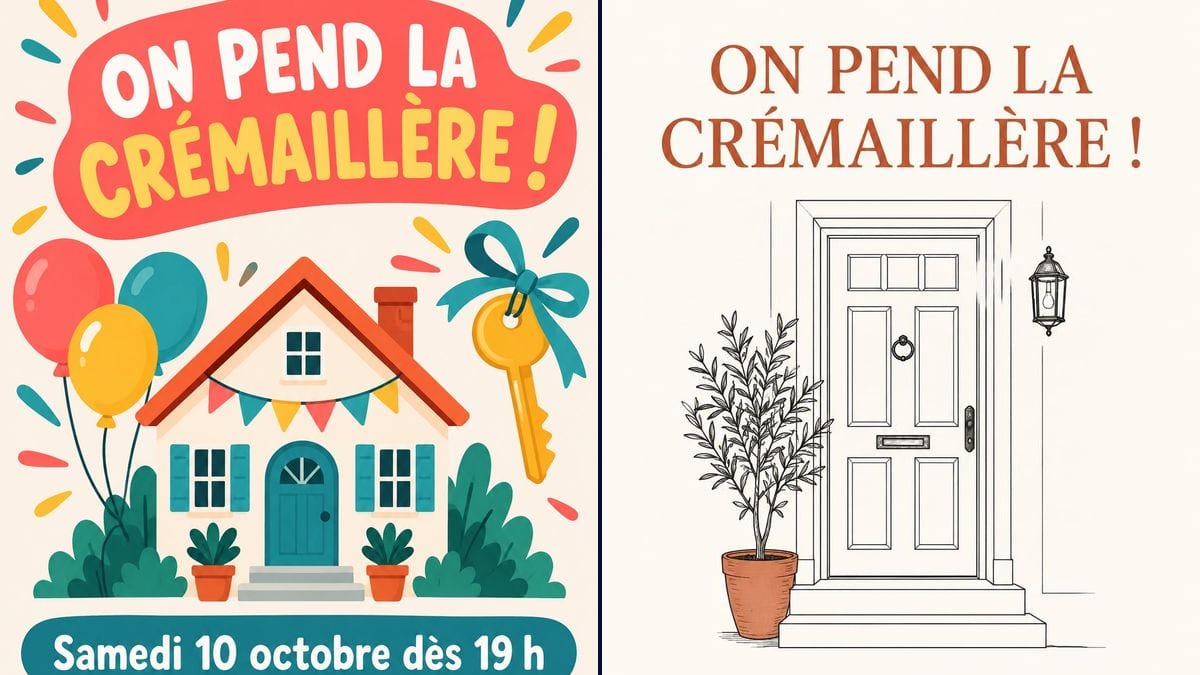
Real workflow (demo in French): a housewarming invitation for Saturday 10 October, first with an illustrated house in coral and teal, a big key and balloons, then in black and terracotta with a front door and a potted olive tree drawn in line.
At a glance
The boxes are barely unpacked and it's already time to invite friends, colleagues and, to head off complaints, the neighbours. This workflow takes the date, the time and your new address and gives you two invitations ready to send by message or drop in the building's letterboxes: one bright and playful, one quieter.
The hard part is getting the address and time right with nothing added. An image model left to itself invents a door code, an RSVP or a cheesy slogan. The prompt puts every line in quotation marks and rules out the rest. GPT Image 2.5 Sunburst spells correctly and is the cheapest model in the catalogue.
For a party that brings the whole building together, see the street party poster; for a birthday in the new flat, the birthday invitation. Both invitations cost six credits.
These are the files of the workflow above, exactly as the models produced them, unretouched. The starting point is shown when there is one.
Render
Renters and homeowners who have just moved in, flatshares, and small businesses opening new premises.
The date, time and address with the floor, a closing line, each in quotation marks, and the kind of home to draw.
Set the date and time
Day, date and arrival time on one line: "Saturday 10 October from 7 pm" reads at a glance.
Write the full address
Street, number, floor or flat number, and the town if guests come from further away. The door code goes by message instead.
Describe the setting
House, building, front door, plants, key: say what looks like your new home, or the model picks a house with a garden.
Send or print
The image goes straight to the friends' group chat, and a printed copy slips under the neighbours' doors to warn them about the noise.
The same canvas, tuned for different needs: each variation is two or three lines of prompt away.
Two flatmates have just signed their lease. The colourful invitation goes to their old uni group, with the floor number, so nobody rings the downstairs neighbour by mistake.
After months of viewings and mortgage calls, the house is theirs. The chic version, printed and posted, goes to parents and in-laws as well as friends.
A heads-up to the building that there'll be people over on Saturday night, and an invitation to drop by. A printed copy in every letterbox takes the sting out of the noise.
After a long stretch abroad, a family moves into grandma's old house. The invitation brings cousins and childhood friends together around the fresh start.
A small agency moves into new premises above a bakery. The owner swaps the title for "Come see our new office!" and invites clients, partners and the neighbours downstairs to the same drinks.
Six months in and they never threw a party. The invitation owns the delay with an extra line, and friends finally see the flat they've only seen in photos.
In a block of flats, with no floor or name for the buzzer, guests ring every bell. Add the floor or flat number and the name on the door.
In the demo, a house with a garden for a second-floor flat. Nobody gets lost over it, but it's nicer when the picture looks like your home: describe it.
Invitations get forwarded and end up on phones you don't know. The door code goes in a private message, not on the picture.
Without "No other words", the model may add "RSVP" or a slogan. That closing line keeps the invitation exactly as you wrote it.
In the demo, yes: all four lines are exact on both invitations, accents and punctuation included. Read your own version before sending it.
Yes, and it's worth it if you live upstairs: in the demo, the colourful version shows a house with a garden despite the second-floor address. Write "a small apartment building" or "a balcony" in the prompt.
Yes: change the title, put in the new office address and time, and go with the chic version for a more professional tone.
Six credits, three per render on GPT Image 2.5 Sunburst at medium quality. A third version, with another setting, costs three more.
Because it spells correctly, punctuation included, and it is the cheapest model in the catalogue. In the demo it held a long accented title in capitals over two lines.
The prompt asks for 3:4 and the render comes out at 2:3, 1024 by 1536 pixels. That's the shape of a 4 x 6 inch card, and it fills a phone screen nicely.
The usual story goes back to before central heating: guests brought firewood to a new home and helped light the first fires, warming the house. The gifts changed, the party stayed.
The model can't produce a working QR code. Send a location link with the image instead, or add the QR code afterwards in a layout tool.
Make a housewarming invitation with AI
Use this workflowFree account, no card required. The workflow opens pre-filled in your canvas.
 GPT Image 2.5 Sunburst
 Nano Banana 2.1
 Recraft V4.1