The best friend organising it
She plans the party in secret with the mum-to-be's partner. The yellow invitation goes to a group chat set up for the occasion, without the guest of honour, three weeks ahead.
A baby shower invitation with the mum-to-be's name, the date and the place, in a clouds and balloon version or with watercolour eucalyptus. Workflow visible here, no account needed.
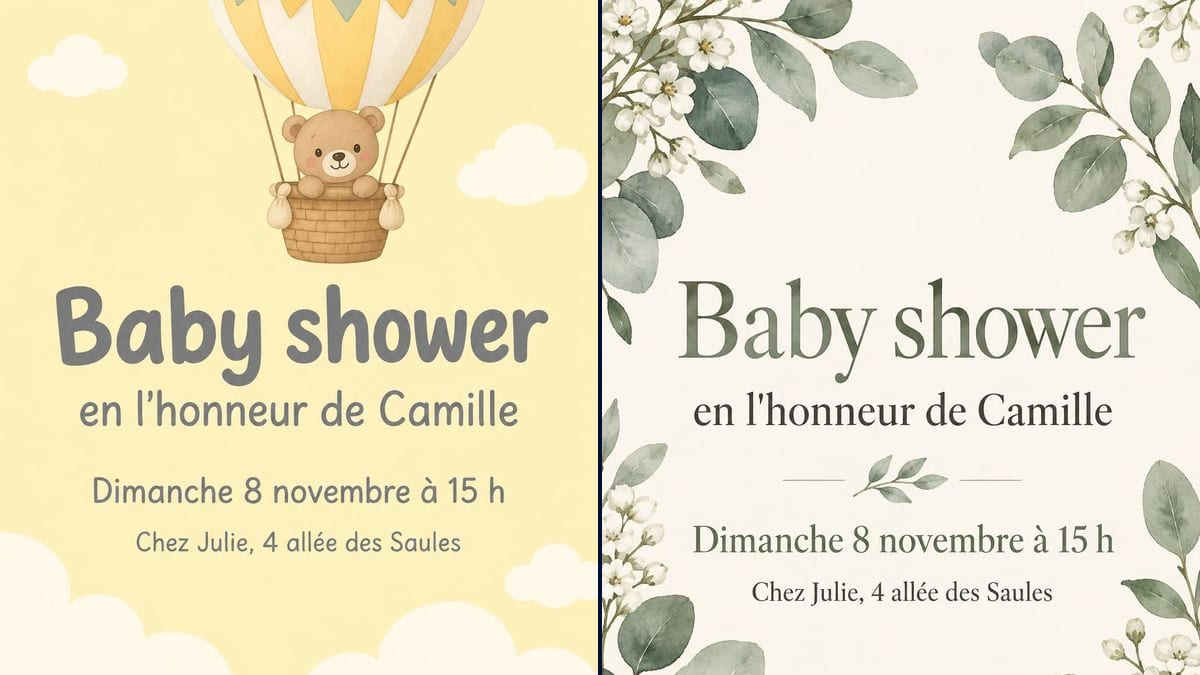
Real workflow (demo in French): a baby shower in honour of Camille on Sunday 8 November at Julie's, first on pale yellow with white clouds and a hot air balloon where a teddy bear crept in, then on cream with watercolour eucalyptus leaves and white flowers.
At a glance
It's usually the best friend or the sister who organises the baby shower, quietly, between messages to the group chat. She needs an invitation that looks good without losing an evening to a card website. This workflow takes the mum-to-be's name, the date and the address and gives you two invitations ready to send: a soft pale yellow one and a more elegant botanical one.
The hard part is exact text and nothing else. An image model left to itself adds "It's a girl!", a birth weight or a gift list, and can give away something the mum wanted to keep quiet. The prompt puts each line in quotation marks and shuts the door on the rest. GPT Image 2.5 Sunburst spells correctly on light backgrounds and is the cheapest model in the catalogue.
After the birth, follow up with the birth announcement, then the christening invitation if the family plans one. Both invitations cost six credits.
These are the files of the workflow above, exactly as the models produced them, unretouched. The starting point is shown when there is one.
Render
Friends, sisters and mums-to-be planning a baby shower, and colleagues marking the start of maternity leave.
The name of the person being celebrated, the day, time and address, each in quotation marks, and the mood you want.
Gather the details
The mum-to-be's name, day, date, time and whose place. Check with her, or with her partner if it's a surprise.
Quote every line
In order, with the size: "Baby shower" big, the address smaller. Add "No other words" at the end.
Pick the mood
Clouds and a balloon for a soft, neutral tone; eucalyptus and flowers for a smarter party. One node per style.
Send it to the group
The image goes out as it is by message. Print a few for the grandmothers who like a proper card.
The same canvas, tuned for different needs: each variation is two or three lines of prompt away.
She plans the party in secret with the mum-to-be's partner. The yellow invitation goes to a group chat set up for the occasion, without the guest of honour, three weeks ahead.
She'd rather choose the guests and the tone. The eucalyptus version, quiet and elegant, goes by message to friends and as a printed card to the aunts who love getting post.
Colleagues mark the start of maternity leave. Swap the address for "Break room, 3rd floor" and the time for the afternoon cake slot, and pin the image on the team board too.
For a couple who want to celebrate together, or for a single dad, write "in honour of Camille and Tom" or just his name. The layout stays the same, only the line changes.
The family lives in three countries. The invitation gives the time, the video call link goes in the message, and everyone opens presents together in front of the screen.
For a second child, people often throw a "sprinkle", a smaller and simpler party. Same prompt, new title, and the botanical look for an afternoon with close friends.
Without "No other words", a model loves writing "It's a girl!" or "Oh baby!". One extra line can spill a secret.
A baby shower rarely lasts all evening, and the mum-to-be tires quickly. A line like "3 to 6 pm" helps guests plan their day.
In the demo, a teddy bear appeared in the balloon. It works, but if you want a particular look, describe it and say what you don't want.
Three to four weeks ahead is about right. Later and the weekends are taken; earlier and the invitation gets lost in the chat.
In the demo, yes: all four lines are exact on both invitations, apostrophe and accents included. Check the date before you send it.
Yes, if the mum wants to: add a line in quotation marks, "It's a girl!", and switch to the colours you like. Otherwise keep neutral tones, as in the demo.
Better to send it as a link in the message with the image. The model can't write a clickable link, and an extra line crowds the card.
Six credits, three per render on GPT Image 2.5 Sunburst at medium quality. A third version, in other colours, costs three more.
Because it spells correctly on light backgrounds and it is the cheapest model in the catalogue. In the demo, grey text on pale yellow, a soft contrast, stayed easy to read.
The prompt asks for 3:4 and the render comes out at 2:3, 1024 by 1536 pixels. That's the shape of a 4 x 6 inch card, and it fills a phone screen nicely.
Yes, in another node in the same style: ask for a sheet of tags reading "For Camille" on pale yellow, in quotation marks.
Yes: change the title to "Boy or girl?" in quotation marks, use pink and blue, and keep the answer for the day itself.
Make a baby shower invitation with AI
Use this workflowFree account, no card required. The workflow opens pre-filled in your canvas.
 GPT Image 2.5 Sunburst
 Nano Banana 2.1
 Recraft V4.1