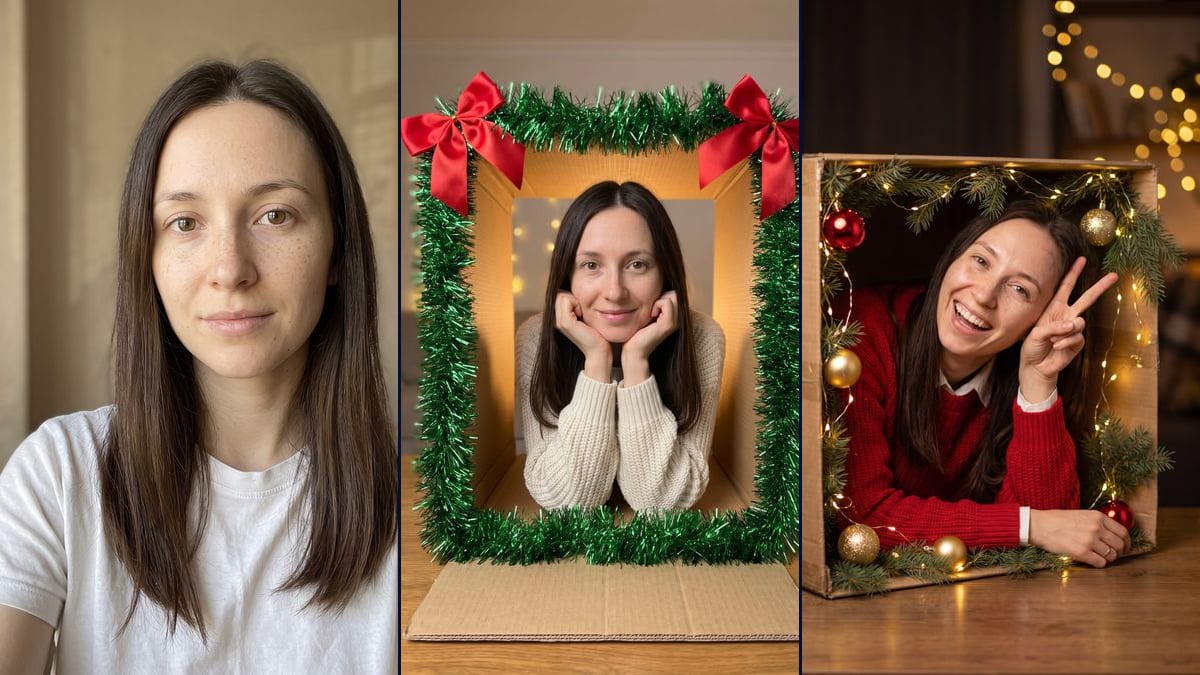
Real workflow: a portrait of a woman with long dark brown hair, in a white T-shirt against a beige wall, then the same woman with her chin in her hands inside a box edged with green tinsel and red bows, and laughing with a peace sign inside a box trimmed with pine and lights. In the first render the box stands upright and its open back shows the room. In the second, a ring nobody asked for has appeared on her hand.
At a glance
You provide
1 photo · a text or a brief
What the workflow produces
2 images in 3:4
Canvas structure
6 nodes wired by 4 connections
Models wired in
Nano Banana Pro
Cost of one full run
about 38 credits, roughly $0.46
Account
The demo is visible without an account; generating requires a free account, trial credits included
In this photo you are inside a cardboard box on a table, its open end facing the camera like a small window, the edge decorated for Christmas. The trend is called "Christmas Box Photo" and has come back every December since 2024. According to the videosi.io/christmas-box-photo-ai page, published on 25 November 2026 and read on the 26th, the first dated post it found is a family card in a box, on TikTok on 20 November 2024, and a card posted on 7 November 2026 was at about 1.8 million views. That is our only dated source, and we have not checked those numbers.
Doing it for real takes a big box, some tinsel, a clear table and someone behind the camera, as the DIY tutorials show. Here you upload a selfie and get two portrait photos back. In the first, your chin is in your hands inside a box edged with green tinsel and two red bows. In the second, you laugh and make a peace sign among pine branches, fairy lights and baubles. Both demo renders were kept on the first try, flaws included: an upright box with an open back in the first, a made-up ring and strips of tape in the second.
These are the files of the workflow above, exactly as the models produced them, unretouched. The starting point is shown when there is one.
Starting point
Your selfie
Render
The same woman smiling with her mouth closed, chin between her fists, in a chunky cream sweater, inside a box edged with thick shiny green tinsel and two red satin bows, in front of a blurred living room and a lit tree; the box stands upright with one flap unfolded flat on the table, its open back shows the room, the tinsel runs past the edges and the freckles are fainter than in the starting photoGenerated with Nano Banana ProThe same woman laughing, head tilted, in a red sweater with a white collar, a peace sign against her temple and one forearm resting, inside a box edged with pine branches, fairy lights and red and gold baubles, in a dark room with golden lights; the box is seen at a three-quarter angle, with no visible flaps and tape on its side, and her hand reaches out of the box onto the table wearing a thin gold ring that was not in the photoGenerated with Nano Banana Pro
Who it is for
People who want the Christmas box photo for a greeting card, a story or a profile picture, without building the set or asking someone to take the picture.
Which files to provide
A sharp selfie of you or of someone who agrees, front-facing and taken in daylight, plus the right person, their eyes, their hair, and the decorations and sweater you want in the prompts. The photo is optional.
How it works
1
Upload a sharp, front-facing selfie
Taken in daylight, hands away from your face. The model is going to put your hands under your chin or against your temple and change your sweater, so what it needs most is your eyes, your nose and your hairline. The demo starts from a chest-up portrait against a beige wall.
2
Describe yourself in the prompt
Both prompts say "the woman from the photo", "the same brown eyes", "the same freckles" and "long straight dark brown hair with a centre parting". Put in the right person and your own features, change the pronouns, and take out the freckles if you do not have any.
3
Choose the decorations and the sweater
The green tinsel and red bows, the pine branches, the lights and baubles, the cream sweater and the red sweater with a white collar are all spelled out. Change them as you like. Keep the sentence "The box must look like real cardboard with visible flaps": it gives the homemade look of the trend.
4
Check the box and the hands, then rerun one render
Zoom in and look at the back of the box, the flaps, the fingers and any jewellery. That is where the demo slipped: an open back showing the room, no flaps in the second render, a ring that was not in the photo. If one render does not work, rerun only that one for 19 credits.
Variations and use cases
The same canvas, tuned for different needs: each variation is two or three lines of prompt away.
As a family greeting card
Upload a photo of several of you, write "the people in this photo" and describe each in one sentence, replace "Only one person" with the right number and ask for a wider box. Each face will be smaller, so less faithful. Add the card's words afterwards in an image editor, since the prompts rule out any text. Everyone must agree to it. Not tested.
A child in the box
Replace "the woman" with "the child", change the pronouns and the features, and take out the makeup line. A smaller box will do. The parents must agree, and the picture can go to the grandparents without being posted anywhere. Not tested.
Your dog or your cat
Replace "the woman" with "the dog" or "the cat", describe the breed, the coat and the eyes, and rewrite the "Keep her face" sentence with those features. Remove the sweater, the peace sign and the chin in the hands, and ask for paws resting on the edge of the box instead. Not tested.
The office version
The trend has an office version too. Replace "a wooden table" and the living room with "an open-plan office with a monitor and plants, out of focus", and the sweater with your work clothes. If colleagues appear in the photo, they must agree to it. Not tested.
A wave instead of a peace sign
In the second prompt, replace "her other hand raised making a peace sign next to her face" with "her other hand raised waving at the camera". It is the other pose you often see in the trend, and it keeps the hand away from the face. Not tested.
A box wrapped like a present
Replace "a large plain brown cardboard box" with "a large box wrapped in patterned red gift paper, open on one side", and keep "No text on the box". You move away from the homemade cardboard of the trend, but the greeting card looks more festive. Not tested.
Common mistakes
Leaving in the demo woman's description
The brown eyes, the freckles and the dark brown hair with a centre parting belong to the sample portrait. With your photo, the model gets two descriptions that contradict each other. Rewrite the "Keep her face exactly as in the photo" sentence with your own features.
Counting on a closed back
In the first render, the box stands upright and its back is open to the room. If you want the little cardboard nook of the trend, add "the back of the box is closed, the room cannot be seen through it". We have not tested it.
Not checking the hands
A gold ring appeared on the resting hand in the second render, although the demo woman wears none. On a card sent to the family, that kind of detail gets questions. Add "no jewellery" to the prompt, or rerun the render.
Expecting a box seen straight on
In the second render, the box is seen at a three-quarter angle, with a whole side panel in the picture and tape on it. For a symmetrical frame, add "the box faces the camera squarely, its sides are not visible". We have not tested it.
Yes, especially in the first render: the face shape, the parting, the eyebrows and the closed-mouth smile come from the portrait, with fainter freckles and slightly lighter eyes. In the second, the big laugh narrows the eyes and adds small lines, but the freckles are clearly there.
Why is the box in the first render open at the back?
The prompt asked for a box lying on its side with a plain cardboard inside. The model stood it up like a frame, unfolded one flap flat on the table and left the back open, so you can see the wall and the living room lights behind her head. From a distance the small window idea still works. We kept the picture as it came out to show the difference.
Can I post the photo without saying it was made with AI?
Better to say it. Both renders look like real photos, and your family may think you actually set up the box in your living room. "Made with AI" in the caption is enough.
How much do the two photos cost?
38 credits, 19 per render on Nano Banana Pro at 2K. Both demo renders were kept on the first try. If one of yours does not work, rerun just that one for 19 credits.
Can I pay less?
Yes, by switching the node to Nano Banana 2.1 at 1K, which costs less per render and gives smaller pictures. We did not test it on this template, and the likeness of the face is the part most likely to suffer. The demo runs on Nano Banana Pro.
How big are the images?
1792 x 2400 pixels, portrait, in a 3:4 ratio. Enough for a story, a profile picture or a greeting card printed at about 15 x 20 cm.
Where does the Christmas Box Photo trend come from?
According to the videosi.io/christmas-box-photo-ai page, published on 25 November 2026 and read on 26 November 2026, the first dated post found is a family card in a box, posted on TikTok on 20 November 2024, with the origin not confirmed. The same page cites a family card from 7 November 2026 at about 1.8 million views and an office version from 3 December 2025 at about 1.7 million, and rates the trend "Spreading". We have not checked those numbers, and Imaginode has no link with that site or with TikTok.
Do I have to provide a photo?
The photo is optional in the canvas, but without it the model invents a woman in the box. To be the one inside the box, you need to upload your selfie.
Do I need a real box for the starting photo?
No. The woman in the demo is in a T-shirt against a beige wall, and the model adds the box, the tinsel, the table and the living room. You have no box to cut and no tinsel to tape on, and nobody has to hold the camera for you.
Do I get a video?
No, two still images, like the trend itself. You can plug a Video node in after the image in the canvas. We have not tested that on this template.
Christmas box photo AI: the Christmas Box trend without a real box
 Nano Banana Pro
 Flux Kontext
 Seedream 5 Pro