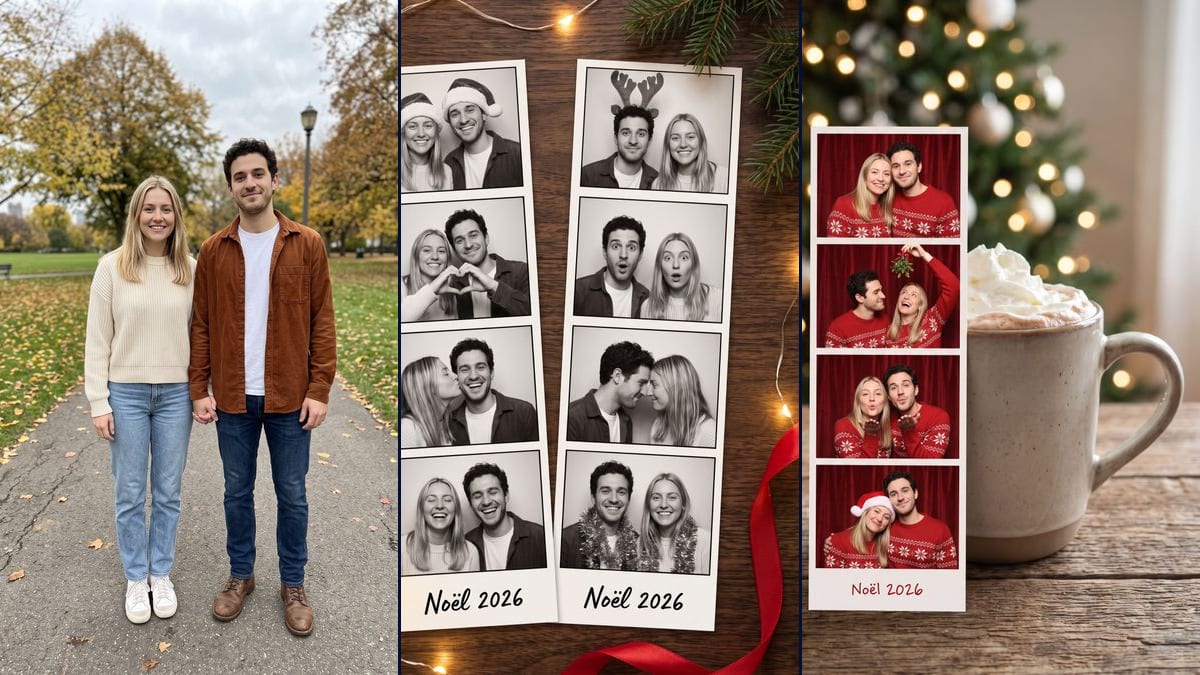
Real workflow: a couple standing in a park in autumn, then two black and white photo booth strips on a wooden table, with Santa hats, a hand heart and reindeer antlers, and a colour strip in Christmas sweaters against a mug of hot chocolate. The frames are rectangles instead of squares, and each render is still a photo of a strip on a table.
At a glance
You provide
1 photo · a text or a brief
What the workflow produces
2 images in 3:4
Canvas structure
6 nodes wired by 4 connections
Models wired in
Nano Banana Pro
Cost of one full run
about 38 credits, roughly $0.46
Account
The demo is visible without an account; generating requires a free account, trial credits included
On TikTok, the Christmas photobooth trend shows photo booth strips, often in black and white, where a couple strikes a different little pose in each frame. The "Christmas Photobooth AI Trend" guide on viralvideoai.app, updated on 13 November 2026, dates it from posts on 7 and 8 November 2026. Here you upload a photo of the two of you and an image model makes the strips.
You get two still pictures, not the video where the camera glides along the strips. The first shows two black and white strips seen from above on a wooden table, with fairy lights and pine branches. The second shows a colour strip, with a red curtain and matching Christmas sweaters, propped against a mug of hot chocolate. On the demo, the faces stay faithful and "Noël 2026" comes out with no spelling mistake. Each render is a photo of a strip lying on a table: to print it, you have to crop, or ask for a single strip on a white background.
These are the files of the workflow above, exactly as the models produced them, unretouched. The starting point is shown when there is one.
Starting point
Your couple photo
Render
Two black and white photo booth strips seen from above on a dark wooden table, with fairy lights, pine branches and a red ribbon; first strip: Santa hats and smiles, a hand heart, her kissing his cheek, both laughing with eyes closed; second strip: him in a reindeer antler headband, surprised faces, foreheads touching, silver tinsel around their necks; "Noël 2026" handwritten with no mistake at the bottom of each strip, faithful faces and the clothes from the photo kept, but the frames are horizontal rectangles instead of squares and the hats only appear in the first frameGenerated with Nano Banana ProA colour photo booth strip standing against a mug of hot chocolate with whipped cream, a blurred lit tree behind; in the frames, a red velvet curtain and matching red Christmas sweaters with white snowflakes: cheek to cheek, mistletoe, both blowing kisses, her in a Santa hat with her head tilted against him; "Noël 2026" written in red with no mistake, but the frames are rectangular and she holds the mistletoe, laughing and looking up, instead of himGenerated with Nano Banana Pro
Who it is for
Couples who want to try the Christmas photobooth trend with their own photo for a story or a post, and people looking for a small Christmas keepsake to print after cropping, slip into a card or hang on the tree.
Which files to provide
A sharp photo of the two of you with both faces clearly visible, ideally facing the camera, and a description of your hair in the prompt (colour, length, curls), plus glasses or a beard if you have them. Both people must agree to it. The photo is optional.
How it works
1
Upload a photo where both faces are clear
The model makes up the poses, the props and the booth, but it needs your faces, sharp and facing the camera. The demo starts from a full-length photo where the faces are small, and they still look right. A tighter shot leaves it less to guess.
2
Describe yourselves in the prompts
The prompts describe a woman with shoulder-length straight blonde hair and a man with short dark curly hair. Replace those words with your own hair, and add glasses or a beard if you have them, or the model may follow the description rather than the photo.
3
Change the text at the bottom if you like
Both prompts write "Noël 2026" in the margin. Put your names or the date of your Christmas Eve party instead, in quotes. On the demo, the text came out with no mistake in both renders, which guarantees nothing for longer text.
4
Crop before you print
Each render shows the strip on a table, with props around it. For a print, crop tight around the strip, or rerun with a prompt for a single strip laid flat on a white background, which we have not tested.
Variations and use cases
The same canvas, tuned for different needs: each variation is two or three lines of prompt away.
A flat strip on white, ready to print
Replace the table description with "a single photobooth strip, seen straight on, laid flat on a plain white background, with no objects around it". The picture should need less cropping before printing. Not tested.
With family or friends
Upload a photo where everyone appears and describe each person in the prompt, hair included. With more faces, each frame gets busier and the likeness may be harder to keep. Not tested.
A solo version
Replace "the woman and the man in this photo" with "the person in this photo" and adapt the poses: a wink, a Santa hat, a funny face, a blown kiss. Remove the description of the second face. Not tested.
Different text at the bottom of the strip
Instead of "Noël 2026", write your names or the date of your Christmas Eve party, for example "Lea and Tom, 24 December". Keep the text short, and check every letter before you print. Not tested.
A New Year's strip
Keep the structure and change the props: party hats, streamers, champagne glasses, and "Happy New Year 2027" in the margin. On the table, gold confetti can replace the pine branches. Not tested.
A wedding photo booth
For a wedding keepsake, describe a dress, a suit, a veil and confetti, then the couple's names with the date at the bottom of the strip. Everyone in the photo must agree to it. Not tested.
Frames that are really square
On the demo, the frames came out as horizontal rectangles despite "four square frames". Push it with "each frame is a perfect square, as tall as it is wide". Nothing guarantees the model will follow it better. Not tested.
The strip as a video
To get the video from the trend, plug a Video node into the black and white render and describe the camera moving slowly down along the strips. The template does not include this node. Not tested, and paid separately.
Common mistakes
Printing the render without cropping it
The render is a staged shot: the strip lies on a table, with pine branches or a mug around it. Print it as it is and you print the table too. Crop the strip or ask for a flat version on a white background.
Leaving the demo couple's description in
The prompts describe a woman with straight blonde hair and a man with dark curly hair. If you do not look like them, fix those words, or the model may pull your hair toward the demo couple's.
Removing the empty-table sentence
On the first colour try, a brown shoe taken from the boots in the photo ended up on the table. The prompt now rules out any other object. If you change the setting, keep that sentence.
Expecting the video from the trend
On TikTok the trend goes around as a video, with the camera gliding along the strips. This template makes two stills. For the movement, add a Video node yourself, which is untested and costs extra credits.
No. The demo starts from a couple standing in a park in autumn. The model invented the booth, the hats, the reindeer antler headband, the Christmas sweaters and the mistletoe. In the black and white version, it kept the clothes from the photo.
Will our faces still look like us?
On the demo, yes, in the eight black and white frames and in the four colour ones. The frames are small: zoom in on each face and compare it with your photo before you post or print.
Can I print the strip straight away?
Not as it is. Each render is a photo of a strip lying on a table, with fairy lights or a mug around it. Crop the strip, or ask for a single strip laid flat on a white background by changing the start of the prompt. That variant is untested.
How much do the two images cost?
38 credits, 19 per render on Nano Banana Pro at 2K. If one version does not work for you, rerun just that one for 19 credits.
Can I pay less?
Yes, by switching the node to Nano Banana 2.1 at 1K, which costs less per render and gives smaller pictures. We did not test it on this template. The demo runs on Nano Banana Pro.
How big are the images?
1792 x 2400 pixels, portrait, in a 3:4 ratio. The strip only fills part of the picture, especially in the colour version where the mug and the tree take up room, so once cropped it has far fewer pixels.
Where does the Christmas photobooth trend come from?
We do not know who started it. The "Christmas Photobooth AI Trend" page on viralvideoai.app, updated on 13 November 2026, quotes MakeViral notes that point to TikTok posts from 7 and 8 November 2026, and an older post from December 2025. Imaginode has no link with the site.
Can I choose the pose in each frame?
Yes, the prompts spell them out frame by frame. Replace them with your own, keeping four poses per strip. On the demo, the model followed the requested order, except for the mistletoe, which she holds instead of him.
Do I have to provide a photo?
The photo is optional in the canvas, but without it the model invents a couple. For it to be the two of you in the booth, you need your photo.
AI Christmas photo booth strip from your couple photo
 Nano Banana Pro
 Flux Kontext
 Seedream 5 Pro