Christmas princess AI photo, made from your own selfie

Your selfie as a Christmas princess: stepping out of a lit carriage in the snow, then a portrait in a white cape. 38 credits for both, and the flaws are shown.

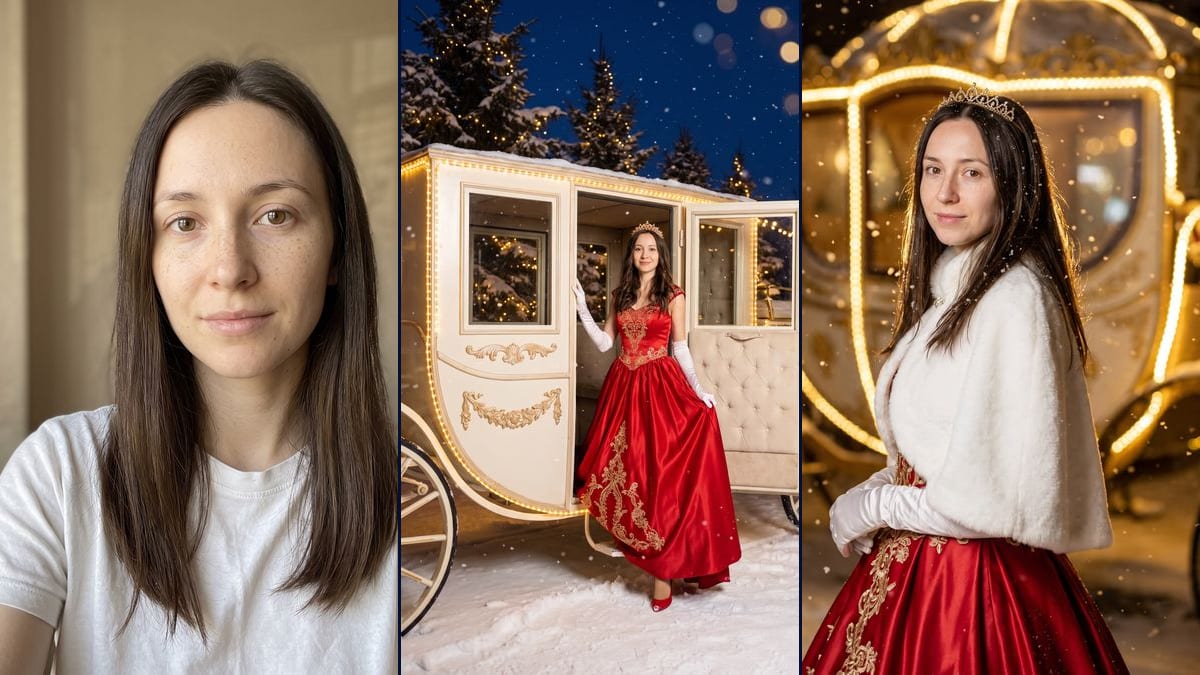
The starting photo: a woman with long, straight dark brown hair, freckles, no makeup and a slight smile, in a white T-shirt, framed head and shoulders against a beige wallInteractive demo

Real workflow, real results. Pan and zoom freely.

Use this workflow

Real workflow: a woman with long dark brown hair in a white T-shirt against a beige wall, then the same woman stepping down from an ivory carriage edged with lights, in a red satin gown embroidered in gold, and in a portrait, white faux-fur cape and tiara, in front of a blurred golden carriage. The carriage is not the same from one image to the other, and her hair is wavy in the first and straight in the second.

At a glance

You provide
1 photo · a text or a brief
What the workflow produces
2 images in 3:4
Canvas structure
6 nodes wired by 4 connections
Models wired in
Nano Banana Pro
Cost of one full run
about 38 credits, roughly $0.46
Account
The demo is visible without an account; generating requires a free account, trial credits included

The "Christmas Princess Carriage AI" trend is only a couple of weeks old. The videosi.io/trending page, updated on 18 November 2026, added it the day before with the status "Just starting" and says it has been going around since 4 November. It also shows up in the new arrivals on viralvideoai.app (the block dated 25 October to 16 November 2026). Those two video template sites are the only dated traces we have read. Over there it is a video of about ten seconds: a red shoe lands in the snow, the camera travels up a red and gold gown to the tiara, then the person spins next to a lit carriage. Here you upload a selfie and get two still images back.

In the first you are stepping down from the carriage, full length: a red satin ball gown embroidered in gold, long white gloves, a tiara, one red shoe in the snow, lit fir trees behind. The second is a close portrait in a white faux-fur cape, with the carriage out of focus in the background. The prompt deliberately rules out the pumpkin-shaped coach, the ice-blue dress and the glass slipper, so that it copies no film. On the demo we still had to redo the first image: the first try came out with a round, pumpkin-shaped cage for a carriage. And the two renders we kept do not show the same carriage, or the same hairstyle.

For a holiday picture without the ball gown (sweater, tree, pyjamas), see the Christmas photo from your selfie. More trend portraits: the 1920s Gatsby toast and the colour sweater portrait. Both renders cost 38 credits, see pricing.

Actual renders from the demo

These are the files of the workflow above, exactly as the models produced them, unretouched. The starting point is shown when there is one.

Starting point

Your selfie

Render

The same woman full length, stepping down from an ivory carriage with gilded mouldings edged with warm lights, one foot on the step and one red shoe in the snow, in a red satin ball gown embroidered in gold, long white gloves and a gold tiara, her hair in waves, in front of lit, snow-covered fir trees and a dark blue sky, a white horse at the right edge of the frame; this is the second try, the first having given a round, pumpkin-shaped carriage; the smile is broader than in the selfie, the freckles fainter and the skin a little smoothed, the open door is padded like an armchair, the gown has small cap sleeves and stops at the ankleGenerated with Nano Banana Pro
The same woman three-quarters on, head turned to the camera with a slight smile, in a short white faux-fur cape fastened with a brooch, long white gloves and a tiara, snowflakes in her hair, the red satin skirt embroidered in gold showing at the bottom, in front of a blurred golden carriage edged with lights; the face and freckles are faithful, but the hair is straight where it is wavy in the other image, the frame runs down to the hips instead of the waist, the cape hides the embroidered bodice, and the carriage behind her, more gilded, with a rounded window and a domed roof, is not the one from the first imageGenerated with Nano Banana Pro

Who it is for

People who want to try the Christmas princess carriage trend on their own selfie, for a story, a holiday card or a December profile picture, as still images rather than video.

Which files to provide

A sharp selfie of an adult, you or someone who agrees, facing the camera, well lit, with no sunglasses and no hair over the eyes, and a description of their hair in both prompts. The photo is optional.

How it works

  1. 1

    Upload a sharp, front-facing selfie of an adult

    The model copies the face it can see. With sunglasses, hair over the eyes or a dark photo it is missing features and makes them up. The demo starts from a well-lit portrait in a white T-shirt against a beige wall. The prompts are written for an adult woman.

  2. 2

    Describe your hair in both prompts

    The prompts say "long dark brown hair", the demo woman's. Put in yours: colour, length, texture. Only the carriage prompt asks for "loose waves". If you want the same hairstyle in the portrait, add the same detail there.

  3. 3

    Run the carriage and check its shape

    On the demo, the first try gave a round, pumpkin-shaped cage. The current prompt describes a coach with a boxy rectangular cabin, and the second try was the right one. If your carriage comes out round, rerun that render alone for 19 credits. Every run gives a different picture.

  4. 4

    Compare your face at full size before posting

    In the full-length image the face is small: on the demo the smile there is broader than in the selfie, the freckles are fainter and the skin is a little smoothed. The close portrait is more faithful. Open both next to your photo before you send them.

Variations and use cases

The same canvas, tuned for different needs: each variation is two or three lines of prompt away.

A version for a man

Replace "the woman in this photo" with "the man in this photo" in both prompts, change the pronouns and rewrite the outfit: the gown, the gloves and the tiara will not do as they are. Keep the sentences about the carriage and the face. Not tested.

A photo for two

Upload a photo where you both face the camera, write "the two people in this photo" and describe what each of you wears. The whole description of the pose has to be rewritten. The more faces, the more they drift. Not tested.

A gown in another colour

Replace "red satin ball gown" and "fine gold embroidery" with your colours, for example "emerald green satin ball gown" and "fine silver embroidery", in both prompts. Leave in the sentence that rules out the ice-blue dress. Not tested.

The same hairstyle in both images

On the demo the hair is wavy by the carriage and straight in the portrait. To line them up, copy "which falls in loose waves" into the portrait prompt, or describe an updo under the tiara in both. Not tested.

The same carriage in the portrait

The carriage in the demo portrait is more gilded and rounder than the one in the first image. Copy the sentence that describes the coach ("a classic closed royal coach with a boxy rectangular cabin...") into the portrait prompt to bring them closer. Not tested.

A video from the carriage image

The original trend is a video. In the canvas you can connect the carriage image to a Video node and describe the movement: the shoe landing, the camera travelling up the gown. We did not do it on this template. Not tested.

Common mistakes

Leaving "long dark brown hair" when yours is different

That description belongs to the woman in the demo. If you are blonde, a redhead or have short hair, the prompt contradicts your photo and the model settles it its own way. Fix the colour and the length in both prompts before you generate.

Deleting the sentences that forbid a round coach

They look repetitive, but they do a job. Before we spelled out "boxy rectangular cabin" and "flat roof", the first demo try gave a round, pumpkin-shaped cage. Take them out and you are back to the carriage everyone already has in mind.

Expecting two images that match

The two renders are generated separately. On the demo the carriage in the portrait is more gilded, with a rounded window and a domed roof, the hair is straight instead of wavy and the cape hides the embroidered bodice. They are two photos on one theme, and they will not cut together as one scene.

Uploading a selfie in sunglasses

The model cannot keep eyes it cannot see, so it draws its own. The same goes for a strand of hair across the face, a profile shot or a backlit photo. Take one facing the camera, sharp, in daylight, with your face clear.

Frequently asked questions

Do I need a dress, or a full-length photo?

No. The demo starts from a woman in a white T-shirt, framed head and shoulders, indoors. The model invented the gown, the gloves, the tiara, the carriage and the snow. Only your face and hair are used.

Will the pictures still look like me?

In the demo portrait, yes: the face shape, the eyes and the freckles are kept, with no makeup added. In the full-length image the smile is broader, the freckles are fainter and the skin is a little smoothed. With a dark or blurry selfie the face can drift further.

Why isn't the carriage shaped like a pumpkin?

Because the prompt forbids it, along with the ice-blue dress and the glass slipper: the template is not meant to copy any film. The demo shows an ivory coach with a boxy rectangular cabin. The model does not always obey. Our first try was a round, pumpkin-shaped cage, and we redid it.

How much do the two images cost?

38 credits, 19 per render on Nano Banana Pro at 2K. If one render does not work for you, rerun just that one for 19 credits. On the demo the carriage took two tries.

Can I pay less?

Yes, by switching the node to Nano Banana 2.1 at 1K, which costs less per render and gives smaller pictures. We did not test it on this template. The demo runs on Nano Banana Pro.

How big are the images?

1792 x 2400 pixels, portrait, in a 3:4 ratio. Enough for a story, an Instagram post or a print of about 15 x 20 cm.

Do I get a video, like in the trend?

No. On the two sites that list it, the trend is a video of about ten seconds. This template gives two still images. You can wire a Video node to either of them in the canvas, but we have not tested that. To act out a scene on video, see put yourself in a film.

Where does the Christmas princess carriage AI trend come from?

We do not know who started it. The videosi.io/trending page, updated on 18 November 2026, added it on 17 November with the status "Just starting" and says it has been going around since 4 November 2026. It is also in the new arrivals on viralvideoai.app, in the block dated 25 October to 16 November 2026. Those are the only dated traces we have read, and Imaginode has no link with either site.

Is the carriage the same in both images?

Not on the demo. The first image shows an ivory coach with a boxy rectangular cabin and a flat roof. In the portrait, the blurred carriage behind her is more gilded, with a rounded window and a domed roof. The portrait prompt does not describe its shape: you can copy the description over from the first one (not tested).

Do I have to provide a photo?

The photo is optional in the canvas, but without it the model invents a person. For it to be you stepping out of the carriage, you need your selfie.
Christmas princess AI photo, made from your own selfie

Use this workflow

Free account, no card required. The workflow opens pre-filled in your canvas.