Do the AI Christmas car lights trend with a photo of your car
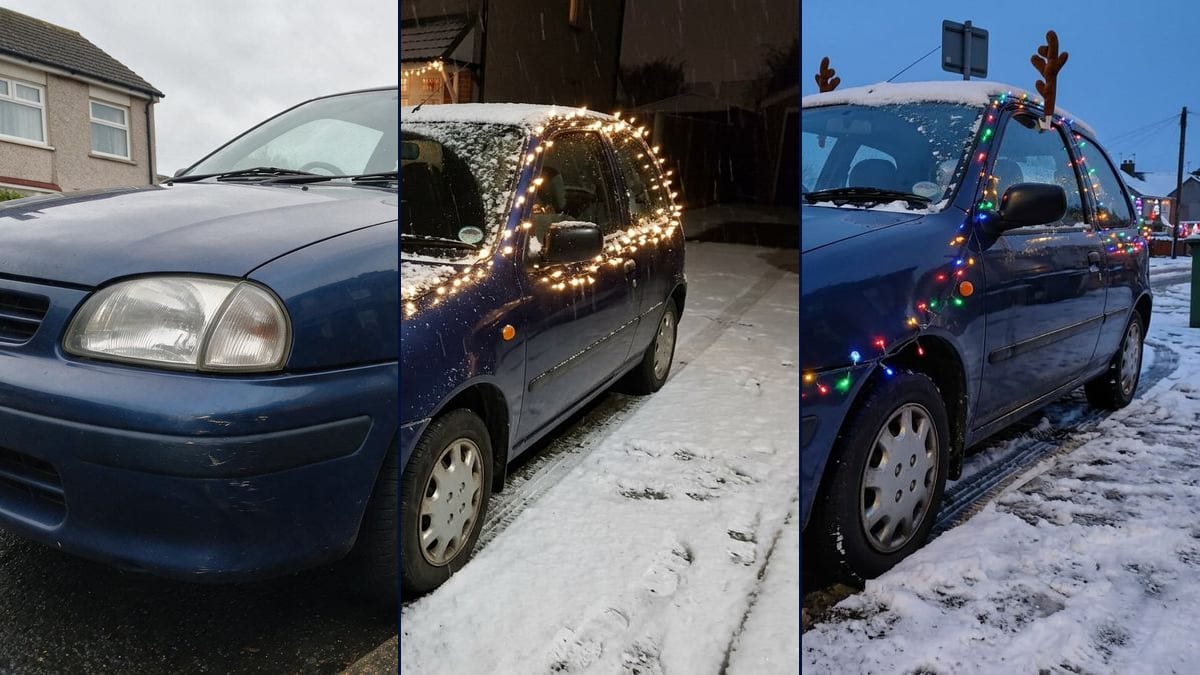
A photo of your car, Christmas edition: warm white lights and a wreath on a snowy driveway, or colourful lights and reindeer antlers in the street. Drift shown. Workflow visible here.
Real workflow: a small dark blue city car parked along a wet kerb, then the same car at night on a snowy driveway, covered in warm white lights with a wreath on the grille, and in the street at dusk with multicoloured lights, reindeer antlers and a red nose. On the driveway, the camera angle moved up and the bumper scratches almost disappeared. Both plates are blank.
At a glance
You provide
1 photo · a text or a brief
What the workflow produces
2 images in 4:3
Canvas structure
6 nodes wired by 4 connections
Models wired in
Nano Banana 2.1
Cost of one full run
about 14 credits, roughly $0.17
Account
The demo is visible without an account; generating requires a free account, trial credits included
Taking a photo of your car and seeing it under snow, covered in string lights: it's a trend of late 2026, started in October under the name "Christmas Car Lights". Nobody publishes audience figures, so we'll leave it there. This workflow makes two versions. A car parked at night on a driveway in front of a house, in warm white lights with a wreath, and the same car in the street at dusk, in coloured lights with reindeer antlers and a red nose.
The model, Nano Banana 2.1, keeps the demo car's shape, colour, headlights, wing mirror and hubcaps. It doesn't follow everything. On the driveway, it raised the camera angle when the prompt asked for the photo's low view, and the bumper scratches get lost under the snow. In the street, it keeps the angle and the setting, but puts the reindeer antlers on the roof instead of clipping them to the window, and the lights stay mostly at the front.
These are the files of the workflow above, exactly as the models produced them, unretouched. The starting point is shown when there is one.
Starting point
Your car photo
Render
The same car parked at night on a snowy driveway in front of a house with lit windows, covered in warm white lights on the roof, windows, bonnet and bumper, a fir wreath with a red bow on the grille, snow on the roof and bonnet, falling snowflakes; shape, colour, headlights, wing mirror and hubcaps kept, but the angle is higher and more head-on, the bumper scratches barely show and the plate is blankGenerated with Nano Banana 2.1The same car in the same snowy street at dusk, multicoloured lights on the front bumper, around the headlight and the window frame, brown plush reindeer antlers, a red nose on the grille, green wheelie bin and lit houses kept, deep blue sky; low angle and bumper scratches kept, but the antlers sit on the roof instead of being clipped to the window, the lights stay mostly at the front and the plate is blankGenerated with Nano Banana 2.1
Who it is for
Drivers who want to do the Christmas car lights trend for their stories or an end-of-year card, car enthusiasts who like photographing their car, content creators following seasonal formats.
Which files to provide
A daylight photo of your car from the front three-quarter, with the whole car in the frame, and the list of details to keep written into the prompt. The photo is optional.
How it works
1
Photograph the whole car in daylight
From the front three-quarter, the whole car in the frame, under an overcast sky if you can. The model adds the night, the snow and the lights itself: a night photo leaves it too much to guess.
2
Name the details to keep
The prompts mention the demo's silver hubcaps and bumper scratches. Swap them for what makes your car yours: wheels, a sticker, a dent, the colour of the mirrors.
3
Pick the driveway or the street
The driveway gives a calm night shot in warm white, but the setting changes and the angle with it. The street keeps your setting and framing, with bright colours. Run both, or a single node for 7 credits.
4
Compare with the original photo
Check the angle, the scratches and the accessories. In the demo, the reindeer antlers left the window for the roof. If a change bothers you, tighten the prompt and rerun only that node.
Variations and use cases
The same canvas, tuned for different needs: each variation is two or three lines of prompt away.
Warm white on the driveway or colour in the street
The driveway makes a Christmas card shot: night, falling snow, white lights and a wreath, a lit house behind. The street stays closer to your photo, same angle and same setting, with bright colours and accessories that make people smile.
A single light colour
Replace "warm white" or the list of colours with one shade, icy blue or red, and add "every bulb the same colour". The result looks more graphic. Not tested in the demo.
A tree strapped to the roof
Add "a small cut fir tree strapped to roof bars, wrapped in the same lights". Keep the line about the camera angle, or the model pulls back to fit the tree in the frame. This version hasn't been tested.
Keep your own street exactly
In the driveway prompt, replace "on a snowy driveway in front of a house" with "in the same street as in the photo, under snow". The model has less setting to invent and holds the angle better, as the street render shows.
A van or a motorbike
Replace "the car" with the vehicle in your photo and adapt the list of details: rear doors, roof rack, fairing. On a motorbike, the lights follow the handlebars and the tank. Not tested here.
A short video of the lights switching on
Connect a Video node to the driveway render and describe the motion: the car is dark, then the lights come on one by one as the snow falls. The demo stops at the two still images, this step hasn't been tested and the video costs extra credits.
Common mistakes
A night or backlit photo
The model needs to see the bodywork, the headlights and the wheels to reproduce them. In the dark or against the sun, it makes up the details, and under the lights the difference shows fast.
Changing the setting and hoping to keep the angle
In the demo, the driveway in front of a house brought a different viewpoint, higher and more head-on, despite the prompt. If the angle matters to you, keep your street and only add the snow and the night.
Driving with the lights on
The photo shows a parked car. In France, coloured lights visible from outside a moving car are banned. Put the decorations on while parked, for the photo, and check the rules where you live before you drive.
Do I need a photo to get my car in Christmas lights?
No, it's optional. Without one, the model invents a car from the prompt. With yours, it keeps its shape, colour and details, which is what the trend is about.
Why not just ask Gemini?
You can. Here, both prompts are ready and wired to the same photo, and the demo shows you up front what the model keeps of the car and what it changes.
Why is the number plate blank?
Both prompts ask for "no readable number plate", so you can post the picture without showing your registration. The model puts in a blank white plate. If you want yours, remove that line, knowing that generated text often comes out misspelled.
How much do the two photos cost?
14 credits, 7 per render on Nano Banana 2.1 in 1K. Rerunning a single image costs 7 credits.
How big are the images?
1200 x 896 pixels, in 4:3. That's enough for a story, a post or a card sent by message, not for a large print.
Why did the camera angle change on the driveway?
The prompt asked to keep the low view, but moving from the street to a driveway in front of a house pushed the model to reshoot the scene at standing height. Rerun the node, or keep your original street to hold the angle.
Do reindeer antlers for cars actually exist?
Yes, there are plush kits that clip onto the top of the windows. In the demo, the model put them on the roof, above the pillars. Write "clipped onto the top edge of the door window" and rerun if you want the real placement.
Can I see the decorations on my house too?
Yes, with another template: holiday house decorating starts from a photo of your house front. Here, the house on the driveway is made up by the model.
Do the AI Christmas car lights trend with a photo of your car
 Nano Banana 2.1
 Flux Kontext
 Seedream 5 Pro