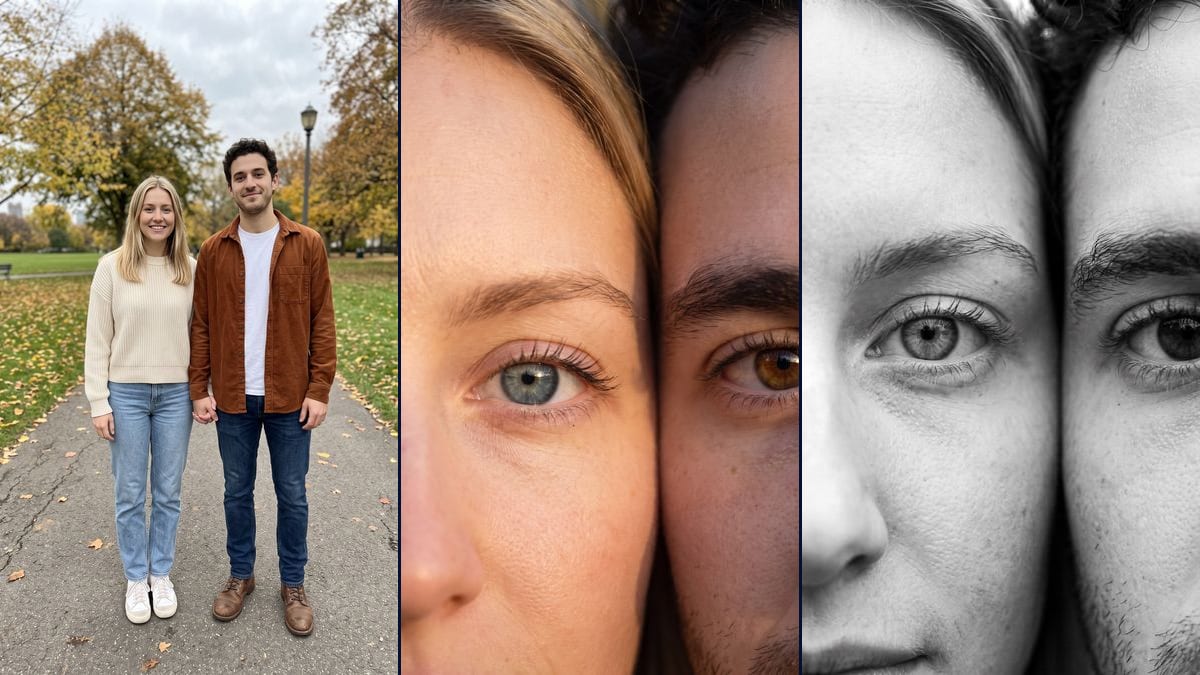
Real workflow: a couple standing full length in an autumn park, then a golden extreme close-up of the woman's blue grey eye against the man's brown eye, and the same idea in black and white. From a photo taken that far away, the eye colour is made up.
At a glance
You provide
1 photo · a text or a brief
What the workflow produces
2 images in 3:4
Canvas structure
6 nodes wired by 4 connections
Models wired in
Nano Banana Pro
Cost of one full run
about 38 credits, roughly $0.46
Account
The demo is visible without an account; generating requires a free account, trial credits included
The couple eyes wallpaper is a single picture: two faces pressed cheek to cheek, cropped so tight that only one eye of each is left. The videosi.io tracker lists it among the trends that are spreading (page seen on 11 November 2026), trending since 20 July. Here you give it your couple photo and an image model builds the close-up.
You get two pictures. The first is in colour, in late afternoon light, with the woman's eye on the left and the man's on the right. The second is in high contrast black and white, with a line of shadow between the two faces. On the demo, the hair, eyebrows and stubble come from the photo. The irises are invented: the starting photo is full length and the eyes in it are a few pixels wide.
These are the files of the workflow above, exactly as the models produced them, unretouched. The starting point is shown when there is one.
Starting point
Your couple photo
Render
Colour extreme close-up of the two faces cheek to cheek in golden light, the woman's blue grey eye under a blonde strand on the left, the man's brown eye under his dark curls on the right, his stubble at the bottom; the iris colour, lashes and skin texture are made up, since the eyes are a few pixels wide in the full length photoGenerated with Nano Banana ProThe same close-up in high contrast black and white, one eye of each looking at the lens, a dark band of shadow between the faces that widens at the top where the hair meets, the corner of the woman's smile at bottom left and the man's stubble at bottom right; here too the irises and lashes are made up by the modelGenerated with Nano Banana Pro
Who it is for
Couples who want to try the couple eyes trend as a wallpaper with their own photo, people looking for a couple gift to print for an anniversary, pairs of friends or a parent and child who want the same picture.
Which files to provide
A sharp photo of the two of you, ideally a close-up with both faces towards the camera, and a description of your eyes in the prompt (iris colour, glasses, beard). Both people must agree to it. The photo is optional.
How it works
1
Take a close-up of both your faces
A sharp photo, faces towards the camera, taken from less than a metre away. The more pixels your eyes take up in the photo, the less the model has to invent the iris and lashes.
2
Describe your eyes in the prompts
Add your iris colour, your glasses if you want to keep them, a beard or freckles. Without that, the model picks for you, as it did on the demo.
3
Pick the format before you run it
The node outputs 3:4. To fill a phone screen, switch it to 9:16: you skip the crop afterwards and keep both eyebrows in the frame.
4
Compare the eyes with your own
Zoom in on the render and check the colour, the eyelid shape and the lashes. If it does not look like you, fix the description and rerun for 19 credits.
Variations and use cases
The same canvas, tuned for different needs: each variation is two or three lines of prompt away.
In 9:16 for a phone screen
Switch the node from 3:4 to 9:16 before you run it. The picture gets taller, and you will probably need to say the frame stops at the tip of the nose, or the model may add the mouth or some background at the bottom. Not tested on the demo.
Half a face on each phone
Cut the picture in two along the line between the faces and put the other person's half on your phone. Held side by side, the two phones rebuild the close-up. Stay in 9:16 so each half fits the screen. Not tested.
A parent and child, or two friends
The trend comes from couples, but the prompt works with any pair. Replace "the woman and the man" with the two people and describe the age gap, or the model may make the child look older. Not tested on the demo.
A wink or closed eyes
Ask for one of you to close an eye, or for both to look at each other instead of the lens. Say clearly which eye stays open, because the model swaps them easily. Not tested.
Night lighting
Swap the golden light for a cold blue evening light, or for a candle reflected in both irises. Keep to one source: two lights give two reflections in each iris. Not tested on the demo.
As a print for a couple gift
At 1792 x 2400 pixels, the picture makes a print of about 15 x 20 cm at 300 dpi, the size of a frame on a side table. For an anniversary, the black and white version prints better on matte paper. Not tested in print.
Common mistakes
Starting from a full length photo
The demo does this on purpose to show the limit: on a whole figure, the eyes are a few pixels wide. The model then invents the iris colour, the lashes and the skin, and the result could be any couple.
Mentioning a lock screen in the prompt
On the demo's first try, those words were enough for the model to draw a fake status bar with the time and the battery. Describe a photograph: your phone will show the time on its own.
Forgetting to rule out the original background
On the first try, the colour version pasted the legs and the pavement from the photo under the eyes. The prompts now list what must not appear: bodies, legs, shoes, street, park. Keep that sentence if you edit them.
Not saying who goes on the left
The prompt puts the woman on the left and the man on the right. If you change the people, give each one a side, or the model may show two eyes from the same person.
Only if the photo shows them well. On the demo, shot full length, the iris colour and the lashes are made up. With a sharp close-up taken from the front, the model has enough to work from your real eyes.
Does it work for two women or two men?
Yes. Replace "the woman" and "the man" with a description of each person, for example "the one with red hair on the left, the one with black hair on the right", so the model does not mix them up.
Why does the black and white version have a dark line in the middle?
The prompt asks for a thin line of shadow between the faces. On the demo it widens at the top, where the hair meets. If you want it thinner, ask for faces that touch.
How much do the two images cost?
38 credits, 19 per render on Nano Banana Pro at 2K. Both demo renders were redone once, so the demo cost 76 credits.
How big are the images?
1792 x 2400 pixels, portrait, in a 3:4 ratio. That is wider than a phone screen: switch the node to 9:16 to avoid cropping.
Where does the couple eyes trend come from?
We do not know who started it. videosi.io dates it to 20 July 2026 and lists it among the trends that are spreading on 11 November 2026. Imaginode has no link with that site.
Do I have to provide a photo?
The photo is optional in the canvas, but without it the model invents two people. To recognise your own eyes, you need your photo, ideally a close-up.
Can I use two separate photos, one of each of us?
Yes, by plugging a second photo into the node and writing "the woman from the first photo, the man from the second". Two sharp front-facing portraits work better than a group shot. Not tested on the demo.
 Nano Banana Pro
 Flux Kontext
 Seedream 5 Pro