The director and her DP
Before camera tests, she wants to show how the light shifts through her short. The strip with the intensity curve becomes their starting point for gels and color temperature, scene by scene.
A color script for your short film, as a twelve-frame grid by act or a long strip with an intensity curve, titles spelled right. Workflow visible here, no account needed.
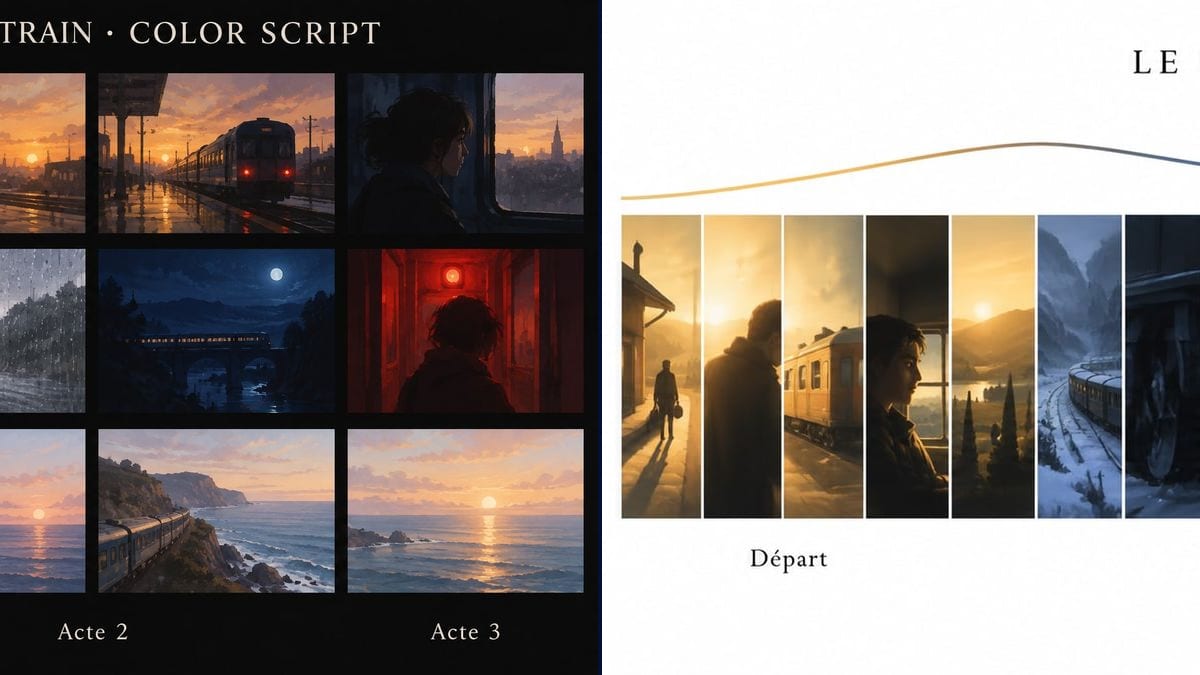
Real workflow: the color script of the fictional short "Le Dernier Train", first twelve frames on black, golden station, rainy platform, night train, red alarm, dawn over the sea, then a strip of about twenty frames from gold to blue, red and pink under a colored curve.
At a glance
Pixar made them famous, but any film can use a color script: the story told through color alone, scene after scene. It tells the DP, the production designer and the colorist where the film warms up, where it cools down and where it turns. Few shorts have one, for lack of time or of a painter. This workflow gives you two layouts: a grid of key frames by act, and a long strip with the intensity curve.
The hard part is the progression. Left to itself, a model paints nice frames that have nothing to do with each other. The prompt fixes the color order and the story beats, and Sunburst spells the title and labels right. The frames stay loose on purpose: patches of light and color, not finished shots.
For the overall look, go through the film mood board; to test the lighting of one specific shot, the lighting test. Both color scripts cost six credits.
These are the files of the workflow above, exactly as the models produced them, unretouched. The starting point is shown when there is one.
Render
Directors, DPs, production designers, animation teams, colorists and AI filmmakers.
The story beats in order, a dominant color for each, the character and setting, and the labels in quotes.
List the key beats
Five to twelve moments of the story, in order: departure, breakdown, night, alarm, dawn. One line each, with place and time of day.
Give each one a color
Warm gold, rainy grey, night blue, alarm red, pale pink. That is what the color script has to show, more than the framing.
Name the character and the setting
A young woman, a train, the sea: without them the model picks its own, and your two layouts stop telling the same film.
Pin it up in prep
Printed on the production office wall or attached to the lighting notes, it stays the reference all the way to the grade.
The same canvas, tuned for different needs: each variation is two or three lines of prompt away.
Before camera tests, she wants to show how the light shifts through her short. The strip with the intensity curve becomes their starting point for gels and color temperature, scene by scene.
A small animation team locks its palette before painting backgrounds. The grid by act goes up above the desks, and every background painter knows which dominant color they are working in.
A director is applying for development money. The color script shows the film's visual direction on one page, next to the synopsis and the director's statement, without paying an illustrator.
The colorist gets the cut along with the color script made before the shoot. She sees where the film was meant to turn red and pink, and pushes the scenes that were shot under flat light.
A creator generates his film shot by shot and watches the colors drift everywhere. The color script fixes the tint of every scene, which he then copies into the prompt of each shot.
A screenwriter takes his series to a producer. A strip of twenty frames, gold to blue, tells the arc of the pilot at a glance while they talk, and stays on the table after the meeting.
In the demo, the grid follows a young woman and the strip a man in the snow, because the second prompt says nothing about who. Describe the same character and setting in both.
"Melancholy mood" everywhere gets you twelve blue-grey frames. Give each beat its own color, with at least one sharp break, like the red alarm.
A color script with precise faces and finished sets turns into a bad storyboard. Keep the paintings loose: the color has to read from across the room.
In the demo grid, the three act labels line up under the last row. Write "one label to the left of each row" if you want one act per row.
In the demo, yes: the French title, the three act labels and the four strip labels are exact, the accent on "Départ" and the apostrophe in "L'aube" included.
No, they invent compositions from your description. A color script is about color and light; for framing, use a storyboard.
Yes: describe the shots of a single scene instead of the film's beats. The same idea works to track the light in a scene that runs from day into night.
Six credits, three per render on GPT Image 2.5 Sunburst at medium quality. A third version, for another episode say, costs three more.
Because it spells the title and labels right, even on the grid's black background, and its loose painted frames are all a color script needs. It is also the cheapest model in the catalogue.
Requested at 16:9: in the demo the grid came out at 3:2, 1536 x 1024 pixels, and the strip much wider, 2081 x 755. To print it large for the wall, run it through the Enhance node.
A mood board gathers references for the whole film. A color script puts them in story order and shows how the color changes from one scene to the next.
Not in this workflow, which starts from a blank page. You can describe your location photos in the prompt so the frames get close to them.
Make a color script for your film with AI
Use this workflowFree account, no card required. The workflow opens pre-filled in your canvas.
 GPT Image 2.5 Sunburst
 Nano Banana 2.1
 Recraft V4.1