The funding application
The board and the key image open a grant application or a pitch to a producer: people see the film before reading the synopsis, and the tone reads in one page.
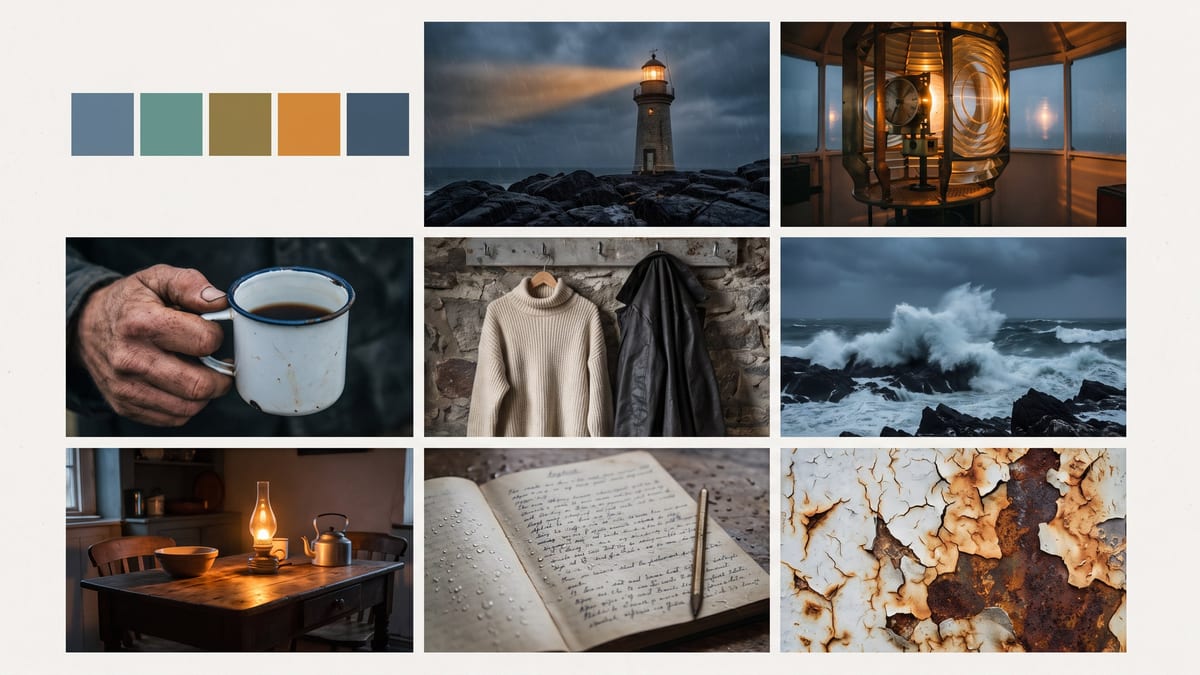
Your pitch becomes a mood board of nine references, palette, light, materials and costumes, then the film's first image in that mood. Workflow visible here, no account needed.
Real workflow: a pitch about a lighthouse keeper in Brittany in 1974 becomes a board of nine references and a palette, then the film's opening shot in exactly that mood. The second image starts from the first.
At a glance
Before the first shot, a film crew agrees on a mood: a palette, a light, materials, costumes. That is the mood board, usually assembled by trawling stock libraries for days. This workflow composes it from your pitch, then draws the film's first image in that mood.
The first hard part is the grid. An image model happily makes a blurry collage or a poster. The prompt therefore describes each of the nine cells, starts with a row of colours, and forbids any text: no labels, no misspelt colour codes.
The second is consistency: the key image starts from the board, wired into its image port, and takes on its palette, light and grain without copying a cell. The board comes before the lighting test and location scouting. Both images cost thirty-eight credits.
These are the files of the workflow above, exactly as the models produced them, unretouched. The starting point is shown when there is one.
Render
Directors, screenwriters, producers, agencies and creators who want to set the visual mood of a project before filming.
The pitch in one sentence, a palette of four named colours and a description of the board's nine cells.
Write the pitch in one sentence
Who, where, when, what threat: "a lighthouse keeper alone in Brittany in 1974, a storm coming". The rest of the board follows from it.
Name the palette in four colours
Slate blue, sea green, oxidised brass, one warm amber. Named colours show up in every cell and in the key image; "cold tones" gives nothing precise.
Describe every cell
A place, a light, a material, a costume, a prop, a texture. Nine described cells make a board; a general mood makes a collage.
Wire the board into the key image
The image port of the second node receives the board. Its prompt asks for a new shot in that palette and grain, without copying a cell.
The same canvas, tuned for different needs: each variation is two or three lines of prompt away.
The board and the key image open a grant application or a pitch to a producer: people see the film before reading the synopsis, and the tone reads in one page.
The palette and lights of the board become the basis of the discussion with the camera department, before lighting tests and location scouting.
One board per track sets the visual world of a video, and the key image becomes the reference for every shot generated or filmed afterwards.
Each season gets its board, same place but another palette, to mark the passing of time and keep consistency from one season to the next.
An agency presents two boards for the same campaign, two moods, before booking anything, and the client chooses on images.
A level's mood is set on a board, then the key image becomes the base of the game teaser and the promotional visuals.
"A melancholic Breton mood" gives a vague collage. Nine described cells give a board a crew can discuss.
Without a ban, the board gets covered in captions and misspelt colour codes. A row of flat colour swatches says the palette without a word.
Without the board as a reference, the key image takes another palette and another grain. The cable between the two nodes is what makes the board a tool.
The key image must be a new shot in the mood, not an enlarged cell. The prompt says so, otherwise the model takes the shortcut.
Yes: script to film pulls a visual bible from a PDF. Copy its pitch and palette into the board's Text node, and the rest of the workflow does not change.
Yes, by wiring a Media node with your images into the board's image port and asking to work them into the grid. Keep images you hold the rights to.
As many as you like: every Image node wired to the board draws another shot in the same mood, nineteen credits each.
Thirty-eight credits, nineteen per image on Nano Banana Pro. Each extra key image in the same mood costs nineteen credits.
Because it holds a grid of nine coherent images without stray text, and takes on the palette and light of a reference image, as measured on location scouting and the lighting test.
They are generated, not pulled from stock libraries or films: you can show them to your crew and funders without crediting a photographer.
16:9 in 2K for the board and the key image. A scope format can be asked for in the key image prompt, for a more cinematic look.
On an era, a genre, a light, yes. Naming a film or a director to copy them, no: describe what you like about their images.
Make a film mood board with AI
Use this workflowFree account, no card required. The workflow opens pre-filled in your canvas.
 Nano Banana Pro
 GPT Image 2.5 Flare
 Seedream 5 Pro