A truly black silhouette
Add to the prompt "the faces are completely black, no eyes or skin visible, only the outline of light". On the demo, the faces stayed lit despite the shadow sentence. Not tested.
One couple photo is enough: two backlit portraits on black, nose to nose or forehead to forehead, under a white heart. 38 credits for both, flaws shown.
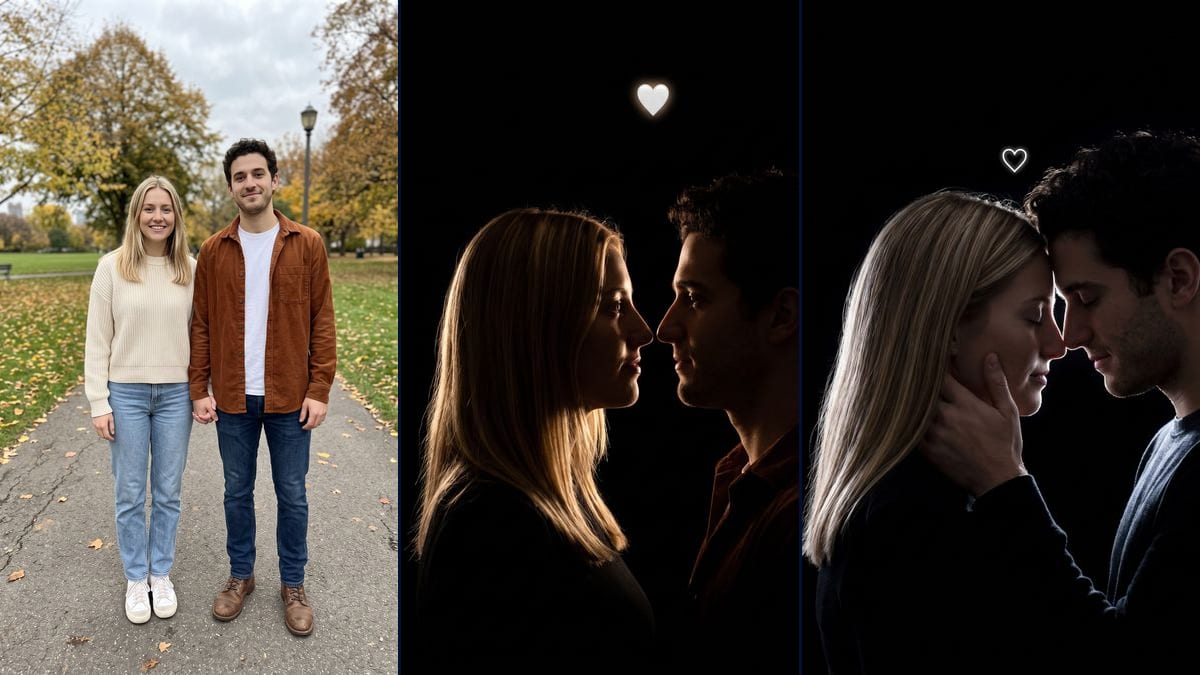
Real workflow: a couple standing hand in hand in a park in autumn, then two portraits on a black background, in profile nose to nose under a glowing white heart, and foreheads touching with eyes closed. The park is gone, but the faces stay more lit than in a real silhouette and the clothes turn dark.
At a glance
On TikTok, the couple silhouette trend shows two people backlit against a pure black background, a warm rim of light on their hair and shoulders, and a small white heart above them. The "Flash Couple Silhouette AI Photo" page on viralvideoai.app, updated on 13 November 2026, cites posts from 3 and 9 November 2026. That is our only dated source. Here you upload a photo of the two of you and an image model makes the portrait.
On their side it is an 8-second video made from two separate photos. Here, one couple photo gives two stills. The first shows you in profile, almost nose to nose, with a golden rim and a glowing white heart centred above. The second puts your foreheads together, eyes closed, his hand on her cheek, under a small heart drawn with a white line. On the demo, the park is gone and the profiles are faithful, but the faces stay more lit than in a real silhouette.
With the same couple photo, try the couple eyes wallpaper, the Christmas photo booth strip or the couple back tattoo. For a sadder picture, there is the broken heart photo. If you only want to swap the setting without the backlight, see the background changer. Both renders cost 38 credits, see pricing.
These are the files of the workflow above, exactly as the models produced them, unretouched. The starting point is shown when there is one.
Starting point
Render
Couples who want to try the backlit silhouette trend with their own photo for a story, a post or a profile picture, with no studio or lighting, and people preparing a surprise for a dating anniversary.
A sharp photo of the two of you with both faces clearly visible, and a description of your hair in the prompt (colour, length, curls), because the hair is what catches the light. Both people must agree to it. The photo is optional.
Upload a photo where both faces are clear
The model redoes the pose and the lighting, but it needs your features to draw your profiles. The demo starts from a full-length photo where the faces are small, and the profiles still look right. A tighter shot leaves it less to guess.
Describe your hair in the prompts
In backlight, the hair is what catches the light. The prompts describe shoulder-length straight blonde hair and short dark curly hair: replace those words with your own, or the model may follow the description rather than the photo.
Compare the light with what you expected
On the demo, both faces stayed visible, eyes and skin included, while the prompt wanted them in shadow. If you want an almost black silhouette, make the shadow sentence stricter and rerun that render alone, for 19 credits.
Check the heart and the hands before you post
On the demo, the first heart looks like an embossed emoji, and the second floats above her head instead of between the foreheads. His hand also looks a little large. Zoom in before you post.
The same canvas, tuned for different needs: each variation is two or three lines of prompt away.
Add to the prompt "the faces are completely black, no eyes or skin visible, only the outline of light". On the demo, the faces stayed lit despite the shadow sentence. Not tested.
In the profile version, replace the heart description with "a simple heart outline traced with a thin line of white light, flat, with no depth". That is what the forehead version gave on the demo. Not tested.
On the demo, the heart drifted above her head, off to the left. Spell it out: "in the exact centre of the frame, just above the point where their foreheads touch". Nothing guarantees the model will follow it better. Not tested.
The model replaced the cream sweater and the rust overshirt with dark tops. If you care about yours, describe them in the prompt, for example "she keeps her cream sweater, he keeps his rust overshirt", even in shadow. Not tested.
The trend often starts from two photos taken apart. Put them together first with add people to a photo, then plug the result into this template. Each step is paid. Not tested.
Replace "warm golden rim light" with "deep red rim light" and the white heart with a red one. The contrast with the black will be weaker than with gold, and blonde hair may turn pink. Not tested.
To get the video from the trend, plug a Video node into one of the renders and describe a slow movement, the heart lighting up and the faces moving closer. The template does not include this node. Not tested, and paid separately.
The prompt asks for faces in shadow, but on the demo the model left them visible. If you want the darkest TikTok look, plan to make the prompt stricter and rerun, or darken the picture in a photo editor.
The prompts talk about straight blonde hair and dark curls. In backlight, hair is what you see best: if you do not look like the demo couple, fix those words, or the model may pull your hair toward theirs.
In the forehead version, his hand on her cheek looks large. It is the kind of detail you only notice when you zoom in. Check the fingers and the size of the hand before you post, and rerun that render alone if needed.
On TikTok, this look goes around as an 8-second video on an edit sound. This template makes two stills. For movement, add a Video node yourself, which is untested and costs extra credits.
No. The demo starts from a couple standing in a park in autumn, in daylight. The model erased the park, put in the black background and added the rim of light. It also swapped the clothes for dark tops.
Not on the demo. The outline of light is there, but you can see the eyes, the skin and the smiles, especially in the forehead version. For a darker result, push "faces completely in darkness", with no guarantee.
No. The trend goes around as an 8-second video made from two separate photos. This template makes two stills from a single couple photo. For movement, add a Video node yourself, paid separately.
38 credits, 19 per render on Nano Banana Pro at 2K. If one version does not work for you, rerun just that one for 19 credits.
Yes, by switching the node to Nano Banana 2.1 at 1K, which costs less per render and gives smaller pictures. We did not test it on this template. The demo runs on Nano Banana Pro.
1792 x 2400 pixels, portrait, in a 3:4 ratio. For a 9:16 story, you will need to crop or add black at the top and bottom, which barely shows on a background that is already black.
We do not know who started it. The "Flash Couple Silhouette AI Photo" page on viralvideoai.app, updated on 13 November 2026, cites TikTok posts from 3 and 9 November 2026, set to an older edit sound. That is our only dated source, and Imaginode has no link with the site.
Not directly: the template expects one photo with both of you in it. You can first put two photos together with add people to a photo, then use the result here. We have not tested that chain.
The photo is optional in the canvas, but without it the model invents a couple. For it to be your profiles in the light, you need your photo.
AI couple silhouette photo from a single couple picture
Use this workflowFree account, no card required. The workflow opens pre-filled in your canvas.
 Nano Banana Pro
 Flux Kontext
 Seedream 5 Pro