The outdoor brand's shop
A small mountain clothing brand adds phone cases to its range. The two shots work as product images from launch day, before the first batch has even arrived.
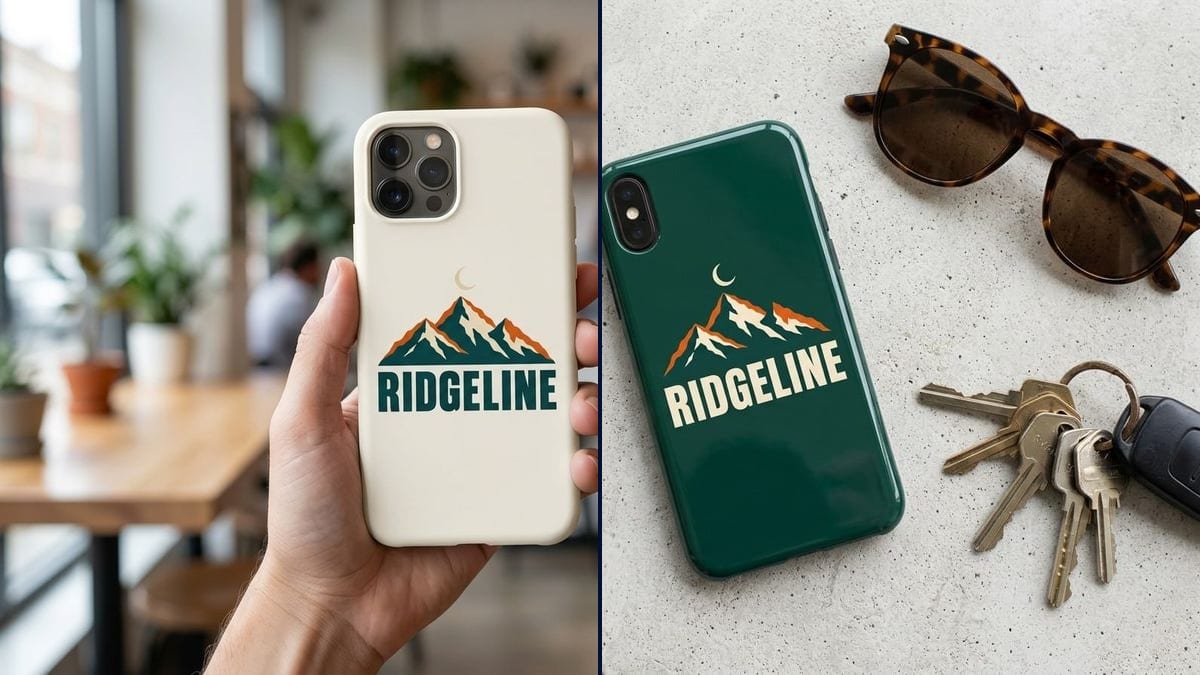
Your design or logo printed on a cream case held in a hand, then on a green case lying on a table, text spelled right. Workflow visible here, no account needed.
Real workflow: an outdoor brand logo, mountains under a crescent moon above the word "RIDGELINE", then printed on a matte cream case held in a café and on a deep green case lying flat next to sunglasses and keys.
At a glance
A personalised case, for yourself, your brand or a present, gets ordered online from a flat preview: a rounded rectangle with your artwork pasted on. You can't see the finish, where the camera sits or how it looks in a hand. This workflow prints YOUR design on two cases shot like shop photos: a matte one in a hand, a glossy one on a table.
The hard part is a sharp design in the right place, without the model adding a phone brand's logo. The prompt centres the design, quotes the text and rules out everything else. Nano Banana 2.1 picks up the logo you supply and spells the word correctly.
To roll out the same logo, try the custom mug or the embroidered cap. Both cases cost fourteen credits.
These are the files of the workflow above, exactly as the models produced them, unretouched. The starting point is shown when there is one.
Starting point
Render
Small brands, illustrators, companies preparing swag and anyone giving a personalised case as a present.
A sharp design or logo, the case colour and finish, and every word of the logo quoted.
Upload your design
Logo, illustration or photo, sharp and at a decent resolution. A plain background helps the model isolate the artwork.
Choose the case
Colour, matte or glossy finish, and the setting: held in a hand, lying on a table, sticking out of a jacket pocket.
Quote the text to keep
Every word in quotes. Anything you don't quote may vanish, like the date line in the demo.
Put the picture to work
On a product page, for a pre-order, or to sign off the artwork with the printer before the run.
The same canvas, tuned for different needs: each variation is two or three lines of prompt away.
A small mountain clothing brand adds phone cases to its range. The two shots work as product images from launch day, before the first batch has even arrived.
She sells her artwork through print on demand. For each illustration she shows the case in a hand, which says far more than the flat preview the platform generates.
For his sister's birthday he wants a case with his nephew's drawing on it. He checks how it looks on a cream case and a green one before placing the order.
A start-up is looking for giveaways for a trade show. Cases with its logo are compared in two colours, and the team decides on a picture that looks like the real thing.
The band sells merch at gigs. They test their latest album cover on a case to see whether the artwork holds up on such a narrow format before ordering a box of them for the tour.
A print shop shows customers their case in context before starting the run, which avoids surprises about where the logo sits relative to the camera and saves a reprint.
Without a rule, the model may draw a manufacturer's logo on the back of the phone. Write "no brand logo of the phone".
The model keeps what you name. In the demo, the unquoted date line disappeared. Put every word you want kept in quotes.
A very horizontal artwork fits badly on a narrow case and ends up cropped or shrunk. Prepare a vertical or centred version.
The picture doesn't know your exact phone model or the camera cut-out. The printer supplies the template; the picture helps you choose.
In the demo, yes: "RIDGELINE" is right on both cases. The small "ESTABLISHED 2019" line from the logo is gone, because the prompt didn't quote it.
No: the prompt forbids any brand logo, and the demo shows none. Still check the back of the phone on your render.
Yes: ask for the photo printed "across the whole case" rather than in the middle, keeping the camera area clear.
Fourteen credits, seven per render on Nano Banana 2.1. A third case colour with the same design costs seven more.
Because it picks up the design you supply, spells the text correctly and respects the no-brand rule. That is what a product image needs.
The prompt asks for the logo in cream and orange: the dark green of the original logo merges into the case, and the mountains become outlines. To keep the original colours, pick a light case.
You can name it, but the image model won't guarantee every detail. For a product page, stick to a generic phone.
4:3 landscape, which suits a product page or a social post.
Design a custom phone case with AI
Use this workflowFree account, no card required. The workflow opens pre-filled in your canvas.
 Nano Banana 2.1
 Flux Kontext
 GPT Image 2.5 Sunburst