The pastry shop switching boxes
She wants to move away from plain white boxes. She compares kraft and a cream gift box with her logo before placing the first order, and shows both pictures to her business partner that evening.
Your logo on a kraft box tied with ribbon, then on a rigid gift box with gold foil. See the packaging before you order five hundred of them. Workflow visible here, no account needed.
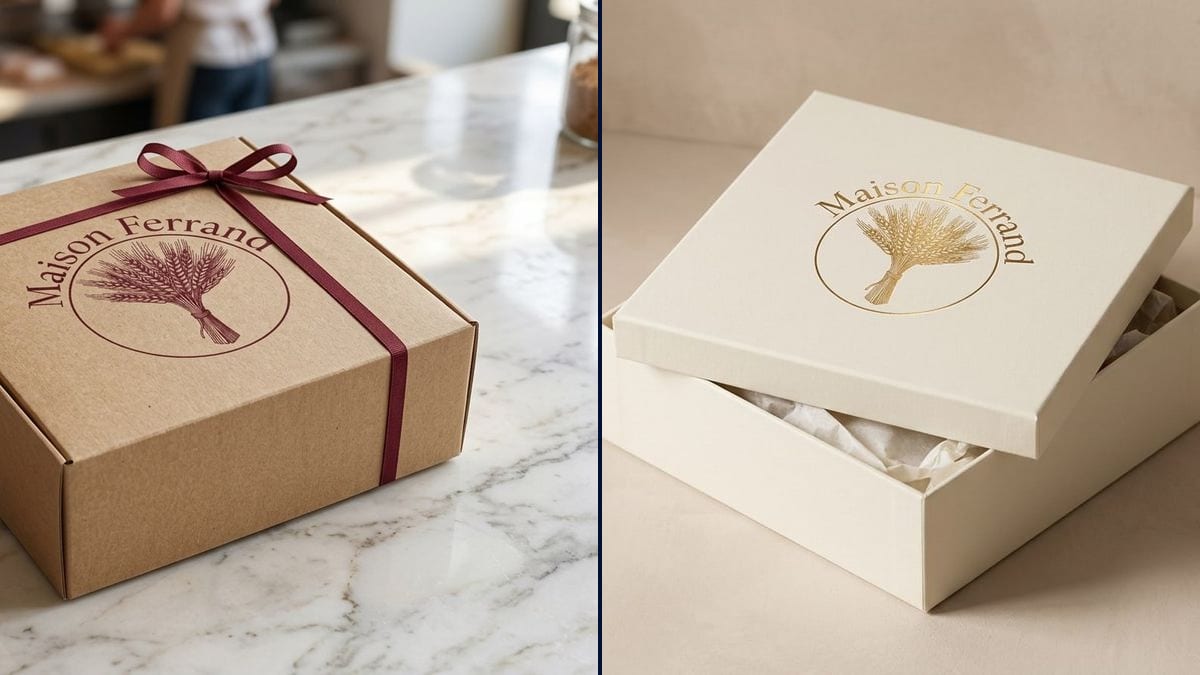
Real workflow: the burgundy Maison Ferrand logo, a wheat sheaf in a circle, then a kraft box with a burgundy ribbon on a marble counter and a cream gift box left ajar, logo in gold foil.
At a glance
Branded boxes usually come with a minimum order in the hundreds, and the proof you get is a flat dieline that tells you very little about how the box will look on your counter. This workflow takes your logo and shows it on two pieces of packaging, photo-real: a kraft pastry box with a ribbon and a rigid gift box with gold foil.
The hard part is keeping the logo intact. An image model left to itself redraws the sheaf, warps the lettering or slips a tagline onto the lid. The prompt names each part of the logo, puts the name in quotes and forbids any other text. Nano Banana 2.1 reads your file and lays the logo into the perspective of the box, with the right print finish.
For the jar or pouch, try the product label; for the shop itself, the reception wall logo. Both boxes cost fourteen credits.
These are the files of the workflow above, exactly as the models produced them, unretouched. The starting point is shown when there is one.
Starting point
Render
Makers and shop owners ordering their first branded boxes, online brands waiting for packaging, designers presenting a logo.
The logo at a decent resolution on a plain background, the exact name in quotes, the box type and the print finish.
Upload the logo
A clean PNG or JPG on a plain background, nothing else around it. The cleaner the file, the closer the artwork stays.
Say what is in it
The symbol, the shape and the exact name in quotes. That is what stops the model from simplifying or rewriting.
Pick board and finish
Kraft, white card, rigid box; ink, gold foil, embossing. One line per box, one node per variant.
Show it before you order
To your partner, your regulars, the packaging supplier. The picture helps you choose; the printer's proof signs off production.
The same canvas, tuned for different needs: each variation is two or three lines of prompt away.
She wants to move away from plain white boxes. She compares kraft and a cream gift box with her logo before placing the first order, and shows both pictures to her business partner that evening.
A maker selling from her own site needs packaging shots for the product page before the boxes have even arrived. The render fills the gap until the real photo shoot.
He can't decide between a gold foil gift box and a simpler kraft one. Two pictures, and he sees which matches the price he wants to put in the window.
A studio delivers a logo to a bakery and adds it on a box and a gift box to the deck, so the client judges the identity on an object and not only on a white page.
A small company is preparing year-end gifts for its clients. The marketing team signs off the logo placement on the box internally before placing the order with the supplier.
The founder has to show a finished product on the campaign page. Packaging with the logo in a photo-real shot makes it concrete, as long as the page says it is a mockup.
A pixelated file or one with a white halo gives a smudgy logo on the board. Start from a clean export on a plain background.
Without the exact name in the prompt, the model may add a letter or change a capital. Copy it exactly as it appears in the logo.
Without "No other text", it happily invents an address or a slogan on the lid. Keep that line in every prompt.
The render has no dimensions, no bleed, no Pantone colours. The printer needs the original logo file and the box template.
It is taken from your file, but the model can tilt or simplify it. In the demo the gold box is faithful and the sheaf leans on the kraft box, so check every render closely.
Yes: macaron box, pizza box, bottle sleeve, gusseted bag. Describe the shape and the material in the prompt.
No. It is a picture to help you decide. The manufacturer works from your vector file and sends its own proof.
Fourteen credits, seven per render on Nano Banana 2.1. A third box with the same logo costs seven more.
Because it takes your logo as a reference and builds the whole photo around it: the board, the ribbon, the marble, the light. It also spells the name correctly, which matters on packaging.
Printing lays down ink, as on the kraft box. Foil stamping presses a metallic film into the board, like the gold on the gift box, with a slight impression and a shine.
Yes for full-colour printing. For gold foil or embossing, the logo becomes a single colour, and the render shows it that way.
4:3 landscape, the usual framing for a product shot on a table.
Make a packaging box mockup with AI
Use this workflowFree account, no card required. The workflow opens pre-filled in your canvas.
 Nano Banana 2.1
 Flux Kontext
 GPT Image 2.5 Sunburst