The illustrator's shop
She sells art prints online. For each poster, the shot above a sofa helps buyers picture the size in their own home, shown next to the flat product image on the listing.
Your poster framed above a sofa, then leaning on a bedroom shelf, at a realistic size. To sell a print or pick a format. Workflow visible here, no account needed.
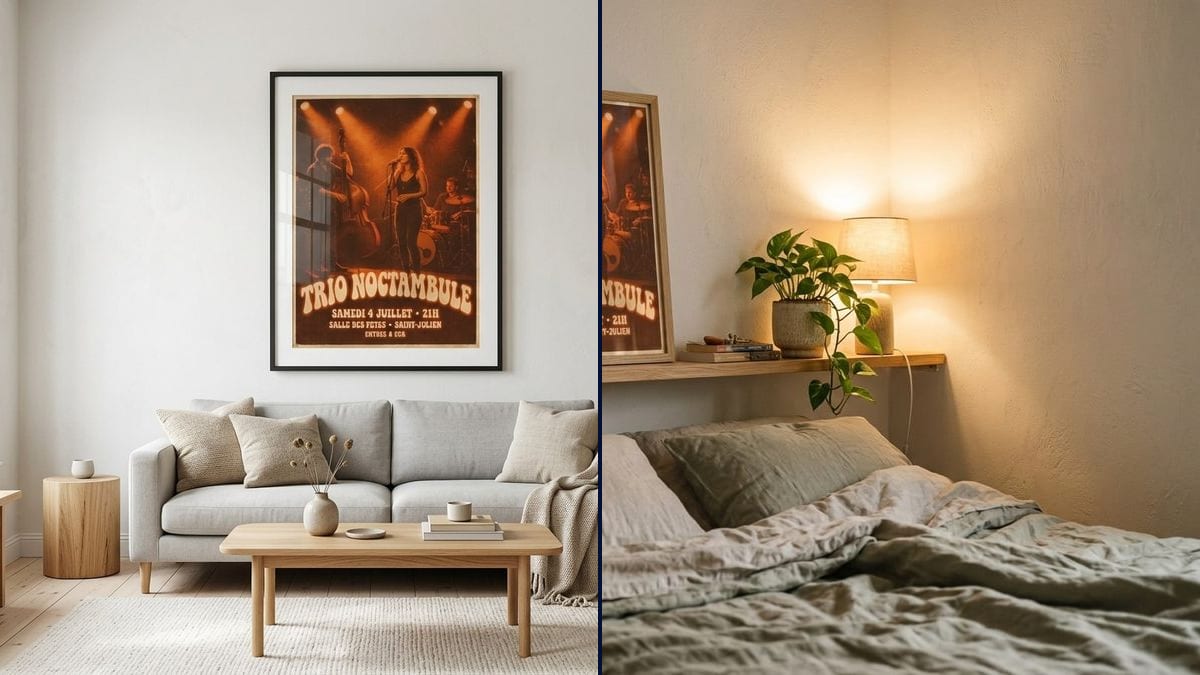
Real workflow: a retro concert poster, "TRIO NOCTAMBULE", then the same poster in a black frame with a mat above a grey sofa and in an oak frame on a bedroom shelf. The small lines at the bottom get scrambled.
At a glance
A poster sells better when you can see it on a wall. In an online shop, a flat file says nothing about size or how it looks in a room, and an interior shoot needs a frame, a flat and good light. This workflow frames YOUR poster in two rooms: a bright living room and a bedroom in warm light.
The hard part is scale and faithfulness. Left alone, a model hangs an oversized frame or redraws the poster along the way. The prompt gives the size, the frame and the spot, and asks to keep the artwork as it is. Nano Banana 2.1 sets it in perspective; small text, though, doesn't always survive the shrinking.
To make the poster first, start from the concert poster or the AI poster maker. Both mockups cost fourteen credits.
These are the files of the workflow above, exactly as the models produced them, unretouched. The starting point is shown when there is one.
Starting point
Render
Illustrators, photographers, bands and poster shops selling online, framers, and anyone choosing a print size for home.
The poster flat at a good resolution, the room, the frame material and its size in centimetres.
Upload the poster flat
The original file, at a good resolution, straight on and without glare. A photo of the pinned-up poster works too, less sharply.
Choose the room and frame
Living room, bedroom, office, hallway; black, oak or white frame, with or without a mat. One mood per node.
Give the size
In centimetres or a paper size: 30 × 40, 50 × 70, A3. That is what makes the scale believable next to the sofa or bed.
Check the text
The title usually holds, small lines less so. Show the mockup for the mood, and the flat file for the details.
The same canvas, tuned for different needs: each variation is two or three lines of prompt away.
She sells art prints online. For each poster, the shot above a sofa helps buyers picture the size in their own home, shown next to the flat product image on the listing.
The band sells its tour poster at the merch table. They post it framed in a bedroom on social media, so fans want to buy one and keep it on the wall long after the gig.
A landscape photographer offers prints at 30 × 40 and 50 × 70. Two room mockups show how differently each size fills a room, so buyers pick the right one before they order.
A poster bought at an exhibition is still in its tube. Before buying a frame, she compares a large black frame above the sofa with a small oak one on a shelf.
A framing shop shows customers their poster in different frames and mats in a room picture, to help them choose the moulding and the mat colour before anything is cut.
An agency shows its client the event poster hanging on a wall, which lands better than a flat PDF when it is time to sign off the design direction before going to print.
Without dimensions, the model hangs a frame that covers the whole wall or a postage stamp above the sofa. Write the size in centimetres.
Shrunk into a big scene, a poster loses its small lines: in the demo the venue and price are scrambled. Don't sell the details on the mockup.
Shot at an angle or with glare, the poster lands distorted in the frame. Start from the original file or a straight-on photo.
A dark concert poster in an all-white living room can work, but choose the room for the buyer you are after, not by chance.
The image and title stay the same. The small lines get scrambled in the demo: the venue and price become unreadable once the poster is shrunk into the room.
Yes: any flat artwork. Replace "the poster" with "the photo print" or "the illustration" if you like.
Not from a single input image. For a gallery wall, make one mockup per poster or combine them beforehand.
Fourteen credits, seven per render on Nano Banana 2.1. A third room with the same poster costs seven more.
Because it takes the image you supply, puts it in perspective in a frame and builds a believable room around it. It keeps the photo and the title; very small text remains its limit.
Once the poster is shrunk to a few hundred pixels, small letters have too little room and the model makes them up. See why AI text goes wrong. For a shop, add the flat artwork alongside.
Yes, for your own posters. See the commercial-use rules for AI images.
4:3 landscape, with the room around the poster. A vertical poster fits without being cropped.
Mock up your poster in a frame with AI
Use this workflowFree account, no card required. The workflow opens pre-filled in your canvas.
 Nano Banana 2.1
 Flux Kontext
 GPT Image 2.5 Sunburst