The first campaign
A young director launches her first campaign to shoot her short over two days. The header uses an image from her moodboard, with the goal in big type, so the page makes sense without reading.
Your short film's campaign header with the goal and duration, then the rewards and their prices in one image, amounts spelled right. Workflow visible here, no account needed.
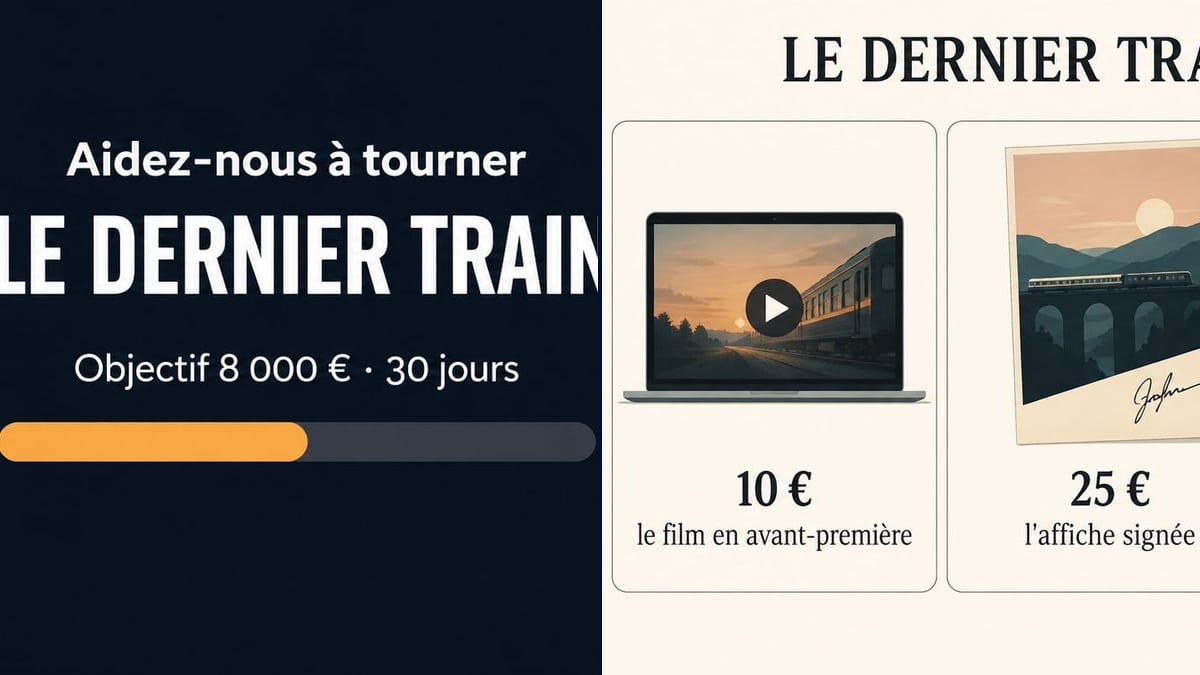
Real workflow: a French header with a lit train on a seaside viaduct under the moon, an €8,000 goal over 30 days and a half-full amber bar, then four reward cards from €10 to €150 on a cream background.
At a glance
A crowdfunding campaign for a short film is won or lost in the first seconds on the page: people see the header, read the goal, scroll down to the rewards. Most filmmakers put a still with no text at the top and a bullet list at the bottom. This workflow makes the two visuals that are missing: the header with title, goal and duration, then the four rewards illustrated with their prices.
The hard part is the amounts. One zero too many or a price shifted onto the wrong card, and you've made a false commitment to backers. The prompt gives each line and each price in quotes, nothing else. Sunburst writes them letter for letter, currency signs included.
For a set photo to go with it, see the behind-the-scenes photo; for the Blu-ray reward, the disc cover. Both visuals cost six credits.
These are the files of the workflow above, exactly as the models produced them, unretouched. The starting point is shown when there is one.
Render
Directors, student collectives and AI filmmakers launching a crowdfunding campaign for a short film.
The title, the campaign's goal and duration, then each reward with its price, written in quotes.
Set the goal and duration
The amount and number of days exactly as they appear on the platform. Those are the figures backers compare.
Cost the rewards
Before writing them, work out what each one costs: printing, postage, time. A €25 signed poster can cost nearly as much to ship.
One card per tier
Price, then what backers get, in a few words. Four or five tiers fit on one visual; beyond that, make two.
Crop to the platform's size
Every platform has its own header size. Check its help pages, crop, and keep the text away from the edges.
The same canvas, tuned for different needs: each variation is two or three lines of prompt away.
A young director launches her first campaign to shoot her short over two days. The header uses an image from her moodboard, with the goal in big type, so the page makes sense without reading.
Four students are funding their graduation film. The rewards visual, shared in the school group chat and by their families, brings in more pledges than the link on its own.
The film is shot, but grading and the sound mix are missing. The header says "Help us finish" rather than "Help us shoot", and the behind-the-scenes photo goes in the body of the page.
An AI filmmaker raises money for festival entry fees and subtitles. The rewards go digital, with nothing to post: a private link, a wallpaper, a name in the end credits.
Halfway through, the team adds a "your name on a clapperboard" tier. They rerun the rewards prompt with five cards and post the new visual as a campaign update.
Every crew member shares the campaign. The header, cropped square for a post and vertical for a story, keeps the title and the goal readable on a phone.
Signed poster, DVD, a day on set: each one costs money to make and ship, and the platform takes its fee. Work out the margin before you put a price on the image.
A half-full bar on the header on launch day suggests the campaign is already under way. It's an illustration; at the start, it's better removed.
Three lines of synopsis on the image and nothing reads at thumbnail size. Title, goal and duration are enough; the pitch goes in the page text.
"A seat at the premiere" with no cinema booked, or a delivery date that's too tight. Only put on the image what you know you can deliver.
In the demo, yes: the goal, the duration and all four prices are exact. On the cards, the price moved above the line in large type instead of being followed by a middle dot.
The prompt bans it: a logo redrawn by a model comes out warped, and the platform already shows it on the page. If you need it elsewhere, use the official file.
No, it's painted half full. At launch, ask for "an empty progress bar" or remove it, and let the platform show the real amount raised.
Six credits, three per visual on GPT Image 2.5 Sunburst at medium quality. One more version, the header with an empty bar for launch for instance, costs three credits.
Because it gets numbers and symbols right, which matters more than anything on a campaign page, and it's the cheapest model in the catalogue. In the demo, the dark panel of the header came out clean.
16:9 landscape, around 1536 x 1024 pixels. Platform headers are often wider: crop it with the text kept in the centre.
This workflow starts from a blank page and draws the illustration. To keep your actual still, set the text and the bar over it in your layout software.
Depending on the country, who runs the campaign and what the rewards are, the money may be taxable. The image changes nothing there: ask an accountant or the platform.
Make crowdfunding visuals for your film with AI
Use this workflowFree account, no card required. The workflow opens pre-filled in your canvas.
 GPT Image 2.5 Sunburst
 Nano Banana 2.1
 Recraft V4.1