The outdoor brand starting out
Two founders are launching a small hiking apparel label. Before ordering a hundred patches, they see the logo stitched on the jacket they plan to sell and pick the border colour.
Your logo as a round embroidered patch, close up on a table and then sewn on a jacket. Judge the stitching before you order from the embroiderer. Workflow visible here, no account needed.
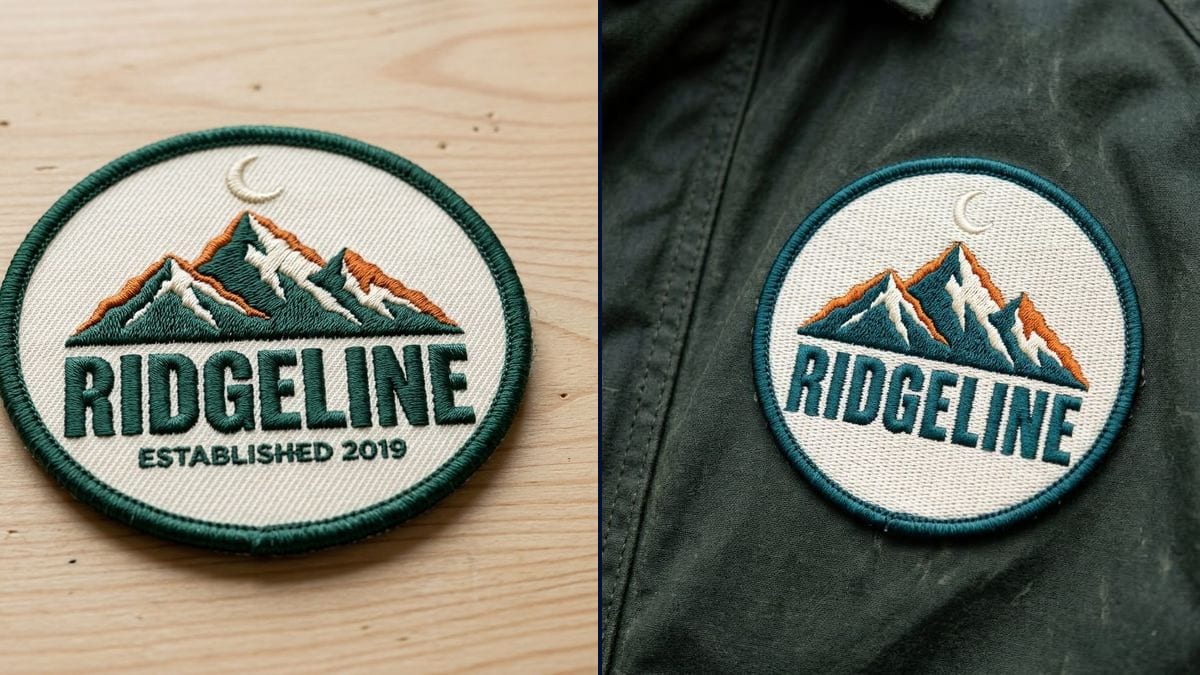
Real workflow: the Ridgeline logo, mountains under a crescent moon, then a round patch with a green border on light wood and the same patch sewn on a dark green waxed canvas jacket.
At a glance
Embroidered patches usually come in runs of fifty or a hundred, and the proof from the embroiderer is a flat drawing that looks little like the finished piece. Thread has depth, fine detail drops out, colours shift a little. This workflow takes your logo and shows it as a round patch, first on its own close up, then sewn on a jacket.
The hard part is the material. An image model left to itself lays the logo down like a print, with no thread and no stitches. The prompt describes the merrowed border, the dense satin stitch and the thread texture, and names every part of the logo. Nano Banana 2.1 keeps the colours and the outline of the mountains, and adds the depth embroidery would give.
For the same logo on a cap, see the embroidered cap; on a printed garment, the t-shirt mockup. Both renders cost fourteen credits.
These are the files of the workflow above, exactly as the models produced them, unretouched. The starting point is shown when there is one.
Starting point
Render
Apparel brands, clubs and associations, companies kitting out their crews, makers selling patches.
The logo at a decent resolution on a plain background, the brand word in quotes, the patch shape and the garment.
Upload the logo
On a white or plain background, at a decent resolution. A logo with flat, solid colours makes the most believable patch.
Describe the patch
Round, oval or shield; merrowed or cut edge; satin stitch or fill. That is what separates it from a print.
List what is in the logo
The symbol and the exact word in quotes. Without them, the model simplifies too much or changes a letter.
Put it on something
On a table for the product page, or sewn on a jacket, a bag or a beanie to see it worn.
The same canvas, tuned for different needs: each variation is two or three lines of prompt away.
Two founders are launching a small hiking apparel label. Before ordering a hundred patches, they see the logo stitched on the jacket they plan to sell and pick the border colour.
The chair of an amateur rugby club wants a patch for the members' hoodies. The committee signs off a realistic picture instead of arguing over a PNG file.
The group wants a patch to sew on leather vests. Seeing it on a garment shows whether the logo still reads at ten centimetres, before paying the digitising fee.
A landscaping firm has its logo stitched on its crews' jackets. The owner compares two patch shapes and shows the picture to the team before ordering from the workwear supplier.
A maker selling iron-on patches needs a photo of each new design on a garment. She checks the design on the render, then photographs the real piece when it arrives.
For a big summer gathering, the organisers make a souvenir patch. The picture goes to the scout leaders for a vote between two designs, then onto the sign-up page.
Gradients, hairlines, tiny text: none of it stitches at six centimetres. If the render loses a detail, the real embroidery will too.
Without satin stitch and thread texture, you get a printed circle. Describe the embroidery or the model won't draw it.
The brand name in quotes stops a letter from going missing or changing. Copy it exactly as it is in the file.
Thread count, real size and backing type are settled with the workshop, from your original file.
Colours and shape, yes. The finest details can drop out: in the demo, the "ESTABLISHED 2019" line is missing from the patch on the jacket.
Yes: change the shape in the prompt and say whether the edge is merrowed or laser cut.
No. They need the original logo file, ideally vector, to digitise the design. The picture shows the result you are after.
Fourteen credits, seven per render on Nano Banana 2.1. A third item, a bag or a beanie, costs seven more.
Because it reads the logo as a reference and builds a real photo around it: the raised thread, the merrowed edge, the jacket canvas. It also keeps the brand word spelled right.
Embroidered patches have depth and visible thread and suit simple logos. Woven patches are flat and finer, and hold small text better. Write "woven" in the prompt to see the difference.
Yes: name it in the prompt. In the demo, the model picked a dark green and then a teal, both taken from the logo.
Square, 1:1, the usual format for patch photos in online shops and on social media.
See your logo as an embroidered patch with AI
Use this workflowFree account, no card required. The workflow opens pre-filled in your canvas.
 Nano Banana 2.1
 Flux Kontext
 GPT Image 2.5 Sunburst