The bakery's Christmas gifts
The owner wants to give her best customers an engraved board in December. She sees the logo on olive wood, settles the size with the engraver and orders thirty with no surprises.
Your logo laser engraved on an olive wood board, then on the pocket of a leather apron. Judge the engraving before you commit to a batch. Workflow visible here, no account needed.
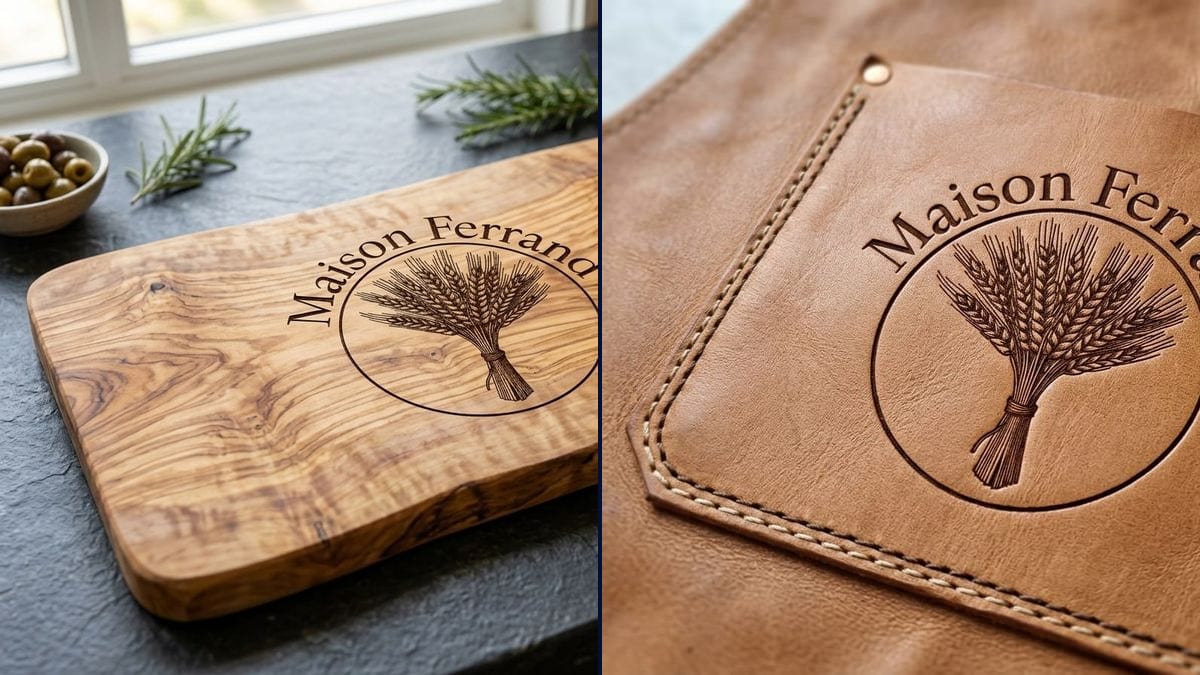
Real workflow: the burgundy Maison Ferrand logo, a wheat sheaf in a circle, then the same logo engraved in the middle of an olive wood board and debossed into the pocket of a tan leather apron.
At a glance
An engraved board or a leather apron with your logo makes a client gift or a shop item that lasts. Engravers often send a flat preview, a black logo dropped on a photo of a board, which says nothing about the burn in the wood or the contrast on leather. This workflow shows your logo engraved on both materials, photo-real.
The hard part is that an engraving isn't drawn like a print. A model left to itself pastes the logo in black, or loses it in the grain. The prompt describes burnt lines in the grain, darker recessed lines in the leather, and lists the logo piece by piece. Nano Banana 2.1 keeps the wheat ears and the name intact.
For the same logo in thread, see the embroidered patch; for an everyday object, the custom mug. Both engravings cost fourteen credits.
These are the files of the workflow above, exactly as the models produced them, unretouched. The starting point is shown when there is one.
Starting point
Render
Shop owners and makers preparing client gifts, restaurants kitting out their staff, engraving workshops showing a preview.
The logo at a decent resolution on a plain background, the exact name in quotes, the object and the material.
Upload the logo
On a plain background, at a decent resolution. A laser engraves one tone only, so a logo in single-colour lines and shapes gives the truest preview.
Pick the object
Board, box, pen, keyring, apron, notebook cover. Name the wood or leather too: olive, beech, walnut, tan leather.
Describe the engraving
Burnt lines in wood, dark recessed lines in leather. Without that line, the model prints instead of engraving.
Check with the engraver
Show them the picture and give them the original file. They'll tell you whether the logo's size and detail work on that object.
The same canvas, tuned for different needs: each variation is two or three lines of prompt away.
The owner wants to give her best customers an engraved board in December. She sees the logo on olive wood, settles the size with the engraver and orders thirty with no surprises.
The chef wants leather aprons engraved with the logo for front and back of house. The picture on the pocket shows whether the logo still reads at eight centimetres before ordering.
A laser engraving workshop sends every business client a realistic preview with the quote. The client sees the logo on the object, not on a white page, and signs off faster.
An agency is preparing year-end gifts for its clients. The marketing team compares an engraved board and a leather pouch with the logo, then picks one to fit the budget.
A wine estate sells cheese boards engraved with its emblem. The renders serve as product images for the online shop while the first pieces are being made.
The best man and maid of honour want to give the couple a board engraved with their monogram. They check the interlaced initials still read in the wood before ordering from a maker.
A laser doesn't engrave colour, it burns more or less deeply. A gradient logo turns into a dark, fuzzy patch. Have a line version ready.
On heavily figured wood like olive, tiny text disappears into the grain. Keep the logo large enough, or choose a plainer wood like beech.
Without the word and the look you want, the model prints the logo in black like a sticker. Describe the burn or the recess.
The engraver sets up the machine from a vector file at the right size. The render has no dimensions or paths; it helps you decide.
In the demo, yes: sheaf, circle and name are right on the board and on the leather. Still read the name on every render.
Yes: describe how the material reacts, frosted white on glass, dark marking on stainless steel, light grey on slate.
No. They need the original logo file, ideally vector, to set up the machine. The picture is for checking the look.
Fourteen credits, seven per render on Nano Banana 2.1. A third engraved object with the same logo costs seven more.
Because it takes the logo as a reference and builds the whole photo around it: the wood, the leather, the kitchen light. It keeps the name spelled right and the fine drawing of the sheaf.
That depends on the wood, the leather and the engraver's settings. The picture gives an idea of the contrast; the workshop confirms it with a test piece.
Yes: add the line in quotes and say where it goes, then remove "No other text" from the prompt.
4:3 landscape, the usual framing for a product shot on a worktop.
Preview your logo as a laser engraving with AI
Use this workflowFree account, no card required. The workflow opens pre-filled in your canvas.
 Nano Banana 2.1
 Flux Kontext
 GPT Image 2.5 Sunburst