The props master on a period film
The story is set on a Breton island in 1954. The props master prints several copies of the yellowed paper, crumples two of them and leaves the third folded on the bar of the harbour café.
Two front pages of invented newspapers for your sets, a 1954 local paper and a modern daily, with your scene's headline written letter for letter. Workflow visible here, no account needed.
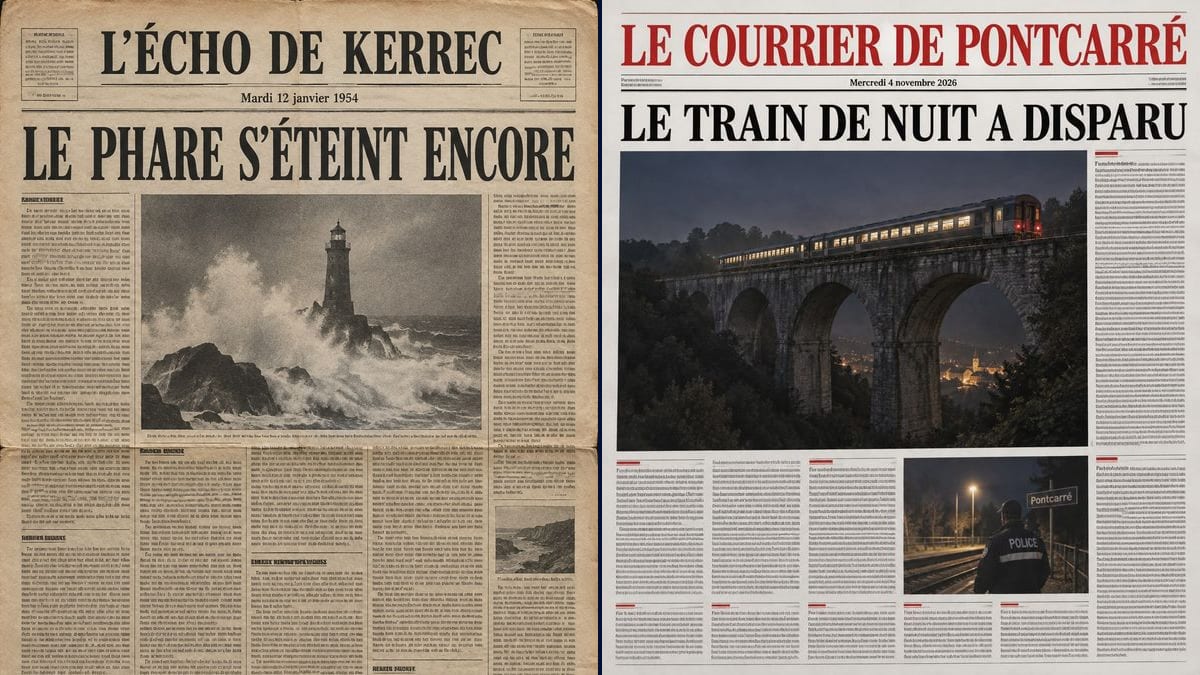
Real workflow: the yellowed front page of "L'ÉCHO DE KERREC" for Tuesday 12 January 1954, a lighthouse lashed by waves under the headline, then "LE COURRIER DE PONTCARRÉ" from 2026 with a lit night train on a viaduct and a police officer on a station platform. Both papers are invented.
At a glance
Scripts love a newspaper beat: a character unfolds the paper at the café, it lies on a desk at the police station, the camera picks it up in an insert to set up the story. The props department has to make it, and it can't lift the masthead of a real paper. This workflow gives you two fictional front pages: a yellowed 1954 regional paper and a present-day daily with a red masthead.
The hard part is the text. Three lines must be exact, the rest has to read as text without being text, and nothing can recall an existing title. The prompt quotes the masthead, the date and the headline, then asks for small unreadable filler. Sunburst writes those three lines letter for letter for three credits a page.
For the letter your character finds next, see the old letter prop; for the rest of the table, the props board. Both front pages cost six credits.
These are the files of the workflow above, exactly as the models produced them, unretouched. The starting point is shown when there is one.
Render
Props masters, production designers, short film and series directors, AI filmmakers.
The fictional paper's name, the story date, the scene's headline and the front page photo you want, plus the period.
Invent the masthead
A name that sounds real and isn't: "The Echo" or "The Courier" plus the town in your story. A quick search confirms no paper already uses it.
Match the date to the story
The weekday has to be right: 12 January 1954 really was a Tuesday. Your script supervisor will check, and so will a sharp-eyed viewer.
Write the scene's headline
Short, in capitals, the one the character reads on screen. It's the only sentence the camera will actually show.
Print for set
For a wide shot the printed image is enough. For a tight insert, run it through the Enhance node or rebuild the headline and photo in your layout software.
The same canvas, tuned for different needs: each variation is two or three lines of prompt away.
The story is set on a Breton island in 1954. The props master prints several copies of the yellowed paper, crumples two of them and leaves the third folded on the bar of the harbour café.
Studio Fenêtre is shooting "Le Dernier Train" with a small crew. The Pontcarré front page announces the missing train in the opening scene, with no graphic designer and no rights to clear.
For "LIGNE DE NUIT", the production designer fills a newsstand and a bar table with copies of the same fictional paper. Each episode gets its own headline, and the paper becomes a landmark viewers recognise.
He needs an exposition shot: a paper on a table with a readable headline. He sends the front page into a video node for a slow push-in instead of hoping a video model will spell it right.
Before the shoot, the director posts the fake front page on social media to announce the film. The headline sets up the mystery, and the date places the story in its era at a glance.
A band wants a fifties film noir video. The yellowed paper comes back in three shots, with a headline taken from the lyrics and a masthead named after the town in the song.
A well-known daily's logo on an invented front page is a rights problem and breaks the illusion. Invent the title and check that it doesn't exist.
Every readable line is one more chance for a mistake. Keep three exact lines and leave the rest as unreadable filler.
"Monday 12 January 1954" gets spotted quickly. Check the weekday on a calendar for the story's year before you render.
An image 1536 pixels tall printed at real newspaper size goes soft. For a close shot, upscale it first or rebuild the page around it.
In the demo, yes for the three readable lines on both pages: the mastheads, the dates and the headlines. The column text is pseudo words on purpose; only the second 2026 photo shows two extra words, POLICE and Pontcarré.
No. Newspaper titles are usually registered trademarks, and the prompt rules out any real paper's name. Make one up, and read the usage rules.
In a medium shot and an insert, yes: both pages have sharp filler made of letters and pseudo words, with subheadings on the 2026 one. Right up close you can tell the words mean nothing, just like a props department newspaper.
Six credits, three per page on GPT Image 2.5 Sunburst at medium quality. One more headline for another day in the story costs three more.
Because it spells correctly on a light background, accented capitals included, and it's the cheapest model in the catalogue. For a prop you redo every episode, that adds up.
The 1954 page comes out at 2:3, 1024 x 1536 pixels. The 2026 page came out almost square, 1199 x 1312. For tabloid size or larger, see upscaling for print.
Yes: duplicate the node and ask for an inside page with one readable heading, or none. On screen you rarely see more than the front and the back.
Yes: add "heavy folds, coffee stains, torn edges" to the prompt. For the physical prop, the props team then ages the printed paper with tea or coffee.
Make a fake newspaper prop for film with AI
Use this workflowFree account, no card required. The workflow opens pre-filled in your canvas.
 GPT Image 2.5 Sunburst
 Nano Banana 2.1
 Recraft V4.1