Retiring after thirty years
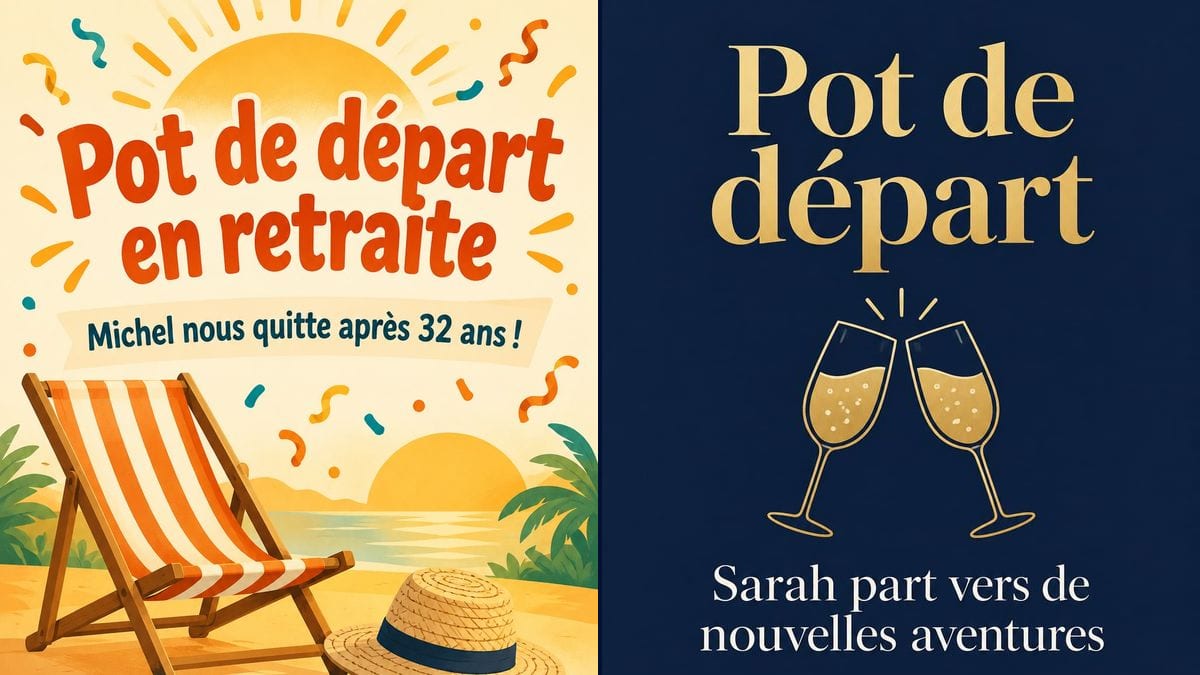
The HR manager is planning Michel's send-off; he joined the plant in 1993. The orange invitation puts his years of service up front, goes out by email to the whole site and gets pinned up in the canteen.
Two farewell invitations, one for a retirement and one for a colleague moving on, with your text spelled right. Workflow visible here, no account needed.
Real workflow: an orange "Pot de départ en retraite" invitation with a striped deck chair, a straw hat and confetti, then a navy "Pot de départ" invitation with two gold glasses clinking.
At a glance
Leaving drinks usually get organised the week before, between two meetings, and the invitation ends up as a plain email with the date in bold. That feels thin for someone who is leaving after twenty or thirty years. This workflow gives you two invitations to pin up in the break room or attach to the email: one for a retirement, one for a colleague moving on.
The hard part is the text. A name, years of service, a date, a time, a place: one mistake and you start again. The prompt gives every line in quotes, in order, and forbids adding anything. GPT Image 2.5 Sunburst writes them letter for letter, and it is the cheapest model for this kind of design.
For a party at home, see the housewarming invitation; for a birthday at the office, the birthday invitation. Both invitations cost six credits.
These are the files of the workflow above, exactly as the models produced them, unretouched. The starting point is shown when there is one.
Render
Colleagues and HR teams organising leaving drinks, schools and clubs saying goodbye to someone.
The four lines to write in quotes: title, a line about the person, day and time, place.
Pick the tone
A cheerful retirement with a deck chair and confetti, or quieter farewell drinks in navy and gold. Keep the node that fits, or both.
Replace the four lines
Title, a line about the person, day and time, place: each line in quotes, instead of the demo ones.
Check date and time
On the image, not in the prompt. A weekday that doesn't match the date and everyone will message you to ask.
Pin it up and send it
Print it on A4 next to the coffee machine, and drop the same image into the email or the team chat.
The same canvas, tuned for different needs: each variation is two or three lines of prompt away.
The HR manager is planning Michel's send-off; he joined the plant in 1993. The orange invitation puts his years of service up front, goes out by email to the whole site and gets pinned up in the canteen.
Sarah is joining a start-up. Her team books a table on a terrace for Thursday evening and posts the navy version in the team chat, with the bar's address.
Staff and the parents' association invite families to the head teacher's end-of-year drinks. The invitation goes home in book bags and on the school gate.
The team wants to mark six months away. The warm retirement layout works here too: change the title and the line about the person, keep the design and the confetti.
A civil servant is moving to an office at the other end of the country. The department books the meeting room on Friday, and the invitation gives the time so the afternoon shift can drop by.
The treasurer of a football club is stopping after fifteen seasons. The committee prints the invitation for the clubhouse and posts it on the club's page so former players come along.
Three paragraphs about someone's career and nobody spots the time. Keep the line short: the speech is for the party.
"At the office" doesn't help in a five-storey building. Give the room or the full address of the bar.
Without the ban on extra words, the model sometimes adds "Happy retirement!" or an invented date. The prompt locks it; keep that sentence.
Send it the day before and half the team already has plans. Allow one to two weeks, plus a reminder that morning.
On the demo, yes: all four lines of each invitation match the prompt exactly, accents included. Proofread anyway before printing.
Yes: add a quoted line such as "Shh, it's a surprise", and send the invitation to everyone except the person leaving.
Not in this canvas, which has no input photo. The simplest way is to place the logo over the image in your layout tool.
Six credits, three per render on GPT Image 2.5 Sunburst at medium quality. One more version, with another date for instance, costs three credits.
It spells accurately and it is the cheapest model in the catalogue. It is most at ease on light backgrounds; on the demo it also handled gold lettering on navy.
The prompt asks for 3:4 and the render comes out in 2:3, portrait. It prints on A4 with a thin white margin, or on a 4 x 6 inch card without cropping.
Yes: change the title to "Welcome drinks" and rewrite the line about the person. Both layouts work for greeting a newcomer.
Yes: replace the deck chair and the hat with something that says who the person is, a bike, a sailing boat, gardening tools. One or two illustrations, no more.
Make a farewell party invitation with AI
Use this workflowFree account, no card required. The workflow opens pre-filled in your canvas.
 GPT Image 2.5 Sunburst
 Nano Banana 2.1
 Recraft V4.1