The first AD on a short
She's preparing five shoot days with a volunteer crew. She settles the layout on the plain template, then rebuilds it in her spreadsheet for each day, with every piece of information always in the same place.
Two A4 call sheet templates, plain or navy, with crew call, the day's scenes and hair and makeup calls written letter for letter. Workflow visible here, no account needed.
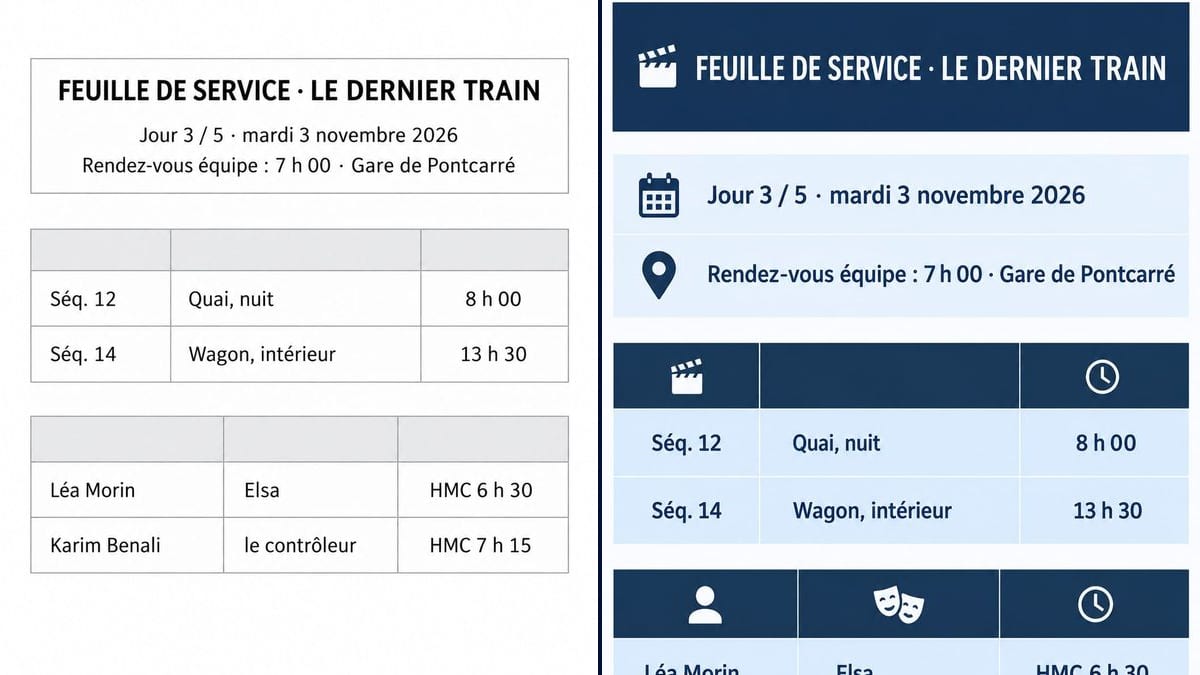
Real workflow: two French call sheets for day 3 of "Le Dernier Train", a made-up short film, with crew call at Pontcarré station, the place name used for the demo, two scenes and two actors called to hair and makeup, one as a grey on white table, the other in navy bands with icons.
At a glance
On a short film, the call sheet often gets made at midnight the night before, by the first AD or the director herself, in a spreadsheet with wonky columns. It goes out by email and on the crew group chat, and everyone reads it on their phone. This workflow gives you two visual templates for a clear call sheet: a plain spreadsheet look and a colour one.
The hard part is accuracy. One wrong hair and makeup time, and an actor waits an hour in the cold or turns up late to the chair. A model left to itself invents names and addresses to fill the boxes. The prompt gives every line in quotes and forbids adding any. Sunburst lines up the table and gets the times right; for the actual day, you carry the template over into your spreadsheet.
Upstream, the call sheet comes out of the script breakdown and the shooting schedule. Both templates cost six credits.
These are the files of the workflow above, exactly as the models produced them, unretouched. The starting point is shown when there is one.
Render
First ADs, production coordinators, short film and music video directors without a production office, film schools, prop masters.
The day's lines in quotes: header, date, crew call, scenes with times, cast with hair and makeup calls.
Set the header
Film title, shoot day out of the total, full date with the weekday, crew call time and location.
List the scenes
Number, set, day or night, scheduled time. Two to six rows for a short film's day.
Call the cast
Name, character, hair and makeup time. Add the column headers you want in quotes, or the top row stays empty.
Move it into the spreadsheet
The image sets the layout. The real sheet, with weather, nearest hospital, catering and contacts, lives in the production spreadsheet and goes out as a PDF.
The same canvas, tuned for different needs: each variation is two or three lines of prompt away.
She's preparing five shoot days with a volunteer crew. She settles the layout on the plain template, then rebuilds it in her spreadsheet for each day, with every piece of information always in the same place.
Nobody else does tomorrow's sheet, so she does it after watching the dailies. The colour template, easy to read on a phone, saves the 11 pm messages asking what time crew call is.
Students are shooting their graduation films. The tutor shows a clean call sheet, then asks each crew for theirs before the first day of the shoot, checked and corrected in class.
A scene takes place on a film set. A believable call sheet, pinned to a wall or held by an extra, comes from the same prompt with a made-up film title.
A music video director shoots for two days with a band. One sheet per day, two locations, four musicians called to makeup: the structure works as it is.
The coordinator shows the intern what a call sheet should look like before handing over tomorrow's, with the mock-up to rebuild in the production's software.
Without a closed list, it invents names, numbers and addresses. On a call sheet, a wrong address sends the crew to the wrong place.
"3 November" on its own leaves room for doubt. Write "Tuesday 3 November" and check the calendar: the model copies without checking.
An image can't be fixed at 10 pm when a location falls through. The template is a pattern; the day's sheet gets edited in the spreadsheet.
Nearest hospital, the coordinator's number, notes for a night on a station platform: the demo, kept short on purpose, doesn't have them. They belong on the real sheet.
In the demo, yes: header, date, crew call, scenes and hair and makeup calls are exact on both sheets, accents, colons and middle dots included.
Because the prompt bans any word that isn't in quotes. Add "Scene", "Set" and "Time" to the list, for example, and the model writes them.
A few more rows fit; past fifteen or so, the text shrinks and mistakes creep in. For a full sheet, keep the image as a mock-up and fill in the spreadsheet.
Six credits, three per sheet on GPT Image 2.5 Sunburst at medium quality. A third layout, black and white for the photocopier for instance, costs three more.
Because it lines up a table and spells correctly, times and accents included, and it's the cheapest model in the catalogue. For a mock-up you tweak several times, that adds up.
On top of the demo: addresses and access, parking, meal times, weather, sunrise and sunset, nearest hospital, production contacts, the day's wardrobe and props, special equipment.
A4 proportions, portrait, about 1055 x 1490 pixels. Readable on a phone and in a PDF; to pin it up in the makeup room, run it through the Enhance node.
Yes: write the lines in French in quotes, as in the demo, "FEUILLE DE SERVICE", "Rendez-vous équipe", "HMC". The model writes what you give it, in the language you give it.
Make a film call sheet with AI
Use this workflowFree account, no card required. The workflow opens pre-filled in your canvas.
 GPT Image 2.5 Sunburst
 Nano Banana 2.1
 Recraft V4.1