The first AD on a short
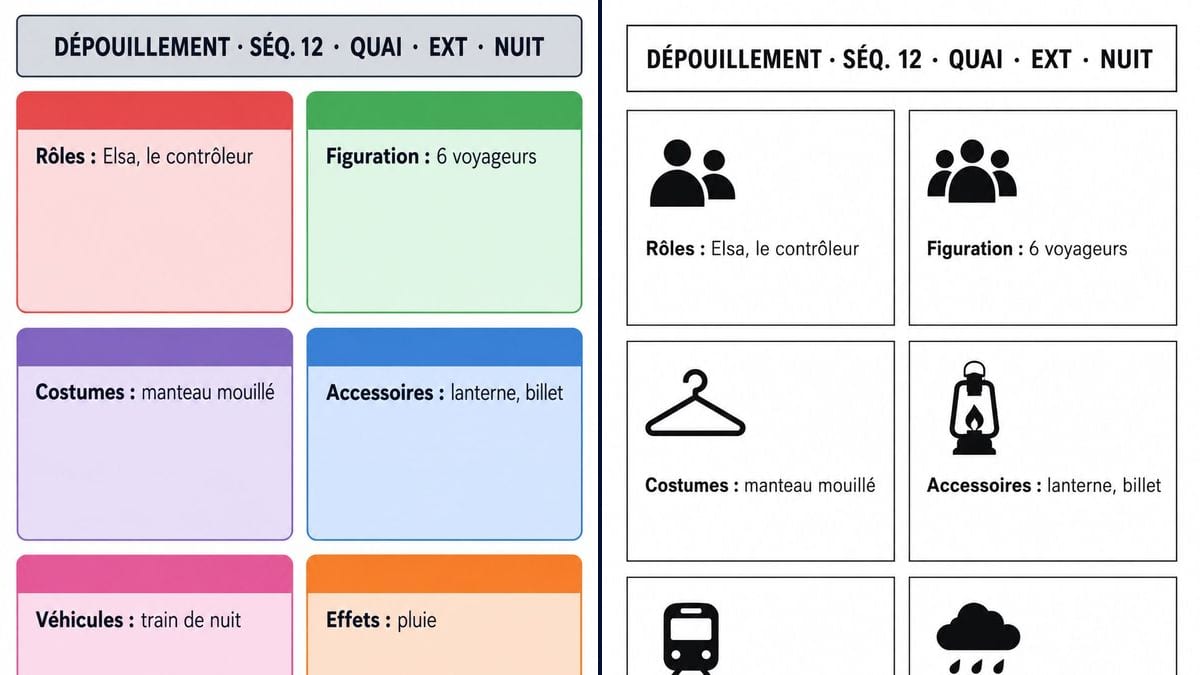
He breaks down the script's twenty scenes before the prep meeting. The colour sheet for the heaviest scene, the platform in the rain, shows the crew everything it involves at a glance.
Two A4 breakdown sheets for one scene, in colour or black and white, with cast, extras, wardrobe, props and effects written correctly. Workflow visible here, no account needed.
Real workflow: two French breakdown sheets for scene 12 of "Le Dernier Train", a made-up short film, platform, exterior night, one with six red, green, purple, blue, pink and orange boxes, the other with black boxes and icons.
At a glance
Before the shooting schedule comes the breakdown: you go through the script scene by scene and note everything the set will need, cast, extras, wardrobe, props, vehicles, effects. On a short film, that often happens in the corner of a notebook. This workflow gives you two breakdown sheet templates per scene, one with colour coded boxes and one in black and white for the photocopier.
The hard part is getting everything right and in its place. A model left to itself adds empty boxes and props nobody asked for. The prompt gives every box in quotes with its colour. Sunburst spells correctly and lays things out neatly, but the image is still a mock-up: the working breakdown lives in a spreadsheet or production software that stays linked to the schedule.
For the next step, go to the shooting schedule; to see the scene before you shoot it, to the shot breakdown. Both sheets cost six credits.
These are the files of the workflow above, exactly as the models produced them, unretouched. The starting point is shown when there is one.
Render
First ADs, production coordinators, prop masters, costume designers, line producers, short film directors and teachers.
The scene header and the content of each box in quotes, with a colour for each.
Copy the header
Scene number, set, interior or exterior, day or night, exactly as in the scene heading.
List by category
Cast, extras, wardrobe, props, vehicles, effects: one box per category, items separated by commas.
Set the colours
Give each box the colour from your code. Otherwise the model picks, and the sheet no longer matches the others.
Move it to your tool
The image is for showing the scene at the prep meeting. The live list lives in the crew's spreadsheet or software.
The same canvas, tuned for different needs: each variation is two or three lines of prompt away.
He breaks down the script's twenty scenes before the prep meeting. The colour sheet for the heaviest scene, the platform in the rain, shows the crew everything it involves at a glance.
She gets the sheet for scene 12 and sees the blue box straight away: lantern, ticket. Her shopping and rental list starts there, along with the question of how many doubles to get.
"Wet coat" means at least two identical coats, one dry and one soaked, plus one for the stand-in. The purple box makes her ask the director before the shoot, not on the platform.
The tutor has students break down a scene, then compares their sheets with a clean template. The black and white version photocopies for the whole class without losing any information.
After an AI previz, a creator shoots with real actors. The breakdown makes him list what he never had to manage when generating: extras, duplicate costumes, a rain machine.
He counts extras, vehicles and effects scene by scene to build the budget. The sheets for the most expensive scenes become the visual basis for the budget meeting with the director.
"Elsa waits in the rain": the rain is an effect, the wet coat is wardrobe. Read every line of the scene, not just the names in capitals.
A crew used to purple for props will get it wrong if the sheet uses blue. Give each box your production's colour.
Without "no other words", it adds plausible but wrong categories and items. On a breakdown, an invented prop ends up being bought.
The script changes and so does the breakdown. An image doesn't update: the reference is the spreadsheet or the software.
In the demo, yes: the header and all six boxes are exact on both versions, accented capitals and colons included.
Orange was meant for stunts, and the scene has none. The model gave it to effects instead. Give every box a colour if you want your own.
Yes: makeup, sound, animals, set dressing, special equipment. One more box in quotes, with its colour. Past ten, the sheet gets cramped.
Six credits, three per sheet on GPT Image 2.5 Sunburst at medium quality. A sheet for another scene costs three more.
Because it spells correctly inside boxes, accented capitals included, and sticks to a closed list. It's also the cheapest model in the catalogue, which matters when you make one sheet per scene.
There are common habits, red for cast or green for extras for instance, but every production and every piece of software has its own code. The demo uses the prompt's colours: adapt them.
A4 proportions, portrait, about 1055 x 1490 pixels. Sharp on screen and in a PDF; to print it large for the production office wall, use the Enhance node.
No, it's one sheet per scene. For twenty scenes, duplicate the nodes and change the lines, or keep the list in a spreadsheet and use the image for the scenes you present.
Make a script breakdown sheet with AI
Use this workflowFree account, no card required. The workflow opens pre-filled in your canvas.
 GPT Image 2.5 Sunburst
 Nano Banana 2.1
 Recraft V4.1