The director with three days
She has twenty scenes and three days' hire of the station. The stripboard, pinned up on the first morning, shows the whole crew why the night platform gets shot before the buffet scene.
Two landscape shooting schedules for a short film, as colour strips like a stripboard or as a table by day, every scene in its place. Workflow visible here, no account needed.
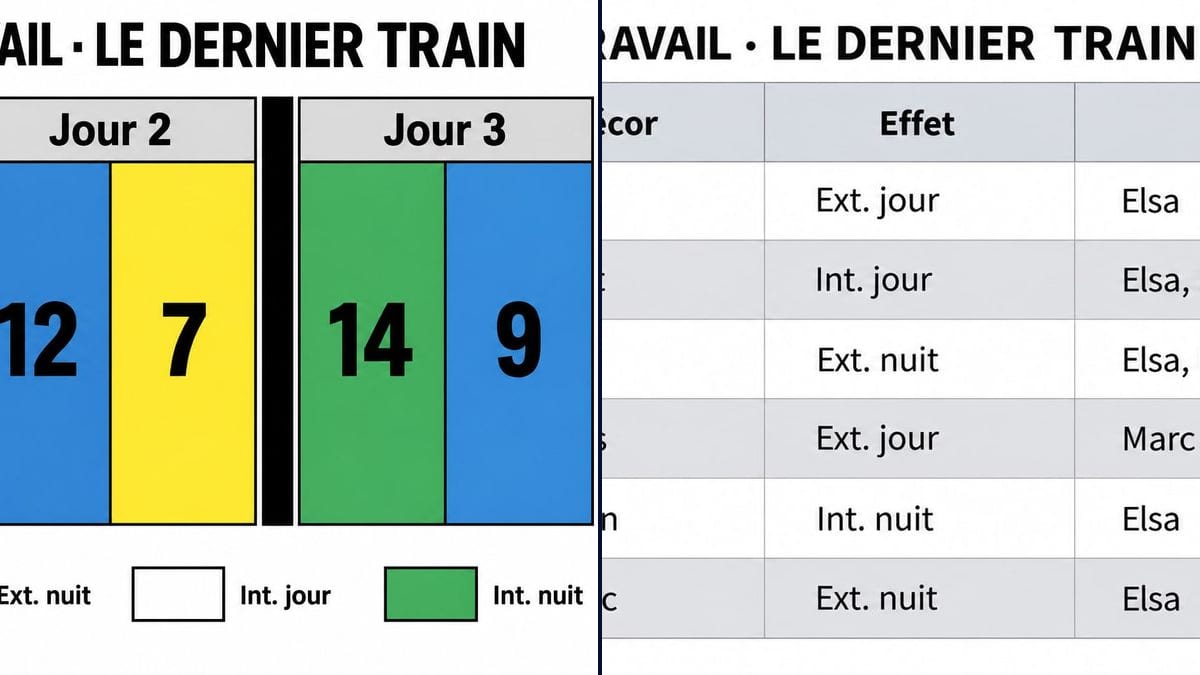
Real workflow: two French shooting schedules for "Le Dernier Train", a made-up short film shot over three days, one as six yellow, white, blue and green strips split by black bars with a legend, the other as a table of the same six scenes with set, int/ext and cast.
At a glance
A shooting schedule puts the scenes in the order you shoot them, not the order of the script: locations grouped, nights together, actors called for as few days as possible. Productions have dedicated software for it; on a short film, it's often a spreadsheet or paper strips on a table. This workflow gives you two visual versions of the same schedule: the classic colour stripboard and a table by day.
The hard part is getting each scene's colour and day right, and keeping both versions in agreement. A model left to itself invents numbers or colours at random. The prompt gives the exact order of the strips with their colours, then every row of the table. Sunburst gets the text right and lays it out cleanly, ready to put up at a prep meeting.
The schedule is built from the script breakdown and leads to each day's call sheet. Both templates cost six credits.
These are the files of the workflow above, exactly as the models produced them, unretouched. The starting point is shown when there is one.
Render
First ADs, line producers, short film and web series directors, film students.
The title, the scene order by day with each strip's colour, and the table rows, in quotes.
Group by location
Every scene at the same location on the same day, nights together, interiors apart. That's the real work; the image comes after.
Colour and day per strip
Write the order left to right: "day 2 with strip 12 in blue". Without that, the model colours the strips in the order of the legend.
Same order in the table
One row per scene, in the same order as the strips: day, scene, set, int/ext, cast. Put the headings in quotes too.
Keep the real schedule elsewhere
An actor drops out, rain is forecast, and everything moves. The live schedule stays in your spreadsheet or software; the image is for the meeting.
The same canvas, tuned for different needs: each variation is two or three lines of prompt away.
She has twenty scenes and three days' hire of the station. The stripboard, pinned up on the first morning, shows the whole crew why the night platform gets shot before the buffet scene.
He walks the director and the DP through the schedule. The day by day table, readable on a projector, makes overloaded days easy to spot before the calls are locked.
Three days or four is a whole budget line. He compares two schedules as images to show the director, in plain terms, what one more night of shooting would cost.
He has to hand in the schedule for his graduation film. The table version gives him a presentation template, and the real schedule gets built in the spreadsheet the school provides.
Used to generating shots in story order, he learns that you shoot by location. The stripboard shows his scenes grouped by place and light before he books any actors.
A crew shoots four episodes in a week. The strips, one colour per episode instead of day and night, show how the episodes interleave across the schedule.
Without a colour per strip, it alternates in legend order, and a night platform can come out as an interior day. Give every strip its colour.
A schedule follows locations and availability, not the story. Shooting scene 1, 2, 3 in order multiplies company moves and hire days.
Sixty strips in one image and the numbers become unreadable. Do one schedule per week, or keep the image for the key days.
A scene on day 2 in the strips and day 3 in the table, and the crew doesn't know which to trust. Copy the same order into both prompts, and check.
In the demo, yes: title, days, numbers, legend, headings and all six table rows are exact, accents and middle dots included.
Yes, because the prompt gives them one by one: scene 12, the platform at night, is blue; 14, the carriage at night, green; 5, the buffet by day, white. The table says the same in its own column.
It's French scheduling shorthand for interior or exterior, day or night, what an English schedule calls Int/Ext and D/N. It sets the strip colour and often the day's hours.
Six credits, three per schedule on GPT Image 2.5 Sunburst at medium quality. Next week's schedule costs three more.
Because it spells correctly in strips and columns and it's the cheapest model in the catalogue. It does what it's told and nothing more, which is why you give it the order and colour of every strip.
On a real stripboard, each strip carries the cast ID numbers. Add them in quotes, such as "1, 2" under the scene number; beyond two or three numbers, switch to the table.
Landscape: the strip version comes out at 1536 x 1024 pixels, the table in a wider format, about 1775 x 890. Both read well on screen and on a projector.
No. Software recalculates everything when a scene moves and links the breakdown, schedule and call sheets. The image shows the schedule as it stands at one moment.
Make a film shooting schedule with AI
Use this workflowFree account, no card required. The workflow opens pre-filled in your canvas.
 GPT Image 2.5 Sunburst
 Nano Banana 2.1
 Recraft V4.1